| AppleScript名:指定パスのAppleScript書類がコンパイル済みかどうかチェック |
| — Created 2014-12-16 by Takaaki Naganoya — 2014 Piyomaru Software use AppleScript version "2.4" use scripting additions use framework "Foundation" use framework "OSAKit" property |NSURL| : a reference to current application’s |NSURL| property OSAScript : a reference to current application’s OSAScript –指定AppleScriptがコンパイルずみ(中間コードへの翻訳の意)かどうかをしらべる set a to (choose file of type {"com.apple.applescript.script-bundle", "com.apple.applescript.script", "com.apple.applescript.text"}) set asRes to chkAScompiled(a) as list of string or string –> true or false –指定のAppleScriptファイルがコンパイル(構文確認+中間言語化)ずみかどうかを取得する on chkAScompiled(anAlias as {alias, string}) set aURL to |NSURL|’s fileURLWithPath:(POSIX path of anAlias) set asO to OSAScript’s alloc()’s initWithContentsOfURL:aURL |error|:(missing value) try set compF to asO’s isCompiled() as boolean return compF on error return false end try end chkAScompiled |
投稿者: Takaaki Naganoya
nameを指定してOSA言語のインスタンスを生成する
name(名称)を指定してOSA言語のインスタンスを生成するテストを行うAppleScriptです。
このあたりの話は、スクリプトエディタ上では直接取得できますし、コマンドラインからだとosalangコマンドを実行すれば名称一覧を取得できます。Cocoa経由でどの程度の情報が取得できるのか、ちょっと試してながらく放置したままになっていました。
再度、OSAKit系の情報を探してみても……見当たらない(ーー;
以前にAppleEvent Managerのドキュメントをまるごとオフラインにしていた前科があるので、担当に「(オフラインになっていて)見えないんだけど?」と確認したところ………
「何が見えないんだ? 最初からそんなもんないぞ。これまでにドキュメントを作ったこともない」
と言われる始末。余計悪いわ(ーー;;;
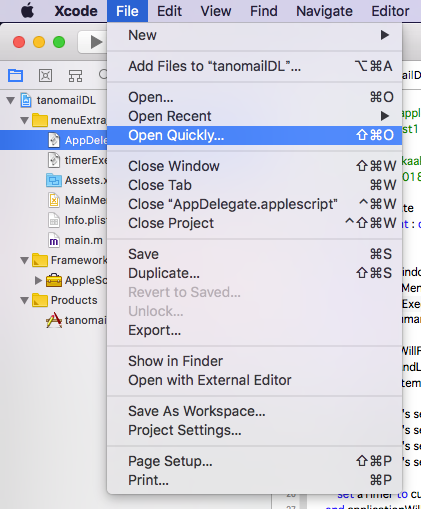
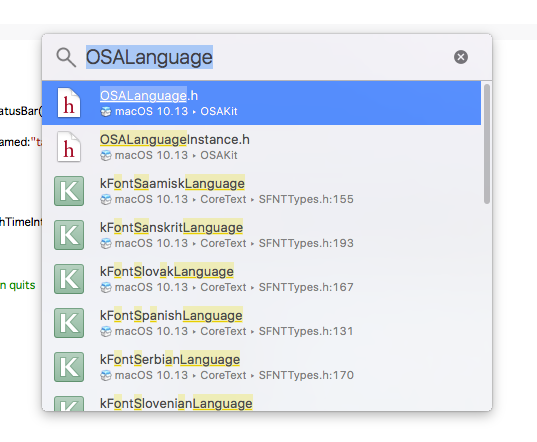
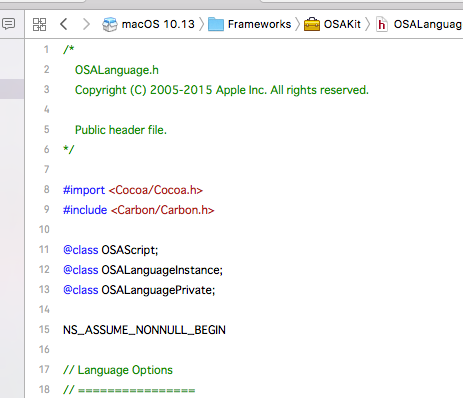
というわけで、Web上にドキュメントが掲載されていないOSAKit系の情報については、Xcode上から、以下のように操作してヘッダーファイルの内容を確認することが必要なようです。


| AppleScript名:nameを指定してOSA言語のインスタンスを生成する |
| — Created 2018-03-05 by Takaaki Naganoya — 2018 Piyomaru Software use AppleScript version "2.4" use scripting additions use framework "Foundation" use framework "OSAKit" property OSALanguage : a reference to current application’s OSALanguage property OSALanguageInstance : a reference to current application’s OSALanguageInstance set anOSALanguageInstance to OSALanguageInstance’s languageInstanceWithLanguage:(OSALanguage’s defaultLanguage()) set aLanguage to anOSALanguageInstance’s |language|()’s |name|() as string –> "AppleScript" set bLanguage to OSALanguage’s languageForName:"AppleScript" set bName to bLanguage’s |name|() as string –> "AppleScript" set cLanguage to OSALanguage’s languageForName:"JavaScript" set cName to cLanguage’s |name|() as string –> "JavaScript" set langArray to (OSALanguage’s availableLanguages()’s valueForKeyPath:"name") as list –> {"AppleScript", "JavaScript"} |
Script Editorをコントロールして各構文要素の色情報を取得する v5
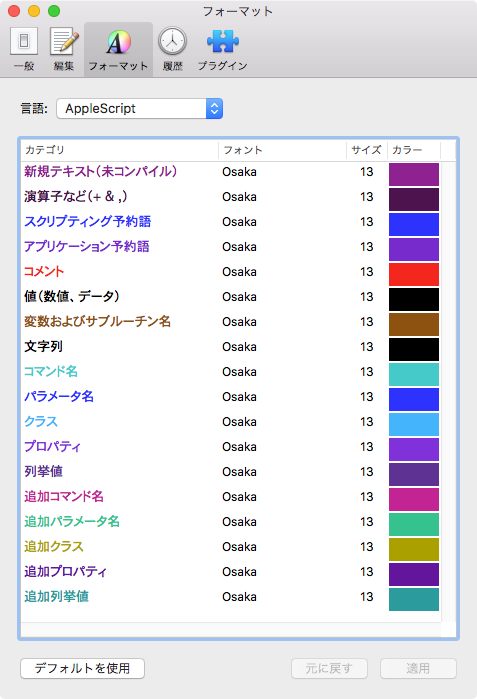
Script Editorをコントロールして、AppleScriptの各構文要素の色情報を取得するAppleScriptです。
AppleScriptの構文要素の色分けを取得するのに、当初はplistファイルから読み込んでいたのですが、途中から(Mac OS X 10.5あたり?)plistファイルのフォーマットがテキスト形式からバイナリ形式に変更になり、AppleScriptから読み込んでも判定できない内容になりました(Cocoaの機能を使うと読み取れるのですが)。
そこで、「プログラム的には意味はないが、対象の構文要素が入っているテキスト」でAppleScriptを新規ドキュメントを作成してコンパイル(構文確認)を実行。新規ドキュメントからリッチテキストとして書式情報を取得し、想定した文字の位置から指定構文要素に対応する色情報を取得します。

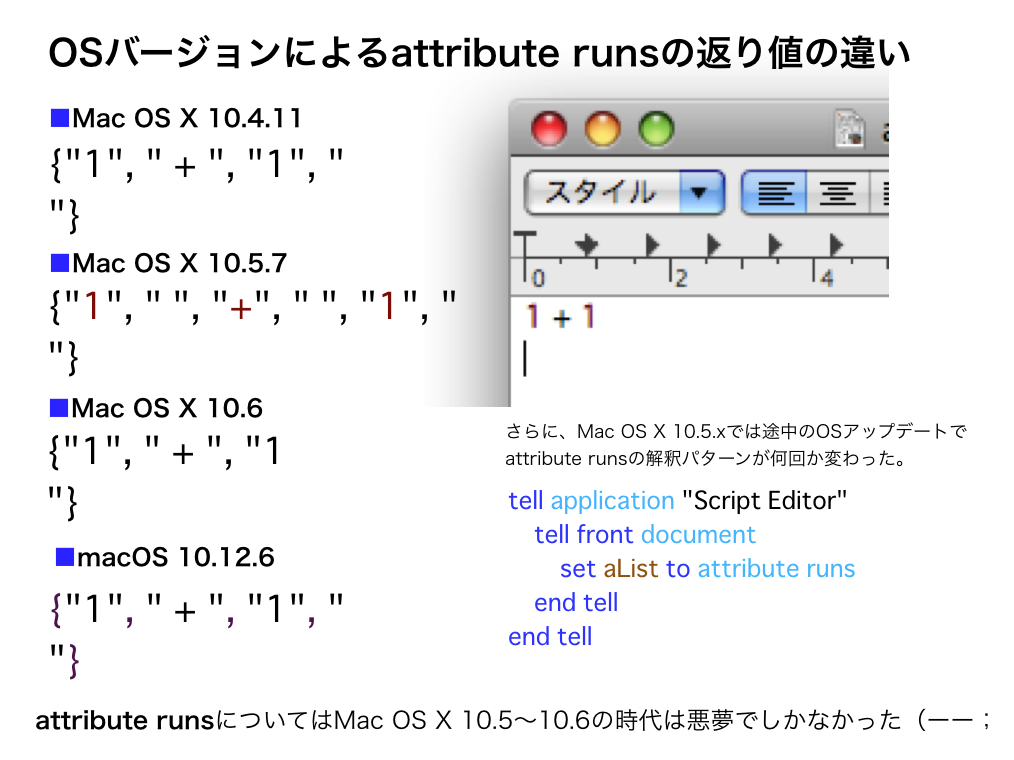
plistの保存形式が途中で変更されたのとは別に、書式つきテキスト(attribute runs)の挙動もOSバージョンによって微妙に変わってきました。

同じデータを与えても、書式の区切りが微妙に変わって、書式(色)情報を固定の箇所から読み取っていてはそのようなOSバージョン変更に伴う挙動の微妙な変更に対応し切れませんでした。そのため、文字列をサーチして毎回動的にデータ位置を検出するように書き換えた経緯があります。
本ルーチンは、変数名のリネーム用に作成したので構文要素確認用のダミーテキストは最低限のものだけを含んでいますが、その気になればすべての構文要素の色情報を取得可能です。
これとは別に、Cocoaの機能を用いてplistから構文書式情報を取得するAppleScriptも存在するものの、計算して微妙に色情報が合わないので、9年前に作成した本ルーチンを使い続けています(当時)。
→ さすがに重要なルーチンなので、Cocoa系の機能を使って処理するように書き換えました。いまはCocoa系ルーチンを使っています
| AppleScript名:Script Editorをコントロールして各構文要素の色情報を取得する v5 |
| — Created 2009-06-01 by Takaaki Naganoya — 2009-2018 Piyomaru Software set scList to getRexicalColorOfScriptEditor() of me –> {{32053, 4213, 32213}, {15672, 3071, 15831}, {2841, 6963, 64125}, {8259, 42547, 64473}, {0, 0, 0}, {32202, 16452, 3889}} –色書式データ。先頭から順番に、、、 –新規テキスト, 演算子など, スクリプティング予約語, コマンド名, 値(数値、データ), 変数およびサブルーチン名 –スクリプトエディタの各構文要素の指定色を返す –v5の変更点:Leopard以降のStyle runsの挙動変化(スペースを分離する/しない)に対応し、動的にサンプル文を走査するようにした –v4の変更点:構文要素検出時のテンポラリウィンドウ作成時にScript Editorを隠す –v3の変更点:重複時のエラー検出を追加 on getRexicalColorOfScriptEditor() set aRes to setVisibleOfSpecifiedProcess("Script Editor", false) of me set rexList to {"+", "set", "application", "Comment", "1", "a"} –文中から検索するテキスト要素 set colList to {} –色情報を入れるリスト tell application "Script Editor" set aDoc to make new document tell front document set aName to name –end tell –tell document aName –未コンパイル時のテキストを取得 set contents to "aaaaa" set rexItem1 to (color of attribute runs) set rexItem1 to contents of (item 1 of rexItem1) set colList to {rexItem1} –各種構文要素を含む文字を入れる set contents to "1 + 1 set a to \"abc\" tell application \"Finder\" end tell –Comment " –追加する場合には、テキストを後ろに追加すること try compile on error close without saving return false end try set rex1 to attribute runs set rex2 to color of attribute runs repeat with i in rexList set j to contents of i set rC to 1 repeat with ii in rex1 set jj to contents of ii set jj to replaceText(jj, " ", "") of me –スペースを削除する if j = jj then set the end of colList to contents of item rC of rex2 exit repeat –抜けていた end if set rC to rC + 1 end repeat end repeat close without saving end tell end tell –Script Editorの再表示 set aRes to setVisibleOfSpecifiedProcess("Script Editor", true) of me –要素の重複検出 set aRes to detectDuplicationSimple(colList) of me if aRes = false then return false else return colList end if end getRexicalColorOfScriptEditor –リスト中の重複検出 on detectDuplicationSimple(cList) copy cList to ccList set j to length of ccList repeat with i from 2 to j set first_item to item 1 of ccList set ccList to rest of ccList if first_item is in ccList then return false end if end repeat return true end detectDuplicationSimple –指定プロセスの可視/不可視切り替え on setVisibleOfSpecifiedProcess(aProc, aBoolean) tell application "System Events" if exists process aProc then set visible of process aProc to aBoolean set resF to true else set resF to false end if end tell return resF end setVisibleOfSpecifiedProcess –任意のデータから特定の文字列を置換 on replaceText(origData, origText, repText) set curDelim to AppleScript’s text item delimiters set AppleScript’s text item delimiters to {origText} set origData to text items of origData set AppleScript’s text item delimiters to {repText} set origData to origData as text set AppleScript’s text item delimiters to curDelim return origData end replaceText |
Script Debugger 7が登場。試用期間が切れても機能制限つきLiteモードで動作
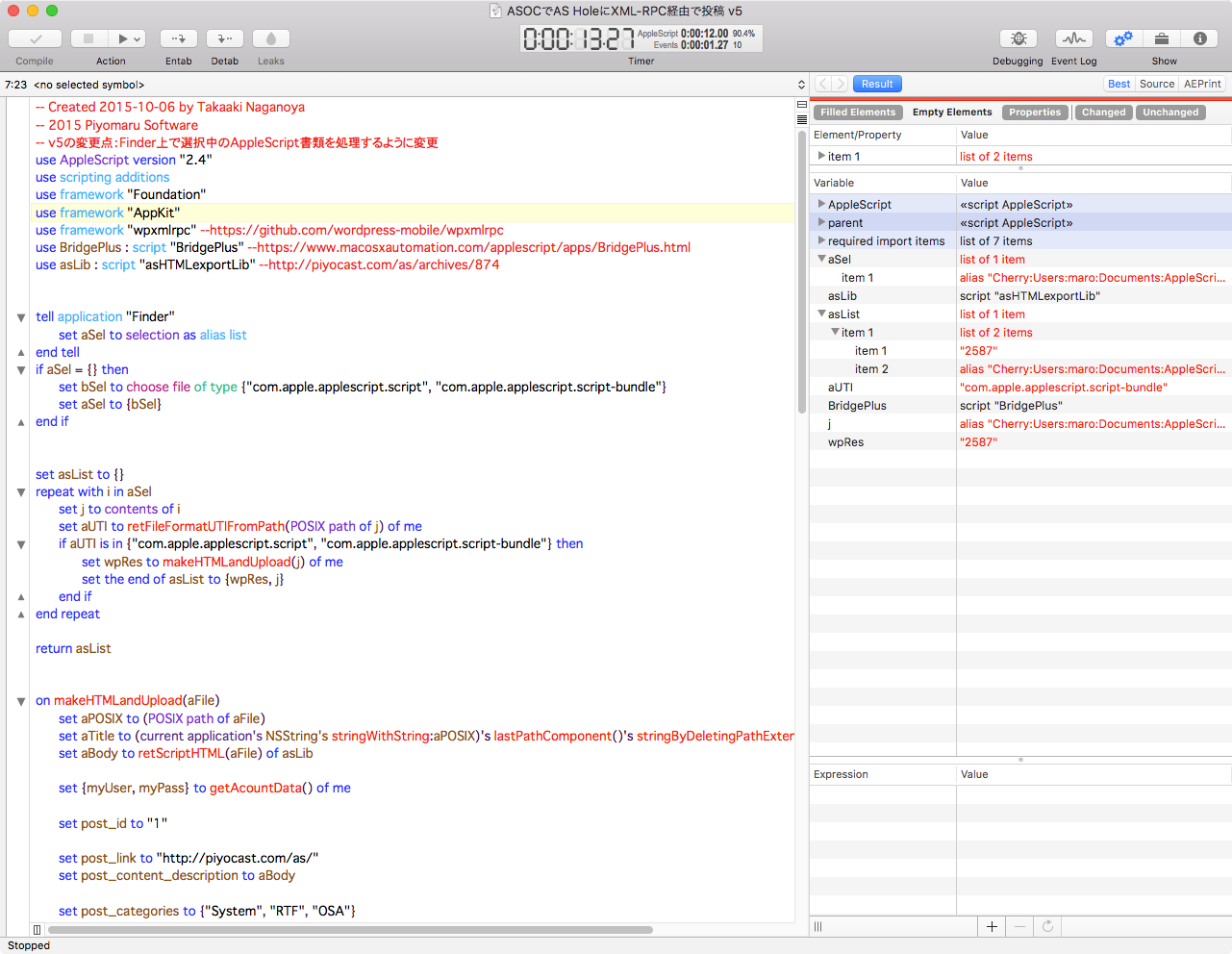
Late Night SoftwareからScript Debuggerの最新バージョン、Script Debugger 7がリリースされました。macOS 10.11以降のOSが対象です。価格は99ドルで、ボリュームディスカウントも用意されています。
Script DebuggerはClassic Mac OSの時代からサードパーティのAppleScript統合開発環境として続いてきたソフトウェアです。AppleScriptのプログラムの開発、実行およびデバッグのための強力な機能を提供します。
v6:AppleScriptObjCに対応
v5:エディタ部分をフル書き換え

▲Script Debugger 7

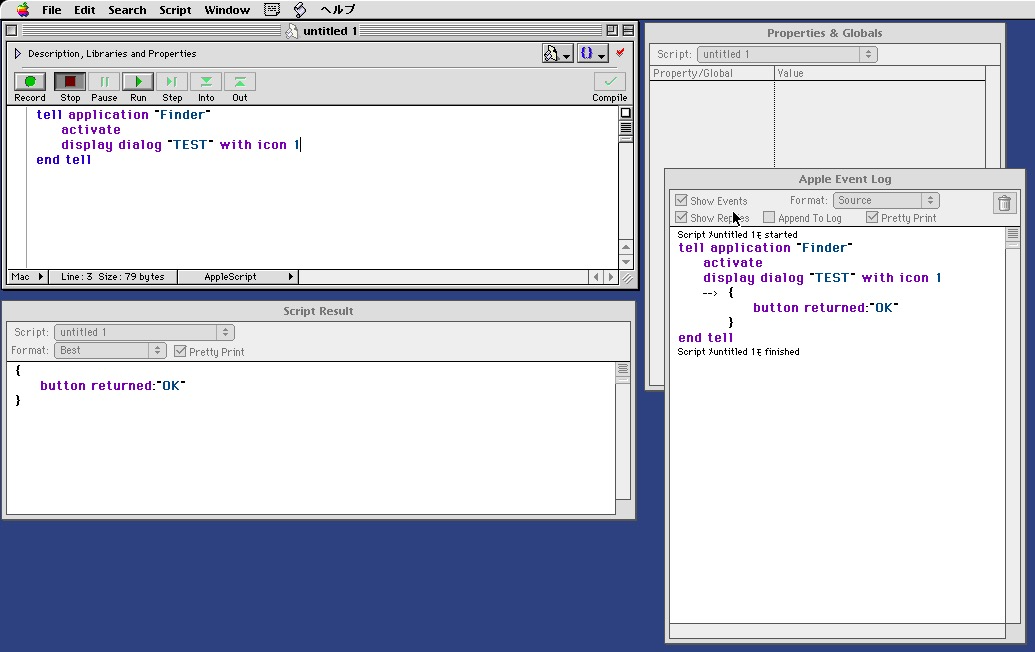
▲Script Debugger 3 + Classic Mac OS 8.6(SheepShaver)
AppleScript統合開発環境の決定版
「デバッガ」の名のとおり、AppleScriptに対して変数内容のリアルタイムモニタリング、ブレークポイントの設定、ステップ実行などの機能を提供します。
さらに、対象アプリケーションの各オブジェクトの属性値情報をリアルタイムでモニタリングする機能を提供しており、初見のGUIアプリケーションであっても、Script Debuggerのこの機能を用いれば、とくに迷うことなく目的の属性値情報にたどり着くことが可能です。
初心者にこそ使ってほしいソフトウェア
こうした機能は、(上級者はもちろんのこと)初心者にこそ有用なもので、自分もたまたまAppleScript入門時にScript Debuggerに出会い(バージョン2か3の頃に)、たいへんに助けられました。FileMaker Proのデータベースからカテゴリごとにデータを抽出してHTMLコンテンツを生成するAppleScriptを、AppleScriptを使い始めて1週間ぐらいで作れるようになったのは、(海外のMailing Listで教えてもらいつつ)Script Debuggerがあったからです。
名前が仰々しいので「むずかしいソフトウェア」と思われがちで、それがScript入門者にとってもメーカーにとってもたいへんに不幸なことだと思っていました。初心者が使うと便利でわかりやすいのに、初心者が「むずかしそう」と敬遠してしまうのは、残念なことです。
一般的なレベルの「AppleScript入門者」にScript Debuggerの機能を2〜3週間で理解しろといっても無理なようなので、もう少し「何か」があれば入門者もより理解が深まり、Script Debuggerの恩恵を授かることができるのに、と思っておりました。
macOS 10.14以降で、サードパーティFramework呼び出しScriptに必須
Apple純正のCocoa Frameworkにくわえ、サードパーティのFrameworkをAppleScriptから呼び出して利用することが、macOS 10.10以降で一般的になってきました、ところが、macOS 10.14以降ではmacOSのセキュリティ機能が強化され、ユーザーフォルダに存在するFrameworkを呼び出して実行することができなくなりました(SIPを解除するとこの制限はなくなります)。
Script Debuggerは、このmacOS 10.14以降の環境で、github上で公開されているオープンソースのFrameworkをビルドして呼び出したいような場合に、SIPを解除せずともFramework呼び出しが行える環境です。
また、macOS 10.15でAppleScriptアプレットにFrameworkを同梱して呼び出すようなやり方がSIPによって禁止されましたが、これもScript Debuggerのアプレット書き出し(Enhanced)を利用することで、Frameworkを同梱して実行できるAppleScriptアプレットを作成できます。
3週間の試用期間を過ぎてもLiteモードで機能制限版として使用可能
そこに、今回のScript Debugger 7で「Liteモード」が用意されました。使用期限が切れても、機能制限版のScript Debuggerとして動作するモードです。このLiteモードの状態でもApple純正のスクリプトエディタよりも高機能です(AppleScript書類の書式にアクセスできない以外は)。
ちなみに、Xcode上でGUIベースのアプリケーションをAppleScriptで組もうとしたときに、Script Debuggerなどのまともな外部AppleScriptエディタは必須のものです。
旅行系サイトごちゃまぜフィード
ApitoreのREST API「旅行系サイト ごちゃまぜフィード」を呼び出して、さまざまな旅行系サイトのNews Feedを一括で取得するAppleScriptです。
# Apitoreは2019年5月31日をもってサービスを終了
「旅行系サイト ごちゃまぜフィード」は、30分に1回の頻度でRSSの更新を確認にいきます。REST APIで最新情報が取得できるオンラインクローラーです。
本AppleScript利用のためには、Apitoreにサインアップしてアカウントを作成し、新規プロジェクトを作成(Test AppleScriptとか)。そこに、本APIを利用できるように登録し、「アクセストークン」を取得する必要があります。
アクセストークンを取得せずに掲載状態のまま本AppleScriptを実行してもエラーになります。
取得したアクセストークンを本AppleScript中のretAccessToken()ハンドラ内に記載し、実行してください。
| AppleScript名:旅行系サイトごちゃまぜフィード |
| — Created 2016-10-27 by Takaaki Naganoya — 2016 Piyomaru Software use AppleScript version "2.4" use scripting additions use framework "Foundation" set allFeeds to {} repeat with i from 1 to 100 set {aRes, maxNum} to getAFeeds(i) of me if aRes = false then exit repeat set maxNum to maxNum as number set allFeeds to allFeeds & aRes if (maxNum div 10) ≤ i then exit repeat end if end repeat return allFeeds –> (* {{author:"", sourceTitle:"Compathy Magazine(コンパシーマガジン)", title:"【東京美食】 2017壽司必吃!東京壽司推薦攻略TOP18,日式壽司禮儀超強指南", link:"https://www.compathy.net/magazine/2017/03/29/tokyosushitop18/", pubDate:1.490783697E+12, description:"", sourceLink:"https://www.compathy.net/magazine"}, *) on getAFeeds(aNum) set reqURLStr to "https://api.apitore.com/api/36/feeds/travel" set accessToken to retAccessToken() of me —Access Token set aRec to {access_token:accessToken, page:(aNum as string)} set aURL to retURLwithParams(reqURLStr, aRec) of me set aRes to callRestGETAPIAndParseResults(aURL) of me set aRESCode to (responseCode of aRes) as integer if aRESCode is not equal to 200 then return {false, false} set aRESTres to (json of aRes) as record set sentiRes to entries of aRESTres set allNum to num of aRESTres return {sentiRes, allNum} end getAFeeds –GET methodのREST APIを呼ぶ on callRestGETAPIAndParseResults(aURL) set aRequest to current application’s NSMutableURLRequest’s requestWithURL:(current application’s |NSURL|’s URLWithString:aURL) aRequest’s setHTTPMethod:"GET" aRequest’s setCachePolicy:(current application’s NSURLRequestReloadIgnoringLocalCacheData) aRequest’s setHTTPShouldHandleCookies:false aRequest’s setTimeoutInterval:60 aRequest’s setValue:"application/json" forHTTPHeaderField:"Accept" aRequest’s setValue:"gzip" forHTTPHeaderField:"Content-Encoding" aRequest’s setValue:"Test AppleScript (gzip)" forHTTPHeaderField:"User-Agent" set aRes to current application’s NSURLConnection’s sendSynchronousRequest:aRequest returningResponse:(reference) |error|:(missing value) set resList to aRes as list set bRes to contents of (first item of resList) set resStr to current application’s NSString’s alloc()’s initWithData:bRes encoding:(current application’s NSUTF8StringEncoding) set jsonString to current application’s NSString’s stringWithString:resStr set jsonData to jsonString’s dataUsingEncoding:(current application’s NSUTF8StringEncoding) set aJsonDict to current application’s NSJSONSerialization’s JSONObjectWithData:jsonData options:0 |error|:(missing value) –Get Response Code & Header set dRes to contents of second item of resList if dRes is not equal to missing value then set resCode to (dRes’s statusCode()) as number set resHeaders to (dRes’s allHeaderFields()) as record else set resCode to 0 set resHeaders to {} end if return {json:aJsonDict, responseCode:resCode, responseHeader:resHeaders} end callRestGETAPIAndParseResults on retURLwithParams(aBaseURL, aRec) set aDic to current application’s NSMutableDictionary’s dictionaryWithDictionary:aRec set aKeyList to (aDic’s allKeys()) as list set aValList to (aDic’s allValues()) as list set aLen to length of aKeyList set qList to {} repeat with i from 1 to aLen set aName to contents of item i of aKeyList set aVal to contents of item i of aValList set the end of qList to (current application’s NSURLQueryItem’s queryItemWithName:aName value:aVal) end repeat set aComp to current application’s NSURLComponents’s alloc()’s initWithString:aBaseURL aComp’s setQueryItems:qList set aURL to (aComp’s |URL|()’s absoluteString()) as text return aURL end retURLwithParams on retAccessToken() return "xxXXXxxX-XxXx-XXXX-xXXX-XXxXXxxXxxXx" –API Tore Access Token end retAccessToken |
証券情報サイト ごちゃまぜフィード
ApitoreのREST API「証券情報サイト ごちゃまぜフィード」を呼び出して、さまざまな証券情報サイトのNews Feedを一括で取得するAppleScriptです。
# Apitoreは2019年5月31日をもってサービスを終了
「証券情報サイト ごちゃまぜフィード」は、30分に1回の頻度でRSSの更新を確認にいきます。REST APIで最新情報が取得できるオンラインクローラーです。
本AppleScript利用のためには、Apitoreにサインアップしてアカウントを作成し、新規プロジェクトを作成(Test AppleScriptとか)。そこに、本APIを利用できるように登録し、「アクセストークン」を取得する必要があります。
アクセストークンを取得せずに掲載状態のまま本AppleScriptを実行してもエラーになります。
取得したアクセストークンを本AppleScript中のretAccessToken()ハンドラ内に記載し、実行してください。
| AppleScript名:証券情報サイト ごちゃまぜフィード |
| — Created 2016-10-27 by Takaaki Naganoya — 2016 Piyomaru Software use AppleScript version "2.4" use scripting additions use framework "Foundation" set allFeeds to {} repeat with i from 1 to 100 set {aRes, maxNum} to getAFeeds(i) of me if aRes = false then exit repeat set maxNum to maxNum as number set allFeeds to allFeeds & aRes if (maxNum div 10) ≤ i then exit repeat end if end repeat return allFeeds –> (* {{author:"日本インタビュ新聞 Media-IR", sourceTitle:"日本インタビュ新聞 株式投資情報", title:"アライドレシスホールディングスは「継続企業の前提に関する注記」の記載を解消", link:"http://kabu-ir.com/article/448533521.html", pubDate:1.490787369E+12, description:"■返済期日が延長され、当面の資金繰りの安定化が図られる見込み アライドテレシスホールディングス<6835>(東2)は29日、「継続企業の前提に関する注記」の記載を解消することを発表した。 同社グループは、平成28年12月期連結会計年度で営業利益5億72百万円、当期純利益1億11百万円を計上した。しかし、営業活動によるキャッシュフロー4億6百万円に対し、連結会計年度末における金融機関からの有利子負債残高が74億94百万円と多額であり、平成29年6月30日に期間満了となるシンジケ..", sourceLink:"http://kabu-ir.com/"}, {author:"日本インタビュ新聞 Media-IR", sourceTitle:"日本インタビュ新聞 株式投資情報", title:"ケイティケイは今17年8月期第2四半期と通期業績予想の利益面での上方修正を発表", *) on getAFeeds(aNum) set reqURLStr to "https://api.apitore.com/api/31/feeds/certificate" set accessToken to retAccessToken() of me —Access Token set aRec to {access_token:accessToken, page:(aNum as string)} set aURL to retURLwithParams(reqURLStr, aRec) of me set aRes to callRestGETAPIAndParseResults(aURL) of me set aRESCode to (responseCode of aRes) as integer if aRESCode is not equal to 200 then return {false, false} set aRESTres to (json of aRes) as record set sentiRes to entries of aRESTres set allNum to num of aRESTres log allNum return {sentiRes, allNum} end getAFeeds –GET methodのREST APIを呼ぶ on callRestGETAPIAndParseResults(aURL) set aRequest to current application’s NSMutableURLRequest’s requestWithURL:(current application’s |NSURL|’s URLWithString:aURL) aRequest’s setHTTPMethod:"GET" aRequest’s setCachePolicy:(current application’s NSURLRequestReloadIgnoringLocalCacheData) aRequest’s setHTTPShouldHandleCookies:false aRequest’s setTimeoutInterval:60 aRequest’s setValue:"application/json" forHTTPHeaderField:"Accept" aRequest’s setValue:"gzip" forHTTPHeaderField:"Content-Encoding" aRequest’s setValue:"Test AppleScript (gzip)" forHTTPHeaderField:"User-Agent" set aRes to current application’s NSURLConnection’s sendSynchronousRequest:aRequest returningResponse:(reference) |error|:(missing value) set resList to aRes as list set bRes to contents of (first item of resList) set resStr to current application’s NSString’s alloc()’s initWithData:bRes encoding:(current application’s NSUTF8StringEncoding) set jsonString to current application’s NSString’s stringWithString:resStr set jsonData to jsonString’s dataUsingEncoding:(current application’s NSUTF8StringEncoding) set aJsonDict to current application’s NSJSONSerialization’s JSONObjectWithData:jsonData options:0 |error|:(missing value) –Get Response Code & Header set dRes to contents of second item of resList if dRes is not equal to missing value then set resCode to (dRes’s statusCode()) as number set resHeaders to (dRes’s allHeaderFields()) –as record else set resCode to 0 set resHeaders to {} end if return {json:aJsonDict, responseCode:resCode, responseHeader:resHeaders} end callRestGETAPIAndParseResults on retURLwithParams(aBaseURL, aRec) set aDic to current application’s NSMutableDictionary’s dictionaryWithDictionary:aRec set aKeyList to (aDic’s allKeys()) as list set aValList to (aDic’s allValues()) as list set aLen to length of aKeyList set qList to {} repeat with i from 1 to aLen set aName to contents of item i of aKeyList set aVal to contents of item i of aValList set the end of qList to (current application’s NSURLQueryItem’s queryItemWithName:aName value:aVal) end repeat set aComp to current application’s NSURLComponents’s alloc()’s initWithString:aBaseURL aComp’s setQueryItems:qList set aURL to (aComp’s |URL|()’s absoluteString()) as text return aURL end retURLwithParams on retAccessToken() return "xxXXXxxX-XxXx-XXXX-xXXX-XXxXXxxXxxXx" –API Tore Access Token end retAccessToken |
ブログごちゃまぜフィード
ApitoreのREST API「ブログ ごちゃまぜフィード」を呼び出して、さまざまな各個人ブログのNews Feedを一括で取得するAppleScriptです。
# Apitoreは2019年5月31日をもってサービスを終了
「ブログ ごちゃまぜフィード」は、30分に1回の頻度でRSSの更新を確認にいきます。REST APIで最新情報が取得できるオンラインクローラーです。
本AppleScript利用のためには、Apitoreにサインアップしてアカウントを作成し、新規プロジェクトを作成(Test AppleScriptとか)。そこに、本APIを利用できるように登録し、「アクセストークン」を取得する必要があります。
アクセストークンを取得せずに掲載状態のまま本AppleScriptを実行してもエラーになります。
取得したアクセストークンを本AppleScript中のretAccessToken()ハンドラ内に記載し、実行してください。
| AppleScript名:ブログごちゃまぜフィード |
| — Created 2016-10-27 by Takaaki Naganoya — 2016 Piyomaru Software use AppleScript version "2.4" use scripting additions use framework "Foundation" set allFeeds to {} repeat with i from 1 to 100 set {aRes, maxNum} to getAFeeds(i) of me if aRes = false then exit repeat set maxNum to maxNum as number set allFeeds to allFeeds & aRes if (maxNum div 10) ≤ i then exit repeat end if end repeat return allFeeds –> (* {{author:"", sourceTitle:"毎日新聞 – ニュース速報(総合)", title:"那須雪崩:NHK、被害者写真誤り訂正し謝罪", link:"http://rss.rssad.jp/rss/artclk/ZLcY1bpa2mkX/98f49f50f6a89c6d7da908d2f7e604f3?ul=IRi._czqYe8fmPstnpk5g5TZSqz2eXK2XhK5Wl.vDmACS2n47wDHuHkQCrQkxmzyg1uf0aUsQxz8MCNU7hjXjz7r54NW", pubDate:1.490796812E+12, description:"<p><img border=\"0\" width=\"1\" height=\"1\" src=\"http://rss.rssad.jp/rss/artimg/ZLcY1bpa2mkX/98f49f50f6a89c6d7da908d2f7e604f3\"/></p>", sourceLink:"http://mainichi.jp"}, *) on getAFeeds(aNum) set reqURLStr to "https://api.apitore.com/api/30/feeds/blog" set accessToken to retAccessToken() of me —Access Token set aRec to {access_token:accessToken, page:(aNum as string)} set aURL to retURLwithParams(reqURLStr, aRec) of me set aRes to callRestGETAPIAndParseResults(aURL) of me set aRESCode to (responseCode of aRes) as integer if aRESCode is not equal to 200 then return {false, false} set aRESTres to (json of aRes) as record set sentiRes to entries of aRESTres set allNum to num of aRESTres log allNum return {sentiRes, allNum} end getAFeeds –GET methodのREST APIを呼ぶ on callRestGETAPIAndParseResults(aURL) set aRequest to current application’s NSMutableURLRequest’s requestWithURL:(current application’s |NSURL|’s URLWithString:aURL) aRequest’s setHTTPMethod:"GET" aRequest’s setCachePolicy:(current application’s NSURLRequestReloadIgnoringLocalCacheData) aRequest’s setHTTPShouldHandleCookies:false aRequest’s setTimeoutInterval:60 aRequest’s setValue:"application/json" forHTTPHeaderField:"Accept" aRequest’s setValue:"gzip" forHTTPHeaderField:"Content-Encoding" aRequest’s setValue:"Test AppleScript (gzip)" forHTTPHeaderField:"User-Agent" set aRes to current application’s NSURLConnection’s sendSynchronousRequest:aRequest returningResponse:(reference) |error|:(missing value) set resList to aRes as list set bRes to contents of (first item of resList) set resStr to current application’s NSString’s alloc()’s initWithData:bRes encoding:(current application’s NSUTF8StringEncoding) set jsonString to current application’s NSString’s stringWithString:resStr set jsonData to jsonString’s dataUsingEncoding:(current application’s NSUTF8StringEncoding) set aJsonDict to current application’s NSJSONSerialization’s JSONObjectWithData:jsonData options:0 |error|:(missing value) –Get Response Code & Header set dRes to contents of second item of resList if dRes is not equal to missing value then set resCode to (dRes’s statusCode()) as number set resHeaders to (dRes’s allHeaderFields()) as record else set resCode to 0 set resHeaders to {} end if return {json:aJsonDict, responseCode:resCode, responseHeader:resHeaders} end callRestGETAPIAndParseResults on retURLwithParams(aBaseURL, aRec) set aDic to current application’s NSMutableDictionary’s dictionaryWithDictionary:aRec set aKeyList to (aDic’s allKeys()) as list set aValList to (aDic’s allValues()) as list set aLen to length of aKeyList set qList to {} repeat with i from 1 to aLen set aName to contents of item i of aKeyList set aVal to contents of item i of aValList set the end of qList to (current application’s NSURLQueryItem’s queryItemWithName:aName value:aVal) end repeat set aComp to current application’s NSURLComponents’s alloc()’s initWithString:aBaseURL aComp’s setQueryItems:qList set aURL to (aComp’s |URL|()’s absoluteString()) as text return aURL end retURLwithParams on retAccessToken() return "xxXXXxxX-XxXx-XXXX-xXXX-XXxXXxxXxxXx" –API Tore Access Token end retAccessToken |
デザイン系 ごちゃまぜフィード
ApitoreのREST API「デザイン系 ごちゃまぜフィード」を呼び出して、さまざまなオシャレなインテリアとかデザインとかを扱うサイトが提供しているNews Feedを一括で取得するAppleScriptです。
# Apitoreは2019年5月31日をもってサービスを終了
「デザイン系 ごちゃまぜフィード」は、30分に1回の頻度でRSSの更新を確認にいきます。REST APIで最新情報が取得できるオンラインクローラーです。巡回先RSSは以下のとおりです。
・Gurafiku
・HITSPAPER
・K’conf Blog
・CASA BRUTUS
・100%LiFE
本AppleScript利用のためには、Apitoreにサインアップしてアカウントを作成し、新規プロジェクトを作成(Test AppleScriptとか)。そこに、本APIを利用できるように登録し、「アクセストークン」を取得する必要があります。
アクセストークンを取得せずに掲載状態のまま本AppleScriptを実行してもエラーになります。
取得したアクセストークンを本AppleScript中のretAccessToken()ハンドラ内に記載し、実行してください。
| AppleScript名:デザイン系 ごちゃまぜフィード |
| — Created 2016-10-27 by Takaaki Naganoya — 2016 Piyomaru Software use AppleScript version "2.4" use scripting additions use framework "Foundation" set allFeeds to {} repeat with i from 1 to 100 set {aRes, maxNum} to getAFeeds(i) of me if aRes = false then exit repeat set maxNum to maxNum as number set allFeeds to allFeeds & aRes if (maxNum div 10) ≤ i then exit repeat end if end repeat return allFeeds –> (* {{author:"日本インタビュ新聞 Media-IR", sourceTitle:"日本インタビュ新聞 株式投資情報", title:"アライドレシスホールディングスは「継続企業の前提に関する注記」の記載を解消", link:"http://kabu-ir.com/article/448533521.html", pubDate:1.490787369E+12, description:"■返済期日が延長され、当面の資金繰りの安定化が図られる見込み アライドテレシスホールディングス<6835>(東2)は29日、「継続企業の前提に関する注記」の記載を解消することを発表した。 同社グループは、平成28年12月期連結会計年度で営業利益5億72百万円、当期純利益1億11百万円を計上した。しかし、営業活動によるキャッシュフロー4億6百万円に対し、連結会計年度末における金融機関からの有利子負債残高が74億94百万円と多額であり、平成29年6月30日に期間満了となるシンジケ..", sourceLink:"http://kabu-ir.com/"}, {author:"日本インタビュ新聞 Media-IR", sourceTitle:"日本インタビュ新聞 株式投資情報", title:"ケイティケイは今17年8月期第2四半期と通期業績予想の利益面での上方修正を発表", *) on getAFeeds(aNum) set reqURLStr to "https://api.apitore.com/api/32/feeds/design" set accessToken to retAccessToken() of me —Access Token set aRec to {access_token:accessToken, page:(aNum as string)} set aURL to retURLwithParams(reqURLStr, aRec) of me set aRes to callRestGETAPIAndParseResults(aURL) of me set aRESCode to (responseCode of aRes) as integer if aRESCode is not equal to 200 then return {false, false} set aRESTres to (json of aRes) as record set sentiRes to entries of aRESTres set allNum to num of aRESTres log allNum return {sentiRes, allNum} end getAFeeds –GET methodのREST APIを呼ぶ on callRestGETAPIAndParseResults(aURL) set aRequest to current application’s NSMutableURLRequest’s requestWithURL:(current application’s |NSURL|’s URLWithString:aURL) aRequest’s setHTTPMethod:"GET" aRequest’s setCachePolicy:(current application’s NSURLRequestReloadIgnoringLocalCacheData) aRequest’s setHTTPShouldHandleCookies:false aRequest’s setTimeoutInterval:60 aRequest’s setValue:"application/json" forHTTPHeaderField:"Accept" aRequest’s setValue:"gzip" forHTTPHeaderField:"Content-Encoding" aRequest’s setValue:"Test AppleScript (gzip)" forHTTPHeaderField:"User-Agent" set aRes to current application’s NSURLConnection’s sendSynchronousRequest:aRequest returningResponse:(reference) |error|:(missing value) set resList to aRes as list set bRes to contents of (first item of resList) set resStr to current application’s NSString’s alloc()’s initWithData:bRes encoding:(current application’s NSUTF8StringEncoding) set jsonString to current application’s NSString’s stringWithString:resStr set jsonData to jsonString’s dataUsingEncoding:(current application’s NSUTF8StringEncoding) set aJsonDict to current application’s NSJSONSerialization’s JSONObjectWithData:jsonData options:0 |error|:(missing value) –Get Response Code & Header set dRes to contents of second item of resList if dRes is not equal to missing value then set resCode to (dRes’s statusCode()) as number set resHeaders to (dRes’s allHeaderFields()) as record else set resCode to 0 set resHeaders to {} end if return {json:aJsonDict, responseCode:resCode, responseHeader:resHeaders} end callRestGETAPIAndParseResults on retURLwithParams(aBaseURL, aRec) set aDic to current application’s NSMutableDictionary’s dictionaryWithDictionary:aRec set aKeyList to (aDic’s allKeys()) as list set aValList to (aDic’s allValues()) as list set aLen to length of aKeyList set qList to {} repeat with i from 1 to aLen set aName to contents of item i of aKeyList set aVal to contents of item i of aValList set the end of qList to (current application’s NSURLQueryItem’s queryItemWithName:aName value:aVal) end repeat set aComp to current application’s NSURLComponents’s alloc()’s initWithString:aBaseURL aComp’s setQueryItems:qList set aURL to (aComp’s |URL|()’s absoluteString()) as text return aURL end retURLwithParams on retAccessToken() return "xxXXXxxX-XxXx-XXXX-xXXX-XXxXXxxXxxXx" –API Tore Access Token end retAccessToken |
ゲーム情報サイト ごちゃまぜフィード
ApitoreのREST API「ゲーム情報サイト ごちゃまぜフィード」を呼び出して、さまざまなゲーム系サイトのNews Feedを一括で取得するAppleScriptです。
# Apitoreは2019年5月31日をもってサービスを終了
「ゲーム情報サイト ごちゃまぜフィード」は、30分に1回の頻度でRSSの更新を確認にいきます。REST APIで最新情報が取得できるオンラインクローラーです。以下のRSSをチェックしています。
・4Gamer.net 新着
・4Gamer.net 注目の記事のみ
・電撃オンライン
・doope!
・Game*Spark
・ゲームのはなし
本AppleScript利用のためには、Apitoreにサインアップしてアカウントを作成し、新規プロジェクトを作成(Test AppleScriptとか)。そこに、本APIを利用できるように登録し、「アクセストークン」を取得する必要があります。
アクセストークンを取得せずに掲載状態のまま本AppleScriptを実行してもエラーになります。
取得したアクセストークンを本AppleScript中のretAccessToken()ハンドラ内に記載し、実行してください。
| AppleScript名:ゲーム情報サイト ごちゃまぜフィード |
| — Created 2016-10-27 by Takaaki Naganoya — 2016 Piyomaru Software use AppleScript version "2.4" use scripting additions use framework "Foundation" set allFeeds to {} repeat with i from 1 to 100 set {aRes, maxNum} to getAFeeds(i) of me if aRes = false then exit repeat set maxNum to maxNum as number set allFeeds to allFeeds & aRes if (maxNum div 10) ≤ i then exit repeat end if end repeat return allFeeds –> (* {author:"okome", sourceTitle:"doope!", title:"Update:Bethesda Game Studiosが開発を手掛けたVaultシム「Fallout Shelter」がSteamに登場、リリースはまもなく", link:"http://doope.jp/2017/0363788.html", pubDate:1.490796335E+12, description:"UPDATE:3月29日23:05 新たにSteamにて本作の配信が開始されました。以下、更新前の本文となります。 今年2月にXbox OneとWin10向けのローンチを果たしたBethesda Game Studios […]", sourceLink:"http://doope.jp"}, {author:"", sourceTitle:"電撃オンライン – 総合ゲーム情報サイト", title:"『9時間9人9の扉 善人シボウデス ダブルパック』PS4/PS Vita版の店舗別予約特典を紹介 ", link:"http://dengekionline.com/elem/000/001/493/1493825/", pubDate:1.490796071E+12, description:"<p>『ZERO ESCAPE 9時間9人9の扉 善人シボウデス ダブルパック』のPS4/PS Vita版の店舗別予約特典ではオリジナルステッカーなど登場しています。</p>", sourceLink:"http://dengekionline.com/"} *) on getAFeeds(aNum) set reqURLStr to "https://api.apitore.com/api/33/feeds/game" set accessToken to retAccessToken() of me —Access Token set aRec to {access_token:accessToken, page:(aNum as string)} set aURL to retURLwithParams(reqURLStr, aRec) of me set aRes to callRestGETAPIAndParseResults(aURL) of me set aRESCode to (responseCode of aRes) as integer if aRESCode is not equal to 200 then return {false, false} set aRESTres to (json of aRes) as record set sentiRes to entries of aRESTres set allNum to num of aRESTres log allNum return {sentiRes, allNum} end getAFeeds –GET methodのREST APIを呼ぶ on callRestGETAPIAndParseResults(aURL) set aRequest to current application’s NSMutableURLRequest’s requestWithURL:(current application’s |NSURL|’s URLWithString:aURL) aRequest’s setHTTPMethod:"GET" aRequest’s setCachePolicy:(current application’s NSURLRequestReloadIgnoringLocalCacheData) aRequest’s setHTTPShouldHandleCookies:false aRequest’s setTimeoutInterval:60 aRequest’s setValue:"application/json" forHTTPHeaderField:"Accept" aRequest’s setValue:"gzip" forHTTPHeaderField:"Content-Encoding" aRequest’s setValue:"Test AppleScript (gzip)" forHTTPHeaderField:"User-Agent" set aRes to current application’s NSURLConnection’s sendSynchronousRequest:aRequest returningResponse:(reference) |error|:(missing value) set resList to aRes as list set bRes to contents of (first item of resList) set resStr to current application’s NSString’s alloc()’s initWithData:bRes encoding:(current application’s NSUTF8StringEncoding) set jsonString to current application’s NSString’s stringWithString:resStr set jsonData to jsonString’s dataUsingEncoding:(current application’s NSUTF8StringEncoding) set aJsonDict to current application’s NSJSONSerialization’s JSONObjectWithData:jsonData options:0 |error|:(missing value) –Get Response Code & Header set dRes to contents of second item of resList if dRes is not equal to missing value then set resCode to (dRes’s statusCode()) as number set resHeaders to (dRes’s allHeaderFields()) as record else set resCode to 0 set resHeaders to {} end if return {json:aJsonDict, responseCode:resCode, responseHeader:resHeaders} end callRestGETAPIAndParseResults on retURLwithParams(aBaseURL, aRec) set aDic to current application’s NSMutableDictionary’s dictionaryWithDictionary:aRec set aKeyList to (aDic’s allKeys()) as list set aValList to (aDic’s allValues()) as list set aLen to length of aKeyList set qList to {} repeat with i from 1 to aLen set aName to contents of item i of aKeyList set aVal to contents of item i of aValList set the end of qList to (current application’s NSURLQueryItem’s queryItemWithName:aName value:aVal) end repeat set aComp to current application’s NSURLComponents’s alloc()’s initWithString:aBaseURL aComp’s setQueryItems:qList set aURL to (aComp’s |URL|()’s absoluteString()) as text return aURL end retURLwithParams on retAccessToken() return "xxXXXxxX-XxXx-XXXX-xXXX-XXxXXxxXxxXx" –API Tore Access Token end retAccessToken |
ニュースサイト ごちゃまぜフィード
ApitoreのREST API「ニュースサイト ごちゃまぜフィード」を呼び出して、さまざまなテック系サイトのNews Feedを一括で取得するAppleScriptです。
# Apitoreは2019年5月31日をもってサービスを終了
「ニュースサイト ごちゃまぜフィード」は、30分に1回の頻度でRSSの更新を確認にいきます。REST APIで最新情報が取得できるオンラインクローラーです。以下のサイトのRSSを収集しています。
・Huffington Post Japan
・IBTimes エンタメ・スポーツ
・IBTimes グローバル
・IBTimes マーケット
・IBTimes ライフ
・IBTimes 企業
・IBTimes 経済
・IBTimes IT・サイエンス
・ダイヤモンド・オンライン
・ビジネスジャーナル
・東洋経済オンライン
・毎日新聞
・CNN
本AppleScript利用のためには、Apitoreにサインアップしてアカウントを作成し、新規プロジェクトを作成(Test AppleScriptとか)。そこに、本APIを利用できるように登録し、「アクセストークン」を取得する必要があります。
アクセストークンを取得せずに掲載状態のまま本AppleScriptを実行してもエラーになります。
取得したアクセストークンを本AppleScript中のretAccessToken()ハンドラ内に記載し、実行してください。
| AppleScript名:ニュースサイト ごちゃまぜフィード |
| — Created 2016-10-27 by Takaaki Naganoya — 2016 Piyomaru Software use AppleScript version "2.4" use scripting additions use framework "Foundation" getNewsFeed() of me on getNewsFeed() set allFeeds to {} repeat with i from 1 to 100 set {aRes, maxNum} to getAFeeds(i) of me if aRes = false then exit repeat set maxNum to maxNum as number set allFeeds to allFeeds & aRes if (maxNum div 10) ≤ i then exit repeat end if end repeat return allFeeds end getNewsFeed on getAFeeds(aNum) set reqURLStr to "https://api.apitore.com/api/34/feeds/news" set accessToken to retAccessToken() of me —Access Token set aRec to {access_token:accessToken, page:(aNum as string)} set aURL to retURLwithParams(reqURLStr, aRec) of me set aRes to callRestGETAPIAndParseResults(aURL) of me set aRESCode to (responseCode of aRes) as integer if aRESCode is not equal to 200 then return {false, false} set aRESTres to (json of aRes) as record set sentiRes to entries of aRESTres set allNum to num of aRESTres –log allNum return {sentiRes, allNum} end getAFeeds –GET methodのREST APIを呼ぶ on callRestGETAPIAndParseResults(aURL) set aRequest to current application’s NSMutableURLRequest’s requestWithURL:(current application’s |NSURL|’s URLWithString:aURL) aRequest’s setHTTPMethod:"GET" aRequest’s setCachePolicy:(current application’s NSURLRequestReloadIgnoringLocalCacheData) aRequest’s setHTTPShouldHandleCookies:false aRequest’s setTimeoutInterval:60 aRequest’s setValue:"application/json" forHTTPHeaderField:"Accept" aRequest’s setValue:"gzip" forHTTPHeaderField:"Content-Encoding" aRequest’s setValue:"Test AppleScript (gzip)" forHTTPHeaderField:"User-Agent" set aRes to current application’s NSURLConnection’s sendSynchronousRequest:aRequest returningResponse:(reference) |error|:(missing value) set resList to aRes as list set bRes to contents of (first item of resList) set resStr to current application’s NSString’s alloc()’s initWithData:bRes encoding:(current application’s NSUTF8StringEncoding) set jsonString to current application’s NSString’s stringWithString:resStr set jsonData to jsonString’s dataUsingEncoding:(current application’s NSUTF8StringEncoding) set aJsonDict to current application’s NSJSONSerialization’s JSONObjectWithData:jsonData options:0 |error|:(missing value) –Get Response Code & Header set dRes to contents of second item of resList if dRes is not equal to missing value then set resCode to (dRes’s statusCode()) as number set resHeaders to (dRes’s allHeaderFields()) as record else set resCode to 0 set resHeaders to {} end if return {json:aJsonDict, responseCode:resCode, responseHeader:resHeaders} end callRestGETAPIAndParseResults on retURLwithParams(aBaseURL, aRec) set aDic to current application’s NSMutableDictionary’s dictionaryWithDictionary:aRec set aKeyList to (aDic’s allKeys()) as list set aValList to (aDic’s allValues()) as list set aLen to length of aKeyList set qList to {} repeat with i from 1 to aLen set aName to contents of item i of aKeyList set aVal to contents of item i of aValList set the end of qList to (current application’s NSURLQueryItem’s queryItemWithName:aName value:aVal) end repeat set aComp to current application’s NSURLComponents’s alloc()’s initWithString:aBaseURL aComp’s setQueryItems:qList set aURL to (aComp’s |URL|()’s absoluteString()) as text return aURL end retURLwithParams on retAccessToken() return "xxXXXxxX-XxXx-XXXX-xXXX-XXxXXxxXxxXx" –API Tore Access Token end retAccessToken |
テックサイト ごちゃまぜフィード
ApitoreのREST API「テックサイト ごちゃまぜフィード」を呼び出して、さまざまなテック系サイトのNews Feedを一括で取得するAppleScriptです。
# Apitoreは2019年5月31日をもってサービスを終了
「テックサイト ごちゃまぜフィード」は、30分に1回の頻度でRSSの更新を確認にいきます。REST APIで最新情報が取得できるオンラインクローラーです。
本AppleScript利用のためには、Apitoreにサインアップしてアカウントを作成し、新規プロジェクトを作成(Test AppleScriptとか)。そこに、本APIを利用できるように登録し、「アクセストークン」を取得する必要があります。
アクセストークンを取得せずに掲載状態のまま本AppleScriptを実行してもエラーになります。
取得したアクセストークンを本AppleScript中のretAccessToken()ハンドラ内に記載し、実行してください。
| AppleScript名:テックサイト ごちゃまぜフィード |
| — Created 2016-10-27 by Takaaki Naganoya — 2016 Piyomaru Software use AppleScript version "2.4" use scripting additions use framework "Foundation" set allFeeds to {} repeat with i from 1 to 100 set {aRes, maxNum} to getAFeeds(i) of me if aRes = false then exit repeat set maxNum to maxNum as number set allFeeds to allFeeds & aRes if (maxNum div 10) ≤ i then exit repeat end if end repeat return allFeeds –> (* {{author:"Ittousai", sourceTitle:"Engadget Japanese RSS Feed", title:" 速報:サムスンGalaxy S8発表イベント UNPACKED 2017 (ライブ更新ページ) ", link:"http://japanese.engadget.com/2017/03/29/galaxy-s8-unpacked-2017/", pubDate:1.49079606E+12, description:"<p> <img src=\"http://o.aolcdn.com/hss/storage/midas/a009a6b57896291f7e66fe091c6bdf94/205070326/unbox.png\" /> </p>", sourceLink:"http://japanese.engadget.com/rss.xml"}, *) on getAFeeds(aNum) set reqURLStr to "https://api.apitore.com/api/35/feeds/tech" set accessToken to retAccessToken() of me —Access Token set aRec to {access_token:accessToken, page:(aNum as string)} set aURL to retURLwithParams(reqURLStr, aRec) of me set aRes to callRestGETAPIAndParseResults(aURL) of me set aRESCode to (responseCode of aRes) as integer if aRESCode is not equal to 200 then return {false, false} set aRESTres to (json of aRes) as record set sentiRes to entries of aRESTres set allNum to num of aRESTres log allNum return {sentiRes, allNum} end getAFeeds –GET methodのREST APIを呼ぶ on callRestGETAPIAndParseResults(aURL) set aRequest to current application’s NSMutableURLRequest’s requestWithURL:(current application’s |NSURL|’s URLWithString:aURL) aRequest’s setHTTPMethod:"GET" aRequest’s setCachePolicy:(current application’s NSURLRequestReloadIgnoringLocalCacheData) aRequest’s setHTTPShouldHandleCookies:false aRequest’s setTimeoutInterval:60 aRequest’s setValue:"application/json" forHTTPHeaderField:"Accept" aRequest’s setValue:"gzip" forHTTPHeaderField:"Content-Encoding" aRequest’s setValue:"Test AppleScript (gzip)" forHTTPHeaderField:"User-Agent" set aRes to current application’s NSURLConnection’s sendSynchronousRequest:aRequest returningResponse:(reference) |error|:(missing value) set resList to aRes as list set bRes to contents of (first item of resList) set resStr to current application’s NSString’s alloc()’s initWithData:bRes encoding:(current application’s NSUTF8StringEncoding) set jsonString to current application’s NSString’s stringWithString:resStr set jsonData to jsonString’s dataUsingEncoding:(current application’s NSUTF8StringEncoding) set aJsonDict to current application’s NSJSONSerialization’s JSONObjectWithData:jsonData options:0 |error|:(missing value) –Get Response Code & Header set dRes to contents of second item of resList if dRes is not equal to missing value then set resCode to (dRes’s statusCode()) as number set resHeaders to (dRes’s allHeaderFields()) as record else set resCode to 0 set resHeaders to {} end if return {json:aJsonDict, responseCode:resCode, responseHeader:resHeaders} end callRestGETAPIAndParseResults on retURLwithParams(aBaseURL, aRec) set aDic to current application’s NSMutableDictionary’s dictionaryWithDictionary:aRec set aKeyList to (aDic’s allKeys()) as list set aValList to (aDic’s allValues()) as list set aLen to length of aKeyList set qList to {} repeat with i from 1 to aLen set aName to contents of item i of aKeyList set aVal to contents of item i of aValList set the end of qList to (current application’s NSURLQueryItem’s queryItemWithName:aName value:aVal) end repeat set aComp to current application’s NSURLComponents’s alloc()’s initWithString:aBaseURL aComp’s setQueryItems:qList set aURL to (aComp’s |URL|()’s absoluteString()) as text return aURL end retURLwithParams on retAccessToken() return "xxXXXxxX-XxXx-XXXX-xXXX-XXxXXxxXxxXx" –API Tore Access Token end retAccessToken |
RSS2JSON
ApitoreのREST API「RSS2JSON」を呼び出して、さまざまな種類のRSS(RSS0.9、RSS1.0、RSS2.0、Atomなど)をJSONに変換し、AppleScriptのrecord(record in list)オブジェクトに変換するAppleScriptです。
# Apitoreは2019年5月31日をもってサービスを終了
Language-Detectionは、テキストの言語判定を行います。検索機能に言語の絞り込みを付けたい場合や、テキストに対して言語別の処理をしたい場合に利用します。
本AppleScript利用のためには、Apitoreにサインアップしてアカウントを作成し、新規プロジェクトを作成(Test AppleScriptとか)。そこに、本APIを利用できるように登録し、「アクセストークン」を取得する必要があります。
アクセストークンを取得せずに掲載状態のまま本AppleScriptを実行してもエラーになります。
取得したアクセストークンを本AppleScript中のretAccessToken()ハンドラ内に記載し、実行してください。
| AppleScript名:RSS2JSON |
| — Created 2016-10-27 by Takaaki Naganoya — 2016 Piyomaru Software use AppleScript version "2.4" use scripting additions use framework "Foundation" –use keychainLib : script "keychainLib" set rssURL to "http://piyocast.com/as/feed/" set reqURLStr to "https://api.apitore.com/api/28/rome/rss2json" –set accessToken to getPasswordForAccount("apitore API Key", "maro@piyocast.com") of keychainLib set accessToken to retAccessToken() of me —Access Token set aRec to {access_token:accessToken, rss:rssURL} set aURL to retURLwithParams(reqURLStr, aRec) of me set aRes to callRestGETAPIAndParseResults(aURL) of me set aRESCode to (responseCode of aRes) as integer if aRESCode is not equal to 200 then return {false, false} set aRESTres to (json of aRes) as list of string or string –as anything –> {|description|:"Useful & Practical AppleScript archive", author:missing value, link:"http://piyocast.com/as", |log|:"", pubDate:1.520068773E+12, title:"AppleScript Hole", entries:{{author:"Takaaki Naganoya", title:"(GET)国土地理院APIで現在位置の標高を取得する", pubDate:1.519998541E+12, |description|:"<p>国土地理院のREST API「標高API」を呼んで、現在位置の標高を取得するAppleScriptです。 現在位置の取得のためにMac本体のWiFiがオンになっている必要があります。 AppleScript名:(GET) … <a href=\"http://piyocast.com/as/archives/2545\" class=\"more-link\"><span class=\"screen-reader-text\">\"(GET)国土地理院APIで現在位置の標高を取得する\"の</span>続きを読む</a></p><p>投稿 <a rel=\"nofollow\" href=\"http://piyocast.com/as/archives/2545\">(GET)国土地理院APIで現在位置の標高を取得する</a> は <a rel=\"nofollow\" href=\"http://piyocast.com/as\">AppleScript Hole</a> に最初に表示されました。</p>", link:"http://piyocast.com/as/archives/2545"}, …. –GET methodのREST APIを呼ぶ on callRestGETAPIAndParseResults(aURL) set aRequest to current application’s NSMutableURLRequest’s requestWithURL:(current application’s |NSURL|’s URLWithString:aURL) aRequest’s setHTTPMethod:"GET" aRequest’s setCachePolicy:(current application’s NSURLRequestReloadIgnoringLocalCacheData) aRequest’s setHTTPShouldHandleCookies:false aRequest’s setTimeoutInterval:60 aRequest’s setValue:"application/json" forHTTPHeaderField:"Accept" –aRequest’s setValue:"gzip" forHTTPHeaderField:"Content-Encoding" –aRequest’s setValue:"Test AppleScript (gzip)" forHTTPHeaderField:"User-Agent" set aRes to current application’s NSURLConnection’s sendSynchronousRequest:aRequest returningResponse:(reference) |error|:(missing value) set resList to aRes as list set bRes to contents of (first item of resList) set resStr to current application’s NSString’s alloc()’s initWithData:bRes encoding:(current application’s NSUTF8StringEncoding) set jsonString to current application’s NSString’s stringWithString:resStr set jsonData to jsonString’s dataUsingEncoding:(current application’s NSUTF8StringEncoding) set aJsonDict to current application’s NSJSONSerialization’s JSONObjectWithData:jsonData options:0 |error|:(missing value) –Get Response Code & Header set dRes to contents of second item of resList if dRes is not equal to missing value then set resCode to (dRes’s statusCode()) as number set resHeaders to (dRes’s allHeaderFields()) as record else set resCode to 0 set resHeaders to {} end if return {json:aJsonDict, responseCode:resCode, responseHeader:resHeaders} end callRestGETAPIAndParseResults on retURLwithParams(aBaseURL, aRec) set aDic to current application’s NSMutableDictionary’s dictionaryWithDictionary:aRec set aKeyList to (aDic’s allKeys()) as list set aValList to (aDic’s allValues()) as list set aLen to length of aKeyList set qList to {} repeat with i from 1 to aLen set aName to contents of item i of aKeyList set aVal to contents of item i of aValList set the end of qList to (current application’s NSURLQueryItem’s queryItemWithName:aName value:aVal) end repeat set aComp to current application’s NSURLComponents’s alloc()’s initWithString:aBaseURL aComp’s setQueryItems:qList set aURL to (aComp’s |URL|()’s absoluteString()) as text return aURL end retURLwithParams on retAccessToken() return "xxXXXxxX-XxXx-XXXX-xXXX-XXxXXxxXxxXx" –API Tore Access Token end retAccessToken |
(GET)国土地理院APIで現在位置の標高を取得する
国土地理院のREST API「標高API」を呼んで、現在位置の標高を取得するAppleScriptです。
現在位置の取得のためにMac本体のWiFiがオンになっている必要があります。
| AppleScript名:(GET)国土地理院APIで現在位置の標高を取得する |
| — Created 2016-10-29 by Takaaki Naganoya — 2016 Piyomaru Software use AppleScript version "2.5" use scripting additions use framework "Foundation" use framework "CoreLocation" use framework "CoreWLAN" –http://maps.gsi.go.jp/development/api.html property locationManager : missing value property curLatitude : 0 property curLongitude : 0 set reqURLStr to "http://cyberjapandata2.gsi.go.jp/general/dem/scripts/getelevation.php" –現在地の緯度、経度情報を取得する set {aLat, aLong} to getCurrentLocation() of me set aRec to {lon:aLong as string, lat:aLat as string, outtype:"JSON"} set aURL to retURLwithParams(reqURLStr, aRec) of me set aRes to callRestGETAPIAndParseResults(aURL) of me set aRESTres to (json of aRes) as record return aRESTres –> {hsrc:"5m(レーザ)", elevation:40.4} –set aRESCode to responseCode of aRes –> 200 –set aRESHeader to responseHeader of aRes –> {Server:"Apache/2.4.10 (Debian) PHP/5.6.19", Content-Type:"application/json; charset=utf-8", X-Powered-By:"PHP/5.6.19", Connection:"Keep-Alive", Access-Control-Allow-Origin:"*", Date:"Sat, 29 Oct 2016 10:53:14 GMT", Content-Encoding:"gzip", Content-Length:"71", Keep-Alive:"timeout=5, max=100", Vary:"Accept-Encoding"} –GET methodのREST APIを呼ぶ on callRestGETAPIAndParseResults(aURL) set aRequest to current application’s NSMutableURLRequest’s requestWithURL:(current application’s |NSURL|’s URLWithString:aURL) aRequest’s setHTTPMethod:"GET" aRequest’s setCachePolicy:(current application’s NSURLRequestReloadIgnoringLocalCacheData) aRequest’s setHTTPShouldHandleCookies:false aRequest’s setTimeoutInterval:60 aRequest’s setValue:"application/json" forHTTPHeaderField:"Accept" set aRes to current application’s NSURLConnection’s sendSynchronousRequest:aRequest returningResponse:(reference) |error|:(missing value) set resList to aRes as list set bRes to contents of (first item of resList) set resStr to current application’s NSString’s alloc()’s initWithData:bRes encoding:(current application’s NSUTF8StringEncoding) set jsonString to current application’s NSString’s stringWithString:resStr set jsonData to jsonString’s dataUsingEncoding:(current application’s NSUTF8StringEncoding) set aJsonDict to current application’s NSJSONSerialization’s JSONObjectWithData:jsonData options:0 |error|:(missing value) –Get Response Code & Header set dRes to contents of second item of resList if dRes is not equal to missing value then set resCode to (dRes’s statusCode()) as number set resHeaders to (dRes’s allHeaderFields()) as record else set resCode to 0 set resHeaders to {} end if return {json:aJsonDict, responseCode:resCode, responseHeader:resHeaders} end callRestGETAPIAndParseResults on retURLwithParams(aBaseURL, aRec) set aDic to current application’s NSMutableDictionary’s dictionaryWithDictionary:aRec set aKeyList to (aDic’s allKeys()) as list set aValList to (aDic’s allValues()) as list set aLen to length of aKeyList set qList to {} repeat with i from 1 to aLen set aName to contents of item i of aKeyList set aVal to contents of item i of aValList set the end of qList to (current application’s NSURLQueryItem’s queryItemWithName:aName value:aVal) end repeat set aComp to current application’s NSURLComponents’s alloc()’s initWithString:aBaseURL aComp’s setQueryItems:qList set aURL to (aComp’s |URL|()’s absoluteString()) as text return aURL end retURLwithParams on urlencodeStr(aStr) set aString to current application’s NSString’s stringWithString:aStr set aString to (aString’s stringByAddingPercentEncodingWithAllowedCharacters:(current application’s NSCharacterSet’s URLQueryAllowedCharacterSet())) as text return aString end urlencodeStr on getCurrentLocation() activeWiFiPower() of me set locationManager to current application’s CLLocationManager’s alloc()’s init() set locE to locationManager’s locationServicesEnabled() if (locE as boolean) = true then locationManager’s setDelegate:me locationManager’s setDesiredAccuracy:(current application’s kCLLocationAccuracyNearestTenMeters) locationManager’s setDistanceFilter:500 locationManager’s startUpdatingLocation() else return false –error in init end if set hitF to false repeat 3000 times if {curLatitude, curLongitude} is not equal to {0, 0} then set hitF to true exit repeat end if delay 0.01 end repeat if hitF = false then return false return {curLatitude, curLongitude} end getCurrentLocation —-以下、curLocationLibの内容 on locationManager:manager didUpdateLocations:locations –Listing 1-3 Processing an incoming location event set location to (locations’s lastObject()) set eventDate to (location’s timestamp()) set howRecent to (eventDate’s timeIntervalSinceNow()) –Calc ABS set howRecent to howRecent as real set howRecent to absNum(howRecent) log howRecent if howRecent < 15.0 then set alt to location’s altitude –> (NSNumber) 46.356517791748 set aSpeed to location’s speed –> (NSNumber) -1.0 set aCourse to location’s course –North:0, East:90, South:180, West:270 –> (NSNumber) -1.0 –By Shane Stanley set theDescription to location’s |description|() –> (NSString) "<+35.xxxxx,+139.xxxxxx> +/- 65.00m (speed -1.00 mps / course -1.00) @ 2015/03/04 8時56分41秒 日本標準時" set anNSScanner to current application’s NSScanner’s scannerWithString:theDescription anNSScanner’s setCharactersToBeSkipped:(current application’s NSCharacterSet’s characterSetWithCharactersInString:"<,") set {theResult, aLat} to anNSScanner’s scanDouble:(reference) set {theResult, aLng} to anNSScanner’s scanDouble:(reference) copy {aLat, aLng} to {my curLatitude, my curLongitude} else log {"stopUpdatingLocation"} locationManager’s stopUpdatingLocation() end if end locationManager:didUpdateLocations: on locationManager:anCLLocationManager didFailWithError:anNSError display dialog (anNSError’s localizedDescription() as text) end locationManager:didFailWithError: on absNum(aNum) if aNum > 0 then return aNum else return (aNum * -1) end if end absNum —Activate WiFi Power on activeWiFiPower() set dName to getWiFiDeviceName() of me set aInterface to current application’s CWInterface’s alloc()’s initWithInterfaceName:dName set aPowerStat to (aInterface’s powerOn()) as boolean if aPowerStat = false then set wRes to aInterface’s setPower:true |error|:(missing value) if wRes = missing value then error "Can’t power on WiFi Interface." end if end if end activeWiFiPower –指定ハードウェアポートのデバイス名を取得する on getWiFiDeviceName() set v2 to system attribute "sys2" –> 4 if v2 ≤ 6 then set hardWareName to "AirPort" –Under Mac OS X 10.6.8 set aMesStr to "Current AirPort Network: " else if v2 ≥ 7 then set hardWareName to "Wi-Fi" –Mac OS X 10.7 or later set aMesStr to "Current Wi-Fi Network: " else display dialog "error" end if set dName to getHardwareDeviceName(hardWareName) of me return dName end getWiFiDeviceName –指定ハードウェアポートのデバイス名を取得する on getHardwareDeviceName(targName) set sRes to do shell script "/usr/sbin/networksetup -listallhardwareports" log sRes set sList to paragraphs of sRes set s1List to items 2 thru -1 of sList set s2List to {} repeat with i in s1List set j to contents of i if j is equal to "VLAN Configurations" then exit repeat end if set the end of s2List to j end repeat –ネットワークポート関連のレコードを作成 set s3List to {} set aLen to length of s2List repeat with i from 1 to aLen by 4 set a1Item to contents of item i of s2List set a1Item to repChar(a1Item, "Hardware Port: ", "") of me set a2Item to contents of item (i + 1) of s2List set a2Item to repChar(a2Item, "Device: ", "") of me set a3Item to contents of item (i + 2) of s2List set a3Item to repChar(a3Item, "Ethernet Address: ", "") of me set the end of s3List to {hardwarePort:a1Item, device:a2Item, ethernetAddress:a3Item} end repeat repeat with i in s3List set j1 to hardwarePort of i set j2 to device of i if j1 is equal to targName then return j2 end if end repeat return "" end getHardwareDeviceName –文字置換ルーチン on repChar(origText, targStr, repStr) set {txdl, AppleScript’s text item delimiters} to {AppleScript’s text item delimiters, targStr} set temp to text items of origText set AppleScript’s text item delimiters to repStr set res to temp as text set AppleScript’s text item delimiters to txdl return res end repChar |
じゃらんAPIで宿情報を検索する
じゃらんの宿表示 Web API経由でリクエストした宿泊情報を返すAppleScriptです。
利用のためには、じゃらんにアカウント登録を行い、アクセスキーを取得。取得したキーをretAccessKey()ハンドラ中に記入することが必要です。
| AppleScript名:じゃらんAPIで宿情報を検索する |
| — Created 2016-11-20 by Takaaki Naganoya — 2016 Piyomaru Software use AppleScript version "2.5" use scripting additions use framework "Foundation" –http://www.jalan.net/jw/jwp0100/jww0102.do property dictStack : missing value — stack to hold array of dictionaries property textInProgress : "" — string to collect text as it is found property anError : missing value — if we get an error, store it here set reqURLStr to "http://jws.jalan.net/APIAdvance/HotelSearch/V1/" set aKey to retAccessKey() of me –横浜みなとみらい地区で2016年11月21日宿泊の1室、大人2名で宿泊可能な施設 set aRec to {|key|:aKey, s_area:"140202", stay_date:"20180421", room_count:"1", adult_num:"2", sc_num:"0"} –日付を「過去」に設定すると結果が返ってこない点に注意 set aURL to retURLwithParams(reqURLStr, aRec) of me set aRes to callRestGETAPIAndParseResults(aURL) of me set aRESCode to responseCode of aRes if aRESCode is not equal to 200 then return false set aRESHeader to responseHeader of aRes set aXMLres to (xml of aRes) set aNameRes to (aXMLres’s valueForKeyPath:"Results.Hotel.HotelName.contents") as list –> {"ホテルルートイン横浜馬車道", "ホテル エディット 横濱", "ホテル アイマーレ 横浜伊勢佐木町", "ホテルパセラの森 横浜関内", "横浜 マンダリンホテル", "ホテルモントレ横浜", "ヨコハマホステルヴィレッジ林会館", "スターホテル横浜", "アパホテル<横浜関内>", "リゾートカプセル桜木町(BBHホテルグループ)"} –GET methodのREST APIを呼ぶ on callRestGETAPIAndParseResults(aURL) set aRequest to current application’s NSMutableURLRequest’s requestWithURL:(current application’s |NSURL|’s URLWithString:aURL) aRequest’s setHTTPMethod:"GET" aRequest’s setCachePolicy:(current application’s NSURLRequestReloadIgnoringLocalCacheData) aRequest’s setHTTPShouldHandleCookies:false aRequest’s setTimeoutInterval:60 aRequest’s setValue:"application/json" forHTTPHeaderField:"Accept" set aRes to current application’s NSURLConnection’s sendSynchronousRequest:aRequest returningResponse:(reference) |error|:(missing value) set resList to aRes as list set bRes to contents of (first item of resList) set resStr to current application’s NSString’s alloc()’s initWithData:bRes encoding:(current application’s NSUTF8StringEncoding) set aXmlRec to my makeRecordWithXML:resStr –Get Response Code & Header set dRes to contents of second item of resList if dRes is not equal to missing value then set resCode to (dRes’s statusCode()) as number set resHeaders to (dRes’s allHeaderFields()) as record else set resCode to 0 set resHeaders to {} end if return {xml:aXmlRec, responseCode:resCode, responseHeader:resHeaders} end callRestGETAPIAndParseResults on retURLwithParams(aBaseURL, aRec) set aDic to current application’s NSMutableDictionary’s dictionaryWithDictionary:aRec set aKeyList to (aDic’s allKeys()) as list set aValList to (aDic’s allValues()) as list set aLen to length of aKeyList set qList to {} repeat with i from 1 to aLen set aName to contents of item i of aKeyList set aVal to contents of item i of aValList set the end of qList to (current application’s NSURLQueryItem’s queryItemWithName:aName value:aVal) end repeat set aComp to current application’s NSURLComponents’s alloc()’s initWithString:aBaseURL aComp’s setQueryItems:qList set aURL to (aComp’s |URL|()’s absoluteString()) as text return aURL end retURLwithParams on retAccessKey() return "xxxXXXXXXXXXxX" –じゃらんAPIキー end retAccessKey on urlencodeStr(aStr) set aString to current application’s NSString’s stringWithString:aStr set aString to (aString’s stringByAddingPercentEncodingWithAllowedCharacters:(current application’s NSCharacterSet’s URLQueryAllowedCharacterSet())) as text return aString end urlencodeStr ——–XMLParse Lib on makeRecordWithXML:xmlString set my dictStack to current application’s NSMutableArray’s array() — empty mutable array set anEmpty to current application’s NSMutableDictionary’s |dictionary|() (my dictStack)’s addObject:anEmpty — add empty mutable dictionary set my textInProgress to current application’s NSMutableString’s |string|() — empty mutable string set anNSString to current application’s NSString’s stringWithString:xmlString set theData to anNSString’s dataUsingEncoding:(current application’s NSUTF8StringEncoding) set theNSXMLParser to current application’s NSXMLParser’s alloc()’s initWithData:theData theNSXMLParser’s setDelegate:me set theResult to theNSXMLParser’s parse() if theResult then — went OK, get first item on stack return ((my dictStack)’s firstObject()) –as record else error (my anError’s localizedDescription() as text) end if end makeRecordWithXML: — this is an XML parser delegate method. Called when new element found on parser:anNSXMLParser didStartElement:elementName namespaceURI:aString qualifiedName:qName attributes:aRecord set parentDict to my dictStack’s lastObject() set childDict to current application’s NSMutableDictionary’s |dictionary|() if aRecord’s |count|() > 0 then childDict’s setValue:aRecord forKey:"attributes" end if set existingValue to parentDict’s objectForKey:elementName if existingValue is not missing value then if (existingValue’s isKindOfClass:(current application’s NSMutableArray)) as boolean then set theArray to existingValue else set theArray to current application’s NSMutableArray’s arrayWithObject:existingValue parentDict’s setObject:theArray forKey:elementName end if theArray’s addObject:childDict else parentDict’s setObject:childDict forKey:elementName end if (my dictStack)’s addObject:childDict end parser:didStartElement:namespaceURI:qualifiedName:attributes: — this is an XML parser delegate method. Called at the end of an element on parser:anNSXMLParser didEndElement:elementName namespaceURI:aString qualifiedName:qName if my textInProgress’s |length|() > 0 then set dictInProgress to my dictStack’s lastObject() dictInProgress’s setObject:textInProgress forKey:"contents" set my textInProgress to current application’s NSMutableString’s |string|() end if my dictStack’s removeLastObject() end parser:didEndElement:namespaceURI:qualifiedName: — this is an XML parser delegate method. Called when string is found. May be called repeatedly on parser:anNSXMLParser foundCharacters:aString if (aString’s stringByTrimmingCharactersInSet:(current application’s NSCharacterSet’s whitespaceAndNewlineCharacterSet()))’s |length|() > 0 then (my textInProgress)’s appendString:aString end if end parser:foundCharacters: — this is an XML parser delegate method. Called when there’s an error on parser:anNSXMLParser parseErrorOccurred:anNSError set my anError to anNSError end parser:parseErrorOccurred: |
画面キャプチャから指定アプリケーションの表示エリアを切り抜いてファイル書き出し v2
指定アプリケーションのメインウィンドウのサイズとポジションを取得し、画面キャプチャから該当エリアを切り抜いてPNG画像に書き出すAppleScriptです。
Mac Blue-ray Playerの再生中のポジションを取得しようとして、AppleScript用語辞書の中身を確認したところ、そのような属性値は存在していません。
そこで、GUI Scripting経由でウィンドウ上のUser Interfaceを確認してみたところ、

といったように、現在の再生ポジションを取得できるような部品にアクセスすることはできませんでした。
ここまで試してダメということは、さすがにAppleScriptでも画面上からまっとうな方法で文字情報を拾うことはできません。
そこで試してみたのがコレです。GUI Scripting経由でメインウィンドウの大きさと位置は取得できます。画面のスクリーンキャプチャから当該エリアのみ切り抜くことも可能です。


そして、現在再生位置を示す文字情報(おそらく画像としてレンダリングして表示)のエリアはウィンドウ位置とサイズから計算で求められます。
これらの文字を、たとえばMicrosoftのCognitive APIなどを呼び出してOCR処理を行うか、あるいは画素数がきわめて少ない情報であるためAppleScript単独で画像解析して0〜9の数字との類似度を計算して擬似的に文字認識を行うといったことは可能でしょう。
いまひとつ、そうした試行錯誤を行う時間がないため、「とりあえず」の場所で止めておきますが、、、、できそうといえばできそうな感じが、、、するようなしないような。


| AppleScript名:画面キャプチャから指定アプリケーションの表示エリアを切り抜いてファイル書き出し v2 |
| — Created 2015-12-22 by Takaaki Naganoya — Modified 2018-03-02 by Takaaki Naganoya — 2018 Piyomaru Software use AppleScript version "2.4" use scripting additions use framework "Foundation" use framework "Quartz" use framework "AppKit" use framework "ApplicationServices" property |NSURL| : a reference to current application’s |NSURL| property NSUUID : a reference to current application’s NSUUID property NSString : a reference to current application’s NSString property NSImage : a reference to current application’s NSImage property NSPNGFileType : a reference to current application’s NSPNGFileType property NSBitmapImageRep : a reference to current application’s NSBitmapImageRep tell application "Blu-ray Player" to activate tell application "System Events" tell application process "Mac Blu-ray Player" tell window 1 set {xSize, ySize} to size set {xPos, yPos} to position end tell end tell end tell do shell script "/usr/sbin/screencapture -c -x" set aImage to current application’s NSImage’s alloc()’s initWithPasteboard:(current application’s NSPasteboard’s generalPasteboard()) set cropedImage to my cropNSImageBy:{xPos, yPos, xSize, ySize} fromImage:aImage set aPath to POSIX path of (path to desktop) set fRes to retUUIDfilePathFromDir(aPath, "png") of me set sRes to saveNSImageAtPathAsPNG(cropedImage, fRes) of me on cropNSImageTo:{x1, y1, x2, y2} fromImage:theImage set newWidth to x2 – x1 set newHeight to y2 – y1 set theSize to (theImage’s |size|()) as record set oldHeight to height of theSize — transpose y value for Cocoa coordintates set y1 to oldHeight – newHeight – y1 set newRect to {{x:x1, y:y1}, {width:newWidth, height:newHeight}} theImage’s lockFocus() set theRep to NSBitmapImageRep’s alloc()’s initWithFocusedViewRect:newRect theImage’s unlockFocus() set outImage to NSImage’s alloc()’s initWithSize:(theRep’s |size|()) outImage’s addRepresentation:theRep return outImage end cropNSImageTo:fromImage: –NSImageを指定の大きさでトリミング on cropNSImageBy:{x1, y1, newWidth, newHeight} fromImage:theImage set theSize to (theImage’s |size|()) as record set oldHeight to height of theSize — transpose y value for Cocoa coordintates set y1 to oldHeight – newHeight – y1 set newRect to {{x:x1, y:y1}, {width:newWidth, height:newHeight}} theImage’s lockFocus() set theRep to NSBitmapImageRep’s alloc()’s initWithFocusedViewRect:newRect theImage’s unlockFocus() set outImage to NSImage’s alloc()’s initWithSize:(theRep’s |size|()) outImage’s addRepresentation:theRep return outImage end cropNSImageBy:fromImage: on retUUIDfilePathFromDir(aPath, aEXT) set aUUIDstr to (NSUUID’s UUID()’s UUIDString()) as string set aPath to ((NSString’s stringWithString:aPath)’s stringByAppendingPathComponent:aUUIDstr)’s stringByAppendingPathExtension:aEXT return aPath end retUUIDfilePathFromDir –NSImageを指定パスにPNG形式で保存 on saveNSImageAtPathAsPNG(anImage, outPath) set imageRep to anImage’s TIFFRepresentation() set aRawimg to NSBitmapImageRep’s imageRepWithData:imageRep set pathString to NSString’s stringWithString:outPath set newPath to pathString’s stringByExpandingTildeInPath() set myNewImageData to (aRawimg’s representationUsingType:(NSPNGFileType) |properties|:(missing value)) set aRes to (myNewImageData’s writeToFile:newPath atomically:true) as boolean return aRes –true/false end saveNSImageAtPathAsPNG |
指定のテキストから言語コードや言語名を取得する
指定のテキストの言語コードや言語名を取得するAppleScriptです。
比較的短い文章でも言語判定ができるという特徴がありますが、文章が長くなったり、セリフの文章が増えると日本語として判定できないといった欠点も持っています。
テキストを文ごとに分割し、「」といった記号を削除すると言語判定の精度を維持できています。とくに、文学作品などのテキストは得意ですが、ラノベ風の文章の言語判定は苦手なようです。
こうした派手めの機能にはどうしても得手、不得手というか構造的にあからさまな弱点を抱えることが多いので、早めに弱点を把握しておくことが重要です。
| AppleScript名:指定のテキストから言語コードや言語名を取得する |
| — Created 2017-04-10 by Shane Stanley use AppleScript version "2.4" use scripting additions use framework "Foundation" set str1 to "Ilmatyynyalukseni on täynnä ankeriaita." set str2 to "Luftputebåten min er full av ål" set str3 to "私の名前は長野谷です。" set str4 to "أنشأ فوكوزاوا يوكيتشي (١٨٣٥–١٩٠١) في اكتوبر عام ١٨٥٨ مدرسة للدراسات الهولندية (تحولت بعد ذلك لمدرسة للغة الانكليزية) في ايدو (طوكيو حاليا). يعد فوكوزاوا يوكيتشي من أحد مؤسسي نهضة اليابان الحديثة، فونهتم بمدرستنا بنوع التعليم الذي ينمي القدرات الإبداعية والفنية التي يتطلب توافرها في طلاب الجامعة بحيث لا ينشغل الطلاب باختبار قبول الجامعات ونحترم استقلالية وتفرد كل طالب وذلك في جو دافئ في بيئة طبيعية مليئة بأشجار" set str5 to "게이오 기주쿠는 어디에나 있는 학교의 하나로 만족하지 않습니다. 게이오 기주쿠는 기주쿠(義塾, 의숙)에서 배우는 학생과 교원이 일본의 ’기품의 원천’ 및 ’지덕의 모범’이 되는 것을 목표로 하는 학숙(學塾)입니다. " set str6 to "庆应义塾不是仅仅满足于成为常常见到的一般性学校。" set a1Res to guessLanguageCodeOf(str1) of me –> "fi" set a2Res to guessLanguageCodeOf(str2) of me –> "sv" set a3Res to guessLanguageCodeOf(str3) of me –> "ja" set a4Res to guessLanguageCodeOf(str4) of me –> "ar" set a5Res to guessLanguageCodeOf(str5) of me –> "ko" set a6Res to guessLanguageCodeOf(str6) of me –> "zh-Hans" set b1Res to guessLanguageOf(str1) of me –> "Finnish" set b2Res to guessLanguageOf(str2) of me –> "Swedish" set b3Res to guessLanguageOf(str3) of me –> "Japanese" set b4Res to guessLanguageOf(str4) of me –> "Arabic" set b5Res to guessLanguageOf(str5) of me –> "Korean" set b6Res to guessLanguageOf(str6) of me –> "Chinese" on guessLanguageOf(theString) set theTagger to current application’s NSLinguisticTagger’s alloc()’s initWithTagSchemes:{current application’s NSLinguisticTagSchemeLanguage} options:0 theTagger’s setString:theString set languageID to theTagger’s tagAtIndex:0 |scheme|:(current application’s NSLinguisticTagSchemeLanguage) tokenRange:(missing value) sentenceRange:(missing value) return ((current application’s NSLocale’s localeWithLocaleIdentifier:"en")’s localizedStringForLanguageCode:languageID) as text end guessLanguageOf on guessLanguageCodeOf(theString) set theTagger to current application’s NSLinguisticTagger’s alloc()’s initWithTagSchemes:{current application’s NSLinguisticTagSchemeLanguage} options:0 theTagger’s setString:theString set languageID to theTagger’s tagAtIndex:0 |scheme|:(current application’s NSLinguisticTagSchemeLanguage) tokenRange:(missing value) sentenceRange:(missing value) return languageID as text end guessLanguageCodeOf |
Language Detection -53 languages- langdetect
ApitoreのREST API「Language Detection -53 languages-」を呼び出して、指定したテキストの言語(日本語とか英語とか)を推定するAppleScriptです。
# Apitoreは2019年5月31日をもってサービスを終了
Language-Detectionは、テキストの言語判定を行います。検索機能に言語の絞り込みを付けたい場合や、テキストに対して言語別の処理をしたい場合に利用します。
本AppleScript利用のためには、Apitoreにサインアップしてアカウントを作成し、新規プロジェクトを作成(Test AppleScriptとか)。そこに、本APIを利用できるように登録し、「アクセストークン」を取得する必要があります。
アクセストークンを取得せずに掲載状態のまま本AppleScriptを実行してもエラーになります。
取得したアクセストークンを本AppleScript中のretAccessToken()ハンドラ内に記載し、実行してください。
本REST APIを評価した感想は、言語判定可能なテキスト分量がやや長め(俳句や短歌程度だとダメ。Twitter投稿ぐらいの文字数があれば大丈夫)でありつつ、APIに突っ込める文字の長さに制限があるため、対象のテキストをすべて渡すのではなく、テキストの一部を抜粋して評価を行うのが適しているように思われました。
| AppleScript名:Language Detection -53 languages- langdetect |
| — Created 2016-10-27 by Takaaki Naganoya — 2016 Piyomaru Software use AppleScript version "2.4" use scripting additions use framework "Foundation" set targStr to "This is a pen. This is an apple. This is applepen." set reqURLStr to "https://api.apitore.com/api/22/langdetect/get" set accessToken to retAccessToken() of me set aRec to {access_token:accessToken, |text|:targStr} set aURL to retURLwithParams(reqURLStr, aRec) of me set aRes to callRestGETAPIAndParseResults(aURL) of me set aRESCode to (responseCode of aRes) set aRESTres to (json of aRes) return aRESTres as list of string or string –GET methodのREST APIを呼ぶ on callRestGETAPIAndParseResults(aURL) set aRequest to current application’s NSMutableURLRequest’s requestWithURL:(current application’s |NSURL|’s URLWithString:aURL) aRequest’s setHTTPMethod:"GET" aRequest’s setCachePolicy:(current application’s NSURLRequestReloadIgnoringLocalCacheData) aRequest’s setHTTPShouldHandleCookies:false aRequest’s setTimeoutInterval:60 aRequest’s setValue:"application/json" forHTTPHeaderField:"Accept" set aRes to current application’s NSURLConnection’s sendSynchronousRequest:aRequest returningResponse:(reference) |error|:(missing value) set resList to aRes as list set bRes to contents of (first item of resList) set resStr to current application’s NSString’s alloc()’s initWithData:bRes encoding:(current application’s NSUTF8StringEncoding) set jsonString to current application’s NSString’s stringWithString:resStr set jsonData to jsonString’s dataUsingEncoding:(current application’s NSUTF8StringEncoding) set aJsonDict to current application’s NSJSONSerialization’s JSONObjectWithData:jsonData options:0 |error|:(missing value) –Get Response Code & Header set dRes to contents of second item of resList if dRes is not equal to missing value then set resCode to (dRes’s statusCode()) as number set resHeaders to (dRes’s allHeaderFields()) as record else set resCode to 0 set resHeaders to {} end if return {json:aJsonDict, responseCode:resCode, responseHeader:resHeaders} end callRestGETAPIAndParseResults on retAccessToken() return "xxXXXxxX-XxXx-XXXX-xXXX-XXxXXxxXxxXx" –API Tore Access Token end retAccessToken on retURLwithParams(aBaseURL, aRec) set aDic to current application’s NSMutableDictionary’s dictionaryWithDictionary:aRec set aKeyList to (aDic’s allKeys()) as list set aValList to (aDic’s allValues()) as list set aLen to length of aKeyList set qList to {} repeat with i from 1 to aLen set aName to contents of item i of aKeyList set aVal to contents of item i of aValList set the end of qList to (current application’s NSURLQueryItem’s queryItemWithName:aName value:aVal) end repeat set aComp to current application’s NSURLComponents’s alloc()’s initWithString:aBaseURL aComp’s setQueryItems:qList set aURL to (aComp’s |URL|()’s absoluteString()) as text return aURL end retURLwithParams |
表示中のCotEditor書類の「前」のファイルを縦書きでオープン v3
CotEditor内のScript Menuに入れて、現在オープン中の(連番つき)テキストファイルと同一フォルダに入っているテキストファイルのうち、番号が「前」に該当するファイルのXattr(拡張属性)を操作して、CotEditorの縦書き属性を追加し、CotEditorのファイルオープン時にデフォルトで縦書き表示を行うAppleScriptです。

前バージョンではGUI Scriptingを使っていたため、CotEditor内蔵Script MenuではなくOS側のScript Menuから呼び出すことしかできませんでした。本バージョンでは、CotEditor内蔵メニューから呼び出せます。


CotEditor内蔵Script Menuから呼べると、ファイル名に指定の特殊文字を入れておくことで、キーボードショートカットから呼び出せるようになります。
–> XAttribute.framework (To ~/Library/Frameworks/)
| AppleScript名:表示中のCotEditor書類の「前」のファイルを縦書きでオープン v3 |
| — Created 2017-12-15 by Takaaki Naganoya — Modified 2018-02-28 by Takaaki Naganoya — 2018 Piyomaru Software –v3:Xattrに追記してCotEditorでデフォルト縦書き表示を行わせた。CotEditorのアプリケーション内のScript Menuから実行可能に use AppleScript version "2.4" use scripting additions use framework "Foundation" use framework "XAttribute" –https://github.com/rylio/OTMXAttribute use bPlus : script "BridgePlus" property |NSURL| : a reference to current application’s |NSURL| property NSArray : a reference to current application’s NSArray property NSString : a reference to current application’s NSString property SMSForder : a reference to current application’s SMSForder property NSPredicate : a reference to current application’s NSPredicate property NSFileManager : a reference to current application’s NSFileManager property NSMutableArray : a reference to current application’s NSMutableArray property NSSortDescriptor : a reference to current application’s NSSortDescriptor property NSURLIsPackageKey : a reference to current application’s NSURLIsPackageKey property NSURLIsDirectoryKey : a reference to current application’s NSURLIsDirectoryKey property NSDirectoryEnumerationSkipsHiddenFiles : a reference to current application’s NSDirectoryEnumerationSkipsHiddenFiles property NSDirectoryEnumerationSkipsPackageDescendants : a reference to current application’s NSDirectoryEnumerationSkipsPackageDescendants property NSDirectoryEnumerationSkipsSubdirectoryDescendants : a reference to current application’s NSDirectoryEnumerationSkipsSubdirectoryDescendants load framework tell application "CotEditor" set dCount to count every document if dCount = 0 then return tell front document set curPath to path –returns POSIX path, not alias or file end tell tell window 1 set aBounds to bounds end tell end tell –オープン中のテキストファイルの親フォルダを求める set aPath to NSString’s stringWithString:curPath set fileName to (aPath’s lastPathComponent()) –ファイル名 set pathExtension to aPath’s pathExtension() as string –拡張子 set parentFol to (aPath’s stringByDeletingLastPathComponent()) as string —親フォルダ –同じフォルダから同じ拡張子のファイルのファイル名を取得 set fList to my getFilesByIncludedStringInName:(pathExtension) fromDirectory:(parentFol) exceptPackages:(true) –昇順ソート set aArray to NSArray’s arrayWithArray:fList set desc1 to NSSortDescriptor’s sortDescriptorWithKey:"self" ascending:true selector:"localizedCaseInsensitiveCompare:" set bArray to aArray’s sortedArrayUsingDescriptors:{desc1} –ファイル名検索 set aIndex to (SMSForder’s indexesOfItem:fileName inArray:bArray inverting:false) as list if aIndex = {} then display notification "Error: File Not Found" return end if set bIndex to (contents of first item of aIndex) + 1 – 1 –0 based to 1 based conversion & previous one set aLen to length of (bArray as list) if bIndex > aLen then display notification "Error: Out of bounds" return end if set newFile to contents of item bIndex of (bArray as list) set newPath to parentFol & "/" & newFile –Add Vertical Xattribute (for CotEditor only) set xRes to addXAttrToFile(newPath, "com.coteditor.VerticalText", "1") of me –Open Previous Document tell application "CotEditor" set oldDoc to front document open (POSIX file newPath) as alias tell window 1 set bounds to aBounds end tell close oldDoc without saving end tell –指定フォルダ内の指定文字列を含むファイル名のファイルをPOSIX pathのlistで抽出する on getFilesByIncludedStringInName:(fileNameStr as string) fromDirectory:(sourceFolder) exceptPackages:(packageF as boolean) set fileManager to NSFileManager’s defaultManager() set aURL to |NSURL|’s fileURLWithPath:sourceFolder set theOptions to ((NSDirectoryEnumerationSkipsPackageDescendants) as integer) + ((NSDirectoryEnumerationSkipsHiddenFiles) as integer) + ((NSDirectoryEnumerationSkipsSubdirectoryDescendants) as integer) set directoryContents to fileManager’s contentsOfDirectoryAtURL:aURL includingPropertiesForKeys:{} options:theOptions |error|:(missing value) set findPredicates to NSPredicate’s predicateWithFormat_("lastPathComponent CONTAINS %@", fileNameStr) set foundItemList to directoryContents’s filteredArrayUsingPredicate:findPredicates –Remove Folders From found URL Array set anArray to NSMutableArray’s alloc()’s init() repeat with i in foundItemList set j to contents of i set {theResult, isDirectory} to (j’s getResourceValue:(reference) forKey:(NSURLIsDirectoryKey) |error|:(missing value)) –Collect files if (isDirectory as boolean = false) then (anArray’s addObject:j) else if (packageF = false) then –Allow Package files? set {theResult, isPackage} to (j’s getResourceValue:(reference) forKey:(NSURLIsPackageKey) |error|:(missing value)) if (isPackage as boolean) = true then (anArray’s addObject:j) end if end if end repeat return (anArray’s valueForKey:"lastPathComponent") as list end getFilesByIncludedStringInName:fromDirectory:exceptPackages: on addXAttrToFile(aFile, anXattr, aValue) –Get Xattr String set anAttribute to (current application’s OTMXAttribute’s stringAttributeAtPath:aFile |name|:anXattr |error|:(missing value)) if anAttribute is not equal to missing value then –Already Exists set tmpRes to removeXAttrFromFile(aFile, anXattr) of me if tmpRes = false then return false end if –Set Xattr set xRes to (current application’s OTMXAttribute’s setAttributeAtPath:aFile |name|:anXattr value:aValue |error|:(missing value)) if xRes = missing value then return false return (xRes as boolean) end addXAttrToFile on removeXAttrFromFile(aFile, anXattr) –Get Xattr String set anAttribute to (current application’s OTMXAttribute’s stringAttributeAtPath:aFile |name|:anXattr |error|:(missing value)) if anAttribute = missing value then return true –There is no use to remove xattr –Remove Xattr set xRes to (current application’s OTMXAttribute’s removeAttributeAtPath:aFile |name|:anXattr |error|:(missing value)) if xRes = missing value then return false return (xRes as boolean) end removeXAttrFromFile |
表示中のCotEditor書類の「次」のファイルを縦書きでオープン v3
CotEditor内のScript Menuに入れて、現在オープン中の(連番つき)テキストファイルと同一フォルダに入っているテキストファイルのうち、番号が「次」に該当するファイルのXattr(拡張属性)を操作して、CotEditorの縦書き属性を追加し、CotEditorのファイルオープン時にデフォルトで縦書き表示を行うAppleScriptです。

前バージョンではGUI Scriptingを使っていたため、CotEditor内蔵Script MenuではなくOS側のScript Menuから呼び出すことしかできませんでした。本バージョンでは、CotEditor内蔵メニューから呼び出せます。
–> XAttribute.framework (To ~/Library/Frameworks/)

| AppleScript名:表示中のCotEditor書類の「次」のファイルを縦書きでオープン v3 |
| — Created 2017-12-15 by Takaaki Naganoya — Modified 2018-02-28 by Takaaki Naganoya — 2018 Piyomaru Software –v3:Xattrに追記してCotEditorでデフォルト縦書き表示を行わせた。CotEditorのアプリケーション内のScript Menuから実行可能に use AppleScript version "2.4" use scripting additions use framework "Foundation" use framework "XAttribute" –https://github.com/rylio/OTMXAttribute use bPlus : script "BridgePlus" property |NSURL| : a reference to current application’s |NSURL| property NSArray : a reference to current application’s NSArray property NSString : a reference to current application’s NSString property SMSForder : a reference to current application’s SMSForder property NSPredicate : a reference to current application’s NSPredicate property NSFileManager : a reference to current application’s NSFileManager property NSMutableArray : a reference to current application’s NSMutableArray property NSSortDescriptor : a reference to current application’s NSSortDescriptor property NSURLIsPackageKey : a reference to current application’s NSURLIsPackageKey property NSURLIsDirectoryKey : a reference to current application’s NSURLIsDirectoryKey property NSDirectoryEnumerationSkipsHiddenFiles : a reference to current application’s NSDirectoryEnumerationSkipsHiddenFiles property NSDirectoryEnumerationSkipsPackageDescendants : a reference to current application’s NSDirectoryEnumerationSkipsPackageDescendants property NSDirectoryEnumerationSkipsSubdirectoryDescendants : a reference to current application’s NSDirectoryEnumerationSkipsSubdirectoryDescendants load framework tell application "CotEditor" set dCount to count every document if dCount = 0 then return tell front document set curPath to path –returns POSIX path, not alias or file end tell tell window 1 set aBounds to bounds end tell end tell –オープン中のテキストファイルの親フォルダを求める set aPath to NSString’s stringWithString:curPath set fileName to (aPath’s lastPathComponent()) –ファイル名 set pathExtension to aPath’s pathExtension() as string –拡張子 set parentFol to (aPath’s stringByDeletingLastPathComponent()) as string —親フォルダ –同じフォルダから同じ拡張子のファイルのファイル名を取得 set fList to my getFilesByIncludedStringInName:(pathExtension) fromDirectory:(parentFol) exceptPackages:(true) –昇順ソート set aArray to NSArray’s arrayWithArray:fList set desc1 to NSSortDescriptor’s sortDescriptorWithKey:"self" ascending:true selector:"localizedCaseInsensitiveCompare:" set bArray to aArray’s sortedArrayUsingDescriptors:{desc1} –ファイル名検索 set aIndex to (SMSForder’s indexesOfItem:fileName inArray:bArray inverting:false) as list if aIndex = {} then display notification "Error: File Not Found" return end if set bIndex to (contents of first item of aIndex) + 1 + 1 –0 based to 1 based conversion & next one set aLen to length of (bArray as list) if bIndex > aLen then display notification "Error: Out of bounds" return end if set newFile to contents of item bIndex of (bArray as list) set newPath to parentFol & "/" & newFile –Add Vertical Xattribute (for CotEditor only) set xRes to addXAttrToFile(newPath, "com.coteditor.VerticalText", "1") of me –Open Next Document tell application "CotEditor" set oldDoc to front document open (POSIX file newPath) as alias tell window 1 set bounds to aBounds end tell close oldDoc without saving end tell –指定フォルダ内の指定文字列を含むファイル名のlistを抽出する on getFilesByIncludedStringInName:(fileNameStr as string) fromDirectory:(sourceFolder) exceptPackages:(packageF as boolean) set fileManager to NSFileManager’s defaultManager() set aURL to |NSURL|’s fileURLWithPath:sourceFolder set theOptions to (NSDirectoryEnumerationSkipsPackageDescendants as integer) + (NSDirectoryEnumerationSkipsHiddenFiles as integer) + (NSDirectoryEnumerationSkipsSubdirectoryDescendants as integer) set directoryContents to fileManager’s contentsOfDirectoryAtURL:aURL includingPropertiesForKeys:{} options:theOptions |error|:(missing value) set findPredicates to NSPredicate’s predicateWithFormat_("lastPathComponent CONTAINS %@", fileNameStr) set foundItemList to directoryContents’s filteredArrayUsingPredicate:findPredicates –Remove Folders From found URL Array set anArray to NSMutableArray’s alloc()’s init() repeat with i in foundItemList set j to contents of i set {theResult, isDirectory} to (j’s getResourceValue:(reference) forKey:(NSURLIsDirectoryKey) |error|:(missing value)) –Collect files if (isDirectory as boolean = false) then (anArray’s addObject:j) else if (packageF = false) then –Allow Package files? set {theResult, isPackage} to (j’s getResourceValue:(reference) forKey:(NSURLIsPackageKey) |error|:(missing value)) if (isPackage as boolean) = true then (anArray’s addObject:j) end if end if end repeat return (anArray’s valueForKey:"lastPathComponent") as list end getFilesByIncludedStringInName:fromDirectory:exceptPackages: on addXAttrToFile(aFile, anXattr, aValue) –Get Xattr String set anAttribute to (current application’s OTMXAttribute’s stringAttributeAtPath:aFile |name|:anXattr |error|:(missing value)) if anAttribute is not equal to missing value then –Already Exists set tmpRes to removeXAttrFromFile(aFile, anXattr) of me if tmpRes = false then return false end if –Set Xattr set xRes to (current application’s OTMXAttribute’s setAttributeAtPath:aFile |name|:anXattr value:aValue |error|:(missing value)) if xRes = missing value then return false return (xRes as boolean) end addXAttrToFile on removeXAttrFromFile(aFile, anXattr) –Get Xattr String set anAttribute to (current application’s OTMXAttribute’s stringAttributeAtPath:aFile |name|:anXattr |error|:(missing value)) if anAttribute = missing value then return true –There is no use to remove xattr –Remove Xattr set xRes to (current application’s OTMXAttribute’s removeAttributeAtPath:aFile |name|:anXattr |error|:(missing value)) if xRes = missing value then return false return (xRes as boolean) end removeXAttrFromFile |
OTMXAttributeで指定ファイルにxattrを追加してテキストファイルにCotEditor縦書き表示属性を付加する
指定テキストファイルのXattr(拡張属性)を操作して、CotEditorの縦書き属性を追加し、CotEditorのファイルオープン時にデフォルトで縦書き表示を行うAppleScriptです。
–> XAttribute.framework (To ~/Library/Frameworks/)
try! macOS meet-upの席上でCotEditorメンテナーの1024jpさんに
「(CotEditorに)デフォルトでプレーンテキストの縦書き表示を行わせる機能ってないんでしょうか?」
と聞いてみたら、本Xattrの存在を教えてもらえました。
これで、GUI Scriptingを併用せずに縦書き表示ができるようになったので、CotEditor内蔵Script Menuからでも縦書きで表示させるファイルを切り替えるようなScriptを呼び出せました。

▲デフォルト時

▲本ScriptによりXattrを追加してFinderからオープン、あるいはCotEditorからオープンを行なった状態
| AppleScript名:OTMXAttributeで指定ファイルにxattrを追加する |
| — Created 2018-02-28 by Takaaki Naganoya — 2018 Piyomaru Software use AppleScript version "2.5" use scripting additions use framework "Foundation" use framework "XAttribute" –https://github.com/rylio/OTMXAttribute set aFile to POSIX path of (choose file) set xRes to addXAttrToFile(aFile, "com.coteditor.VerticalText", "1") on addXAttrToFile(aFile, anXattr, aValue) –Get Xattr String set anAttribute to (current application’s OTMXAttribute’s stringAttributeAtPath:aFile |name|:anXattr |error|:(missing value)) if anAttribute is not equal to missing value then –Already Exists set tmpRes to removeXAttrFromFile(aFile, anXattr) of me if tmpRes = false then return false end if –Set Xattr set xRes to (current application’s OTMXAttribute’s setAttributeAtPath:aFile |name|:anXattr value:aValue |error|:(missing value)) if xRes = missing value then return false return (xRes as boolean) end addXAttrToFile on removeXAttrFromFile(aFile, anXattr) –Get Xattr String set anAttribute to (current application’s OTMXAttribute’s stringAttributeAtPath:aFile |name|:anXattr |error|:(missing value)) if anAttribute = missing value then return true –There is no use to remove xattr –Remove Xattr set xRes to (current application’s OTMXAttribute’s removeAttributeAtPath:aFile |name|:anXattr |error|:(missing value)) if xRes = missing value then return false return (xRes as boolean) end removeXAttrFromFile |