

Menu

Skip to content
AppleScriptの穴
  • Home
  • Products
  • Books
  • Docs
  • Events
  • Forum
  • About This Blog
  • License
  • 仕事依頼

AppleScriptの穴

Useful & Practical AppleScript archive. Click '★Click Here to Open This Script' Link to download each AppleScript

指定PDFの全ページからリンクアノテーションのURLを取得してURLを書きかえる

Posted on 3月 28, 2018 by Takaaki Naganoya

指定PDFの全ページのURLリンクアノテーションのURLを書き換えるAppleScriptです。

URL Linkアノテーションを添付したPDFに対して、Linkアノテーションのboundsを取得して削除し、同じboundsの異なるURLへのリンクアノテーションを作成して保存します。

Keynote、Pages、NumbersのiWorkアプリケーションにはオブジェクトに対してリンクを付加し、URLを指定することができるようになっていますが、URLスキームはhttpがデフォルトで指定されています。

Pages上でURLスキームを指定できたら、それはそれで使い道がいろいろありそうですが、リクエストを出してもここはhttp(かmailto)以外は有効になる気配がありません。

そこで、URLだけダミーのものをこれらのiWorkアプリケーション上で割り振っておいていったんPDF書き出しを行い、書き出されたPDFのLinkアノテーションをあとでAppleScriptから書き換えることで、任意のURLリンクを埋め込むのと同じことができるようになるだろう、と考えて実験してみました。

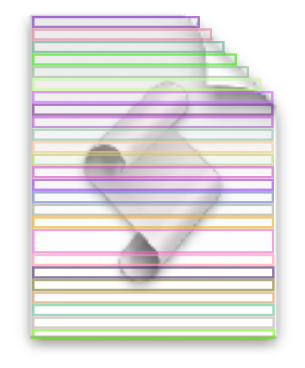
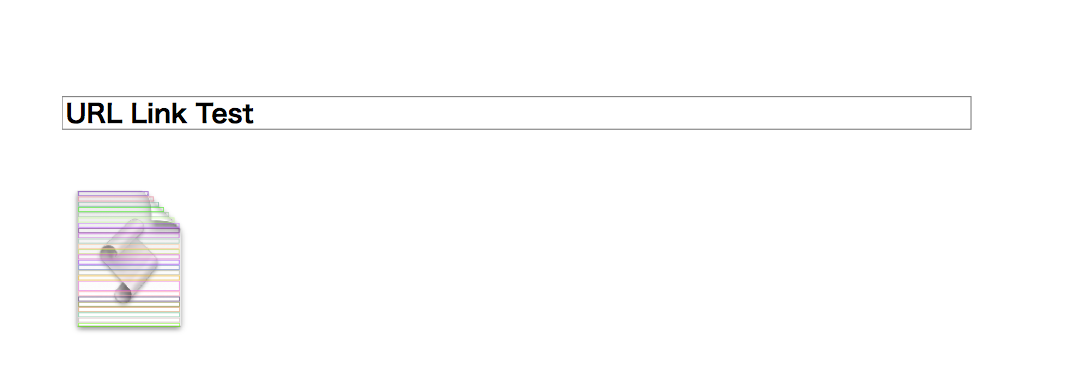
ただ、1つのグラフィックオブジェクトに対してKeynote上でリンクを付与してPDF書き出しすると、Keynoteがオブジェクトの領域を細分化してリンクを作成するようです。文字とグラフィックにリンクを指定しただけなのに、やたらと大量のリンクアノテーションが検出されるので、念のためにチェックしてみたらこんな(↓)感じでした。
AppleScript名:指定PDFの全ページからリンクアノテーションのURLを取得してURLを書きかえる
— Created 2017-06-08 by Takaaki Naganoya
— Modified 2018-03-14 by Takaaki Naganoya
— 2017, 2018 Piyomaru Software
use AppleScript version "2.5"
use scripting additions
use framework "Foundation"
use framework "Quartz"

property |NSURL| : a reference to current application’s |NSURL|
property PDFActionURL : a reference to current application’s PDFActionURL
property PDFDocument : a reference to current application’s PDFDocument
property PDFAnnotationLink : a reference to current application’s PDFAnnotationLink

set aPOSIX to POSIX path of (choose file of type {"com.adobe.pdf"} with prompt "Choose a PDF with Annotation")
set linkList to replaceLinkURLFromPDF(aPOSIX, "http://www.apple.com/jp", "applescript://com.apple.scripteditor?action=new&script=display%20dialog%20%22TEST%22") of me

on replaceLinkURLFromPDF(aPOSIX, origURL, toURL)
  set v2 to system attribute "sys2" –> case: macOS 10.12 =12
  
  
set aURL to (|NSURL|’s fileURLWithPath:aPOSIX)
  
set aPDFdoc to PDFDocument’s alloc()’s initWithURL:aURL
  
set pCount to aPDFdoc’s pageCount()
  
  
–PDFのページ(PDFPage)でループ
  
repeat with ii from 0 to (pCount – 1)
    set tmpPage to (aPDFdoc’s pageAtIndex:ii) –PDFPage
    
    
set anoList to (tmpPage’s annotations()) as list
    
if anoList is not equal to {missing value} then –指定PDF中にAnotationが存在した
      
      
–対象PDFPage内で検出されたAnnotationでループ
      
repeat with i in anoList
        if v2 < 13 then
          set aType to (i’s type()) as string –to macOS Sierra (10.10, 10.11 & 10.12)
        else
          set aType to (i’s |Type|()) as string –macOS High Sierra (10.13) or later
        end if
        
        
–Link Annotationの削除と同様のサイズでLink Annotationの新規作成
        
if aType = "Link" then
          set tmpURL to (i’s |URL|()’s absoluteString()) as string
          
          
if tmpURL = origURL then
            set theBounds to i’s |bounds|() –削除する前にLink Annotationの位置情報を取得
            
–> {origin:{x:78.65625, y:454.7188}, size:{width:96.96875, height:4.0937}}
            
            (
tmpPage’s removeAnnotation:i) –PDFPageから指定のLink Annotationを削除  
            
            
set theLink to (PDFAnnotationLink’s alloc()’s initWithBounds:theBounds)
            
set theAction to (PDFActionURL’s alloc()’s initWithURL:(current application’s |NSURL|’s URLWithString:toURL))
            (
theLink’s setMouseUpAction:theAction)
            (
tmpPage’s addAnnotation:theLink)
            
            
log {ii + 1, theBounds, origURL}
          end if
        end if
      end repeat
    end if
  end repeat
  
  
return (aPDFdoc’s writeToFile:aPOSIX) as boolean
end replaceLinkURLFromPDF

★Click Here to Open This Script 

(Visited 261 times, 1 visits today)
Posted in file PDF URL | Tagged 10.11savvy 10.12savvy 10.13savvy | 1 Comment

1 thoughts on “<span>指定PDFの全ページからリンクアノテーションのURLを取得してURLを書きかえる</span>”

  1. 12/24/18
    6:03 PM
    2018年12月24日
    6:03 PM

    Reply

    2018年に書いた価値あるScript – AppleScriptの穴 says:

    […] ・指定PDFの全ページからリンクアノテーションのURLを取得してURLを書きかえる PDFのリンク書き換えScriptは、えほんシリーズ(Keynoteで作成)のPDFにScript Linkを埋め込むために試作したScript […]

Leave a Reply Cancel reply

Your email address will not be published. Required fields are marked *

You may use these HTML tags and attributes: <a href="" title=""> <abbr title=""> <acronym title=""> <b> <blockquote cite=""> <cite> <code> <del datetime=""> <em> <i> <q cite=""> <s> <strike> <strong>

電子書籍(PDF)をオンラインストアで販売中!

Google Search

Popular posts

  • シンプルな文字置換
  • macOS(Mac OS X/OS X)上のAppleScriptの歴史
  • Apple Creator Studioに含まれるKeynote/Pages/Numbersは新バージョン?
  • 最初期に書かれた書籍「AppleScript道入門」の序文をいま振り返る
  • Claris FileMaker Pro 2025(v22)がリリースされた
  • 指定フォルダ内から指定拡張子のファイルを取得し、エイリアスだったらオリジナルのパスをPOSIX pathで取得
  • MacBook Air/MacBook Proのディスプレイ開閉角度を取得
  • ASCII ART QR Encoder
  • macOS 15.7.2 スクリプトメニューから実行できなくなった地図系ライブラリ?
  • Adobe InDesignのAppleScript実行エンジンがCarbonからCocoaベースに書き換えられる
  • 「AppleScriptセキュリティ実践ガイド」を発売
  • 暗黙のuseコマンド
  • 開始時刻から終了時刻までhh:mm形式の文字列を15分単位でリスト出力
  • 各種GUIアプリ書類のオープン速度を向上するためにUIアニメーションの一時停止を
  • ASCII ARTで円を線で描く
  • Finder上で選択中のHEIC画像から位置情報を削除_v5
  • Keynote->Keynote Creator Studio(以下同様)
  • ASCII ARTで直線を引く v3.1
  • FSFindFolder failed with error=-43
  • 2025年に書いた価値あるAppleScript

Tags

10.11savvy (1101) 10.12savvy (1242) 10.13savvy (1391) 10.14savvy (587) 10.15savvy (440) 11.0savvy (283) 12.0savvy (212) 13.0savvy (204) 14.0savvy (159) 15.0savvy (172) 26.0savvy (51) CotEditor (68) Finder (53) Keynote (123) NSAlert (61) NSArray (51) NSBitmapImageRep (20) NSBundle (20) NSButton (34) NSColor (53) NSDictionary (28) NSFileManager (23) NSFont (21) NSImage (41) NSJSONSerialization (21) NSMutableArray (63) NSMutableDictionary (22) NSPredicate (36) NSRunningApplication (56) NSScreen (30) NSScrollView (22) NSString (119) NSURL (98) NSURLRequest (23) NSUTF8StringEncoding (30) NSView (33) NSWorkspace (20) Numbers (80) Pages (58) Safari (45) Script Editor (27) WKUserContentController (21) WKUserScript (20) WKWebView (23) WKWebViewConfiguration (22)

カテゴリー

  • 2D Bin Packing
  • 3D
  • AirDrop
  • AirPlay
  • Animation
  • Apple Inteligence
  • AppleScript Application on Xcode
  • Beginner
  • Benchmark
  • beta
  • Bluetooth
  • Books
  • boolean
  • bounds
  • Bug
  • Calendar
  • call by reference
  • check sum
  • Clipboard
  • Cocoa-AppleScript Applet
  • Code Sign
  • Color
  • Custom Class
  • date
  • dialog
  • diff
  • drive
  • Droplet
  • exif
  • file
  • File path
  • filter
  • folder
  • Font
  • Font
  • GAME
  • geolocation
  • GUI
  • GUI Scripting
  • Hex
  • History
  • How To
  • iCloud
  • Icon
  • Image
  • Input Method
  • Internet
  • iOS App
  • JavaScript
  • JSON
  • JXA
  • Keychain
  • Keychain
  • Language
  • Library
  • list
  • Locale
  • Localize
  • Machine Learning
  • Map
  • Markdown
  • Menu
  • Metadata
  • MIDI
  • MIME
  • Natural Language Processing
  • Network
  • news
  • Newt On Project
  • NFC
  • Noification
  • Notarization
  • Number
  • Object control
  • OCR
  • OSA
  • parallel processing
  • PDF
  • Peripheral
  • process
  • PRODUCTS
  • QR Code
  • Raw AppleEvent Code
  • Record
  • rectangle
  • recursive call
  • regexp
  • Release
  • Remote Control
  • Require Control-Command-R to run
  • REST API
  • Review
  • RTF
  • Sandbox
  • Screen Saver
  • Script Libraries
  • Scripting Additions
  • sdef
  • search
  • Security
  • selection
  • shell script
  • Shortcuts Workflow
  • Sort
  • Sound
  • Spaces
  • Spellchecker
  • Spotlight
  • SVG
  • Swift
  • System
  • Tag
  • Telephony
  • Text
  • Text to Speech
  • timezone
  • Tools
  • Update
  • URL
  • UTI
  • Web Contents Control
  • WiFi
  • XML
  • XML-RPC
  • イベント(Event)
  • 未分類

アーカイブ

  • 2026年8月
  • 2026年7月
  • 2026年6月
  • 2026年5月
  • 2026年3月
  • 2026年2月
  • 2026年1月
  • 2025年12月
  • 2025年11月
  • 2025年10月
  • 2025年9月
  • 2025年8月
  • 2025年7月
  • 2025年6月
  • 2025年5月
  • 2025年4月
  • 2025年3月
  • 2025年2月
  • 2025年1月
  • 2024年12月
  • 2024年11月
  • 2024年10月
  • 2024年9月
  • 2024年8月
  • 2024年7月
  • 2024年6月
  • 2024年5月
  • 2024年4月
  • 2024年3月
  • 2024年2月
  • 2024年1月
  • 2023年12月
  • 2023年11月
  • 2023年10月
  • 2023年9月
  • 2023年8月
  • 2023年7月
  • 2023年6月
  • 2023年5月
  • 2023年4月
  • 2023年3月
  • 2023年2月
  • 2023年1月
  • 2022年12月
  • 2022年11月
  • 2022年10月
  • 2022年9月
  • 2022年8月
  • 2022年7月
  • 2022年6月
  • 2022年5月
  • 2022年4月
  • 2022年3月
  • 2022年2月
  • 2022年1月
  • 2021年12月
  • 2021年11月
  • 2021年10月
  • 2021年9月
  • 2021年8月
  • 2021年7月
  • 2021年6月
  • 2021年5月
  • 2021年4月
  • 2021年3月
  • 2021年2月
  • 2021年1月
  • 2020年12月
  • 2020年11月
  • 2020年10月
  • 2020年9月
  • 2020年8月
  • 2020年7月
  • 2020年6月
  • 2020年5月
  • 2020年4月
  • 2020年3月
  • 2020年2月
  • 2020年1月
  • 2019年12月
  • 2019年11月
  • 2019年10月
  • 2019年9月
  • 2019年8月
  • 2019年7月
  • 2019年6月
  • 2019年5月
  • 2019年4月
  • 2019年3月
  • 2019年2月
  • 2019年1月
  • 2018年12月
  • 2018年11月
  • 2018年10月
  • 2018年9月
  • 2018年8月
  • 2018年7月
  • 2018年6月
  • 2018年5月
  • 2018年4月
  • 2018年3月
  • 2018年2月

https://piyomarusoft.booth.pm/items/301502

メタ情報

  • ログイン
  • 投稿フィード
  • コメントフィード
  • WordPress.org

Forum Posts

  • 人気のトピック
  • 返信がないトピック

メタ情報

  • ログイン
  • 投稿フィード
  • コメントフィード
  • WordPress.org
Proudly powered by WordPress
Theme: Flint by Star Verte LLC