



Menu

Skip to content
AppleScriptの穴
  • Home
  • Products
  • Books
  • Docs
  • Events
  • Forum
  • About This Blog
  • License
  • 仕事依頼

AppleScriptの穴

Useful & Practical AppleScript archive. Click '★Click Here to Open This Script' Link to download each AppleScript

ASCII ART QR Encoder

Posted on 12月 31 by Takaaki Naganoya

指定のデータをASCII ARTで表現されたQRコードのテキストに変換するAppleScriptです。もともと、QR Code画像の作成は普通にできているので、あえてASCII ARTで作成する必要はないのですが、思いつきで作って(作らせて)みました。

この手の「作ってみるほどの価値はないが、冗談半分で作ってみる」のに人間のパワーを割くのは得策ではありません。ChatGPTに作らせてみました(2回ほど動かないコードが出てきましたが)。

作ったあとで他の作例がないか確認してみたところ、Terminal上でQRコードを表示するのに利用している例が見当たりました。
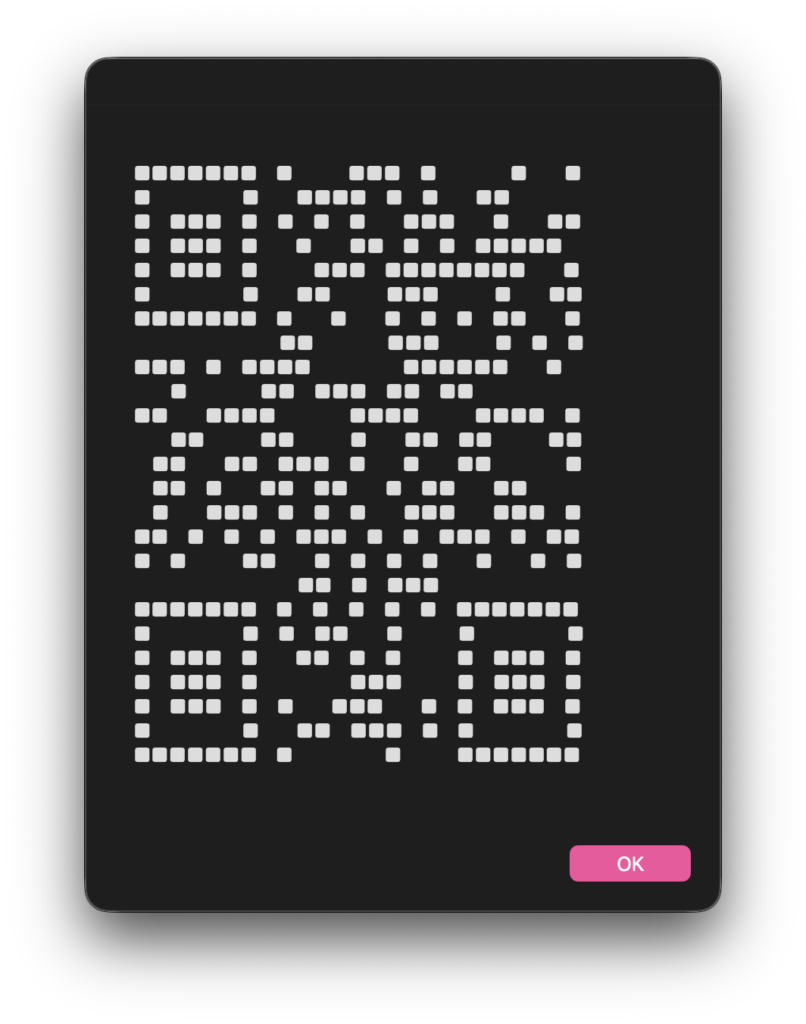
このASCII ART QR CodeのダイアログをiPhone内蔵カメラで認識させてみたところ、問題なく認識できました。

AppleScript名:ASCII ART QR Encoderscptd.scptd
—
–  Created by: Takaaki Naganoya
–  Created on: 2025/12/31
—
–  Copyright © 2025 Piyomaru Software, All Rights Reserved
—

use AppleScript
use framework "Foundation"
use framework "CoreImage"
use framework "AppKit"
use scripting additions

set testString to "http://piyocast.com/as/"
set asciiQR to makeAsciiQRCode(testString)

display dialog asciiQR buttons {"OK"} default button "OK"

— ASCII ART QR Encoder
on makeAsciiQRCode(theText)
  — 1. 文字列 → NSData
  
set textData to current application’s NSString’s stringWithString:theText
  
set dataObj to textData’s dataUsingEncoding:(current application’s NSUTF8StringEncoding)
  
  
— 2. QR生成
  
set qrFilter to current application’s CIFilter’s filterWithName:"CIQRCodeGenerator"
  
qrFilter’s setDefaults()
  
qrFilter’s setValue:dataObj forKey:"inputMessage"
  
qrFilter’s setValue:"M" forKey:"inputCorrectionLevel"
  
  
set ciImage to qrFilter’s outputImage()
  
  
— 3. CIImage → NSBitmapImageRep
  
set bitmapRep to current application’s NSBitmapImageRep’s alloc()’s initWithCIImage:ciImage
  
  
— サイズ取得
  
set pixelsWide to bitmapRep’s pixelsWide()
  
set pixelsHigh to bitmapRep’s pixelsHigh()
  
  
set resultText to ""
  
  
— 4. ピクセル走査
  
repeat with y from (pixelsHigh – 1) to 0 by -1
    set lineText to ""
    
repeat with x from 0 to (pixelsWide – 1)
      set pixelColor to (bitmapRep’s colorAtX:x y:y)
      
set grayColor to (pixelColor’s colorUsingColorSpaceName:(current application’s NSCalibratedWhiteColorSpace))
      
set brightness to grayColor’s whiteComponent()
      
      
if brightness < 0.5 then
        set lineText to lineText & "■"
      else
        set lineText to lineText & " " — 全角スペース
      end if
    end repeat
    
set resultText to resultText & lineText & linefeed
  end repeat
  
  
return resultText
end makeAsciiQRCode

★Click Here to Open This Script 

(Visited 6 times, 6 visits today)
Posted in Image | Tagged 15.0savvy 26.0savvy | Leave a comment

Leave a Reply Cancel reply

Your email address will not be published. Required fields are marked *

You may use these HTML tags and attributes: <a href="" title=""> <abbr title=""> <acronym title=""> <b> <blockquote cite=""> <cite> <code> <del datetime=""> <em> <i> <q cite=""> <s> <strike> <strong>

電子書籍(PDF)をオンラインストアで販売中!

Google Search

Popular posts

  • macOS 26, Tahoe
  • Script Debuggerの開発と販売が2025年に終了
  • 【続報】macOS 15.5で特定ファイル名パターンのfileをaliasにcastすると100%クラッシュするバグ
  • NSObjectのクラス名を取得 v2.1
  • 2024年に書いた価値あるAppleScript
  • Xcode上のAppleScriptObjCのプログラムから、Xcodeのログ欄へのメッセージ出力を実行
  • AppleScript Dropletのバグっぽい動作が「復活」(macOS 15.5β)
  • macOS 26, 15.5でShortcuts.app「AppleScriptを実行」アクションのバグが修正される
  • Script Debuggerがフリーダウンロードで提供されることに
  • 指定フォルダ以下の画像のMD5チェックサムを求めて、重複しているものをピックアップ
  • Dock Menu
  • 執筆中:AppleScript最新リファレンスver2.8対応(macOS 15対応アップデート)
  • macOS 15.5beta5(24F74)でaliasのキャスティングバグが修正された???
  • Claris FileMaker Pro 2025(v22)がリリースされた
  • 複数の重複検出ルーチンを順次速度計測
  • Cocoa-AppleScript AppletがRosettaオンで動いた!
  • シンプルな文字置換
  • Excel 指定範囲のセルの上に画像を配置
  • Applicationのactivateを記録する v2
  • Numbersで選択範囲のdateの年を+1する

Tags

10.11savvy (1101) 10.12savvy (1242) 10.13savvy (1391) 10.14savvy (587) 10.15savvy (438) 11.0savvy (283) 12.0savvy (212) 13.0savvy (204) 14.0savvy (159) 15.0savvy (162) 26.0savvy (29) CotEditor (67) Finder (53) Keynote (120) NSAlert (61) NSArray (51) NSBitmapImageRep (20) NSBundle (20) NSButton (34) NSColor (53) NSDictionary (28) NSFileManager (23) NSFont (21) NSImage (41) NSJSONSerialization (21) NSMutableArray (63) NSMutableDictionary (22) NSPredicate (36) NSRunningApplication (56) NSScreen (30) NSScrollView (22) NSString (119) NSURL (98) NSURLRequest (23) NSUTF8StringEncoding (30) NSView (33) NSWorkspace (20) Numbers (76) Pages (56) Safari (44) Script Editor (27) WKUserContentController (21) WKUserScript (20) WKWebView (23) WKWebViewConfiguration (22)

カテゴリー

  • 2D Bin Packing
  • 3D
  • AirDrop
  • AirPlay
  • Animation
  • AppleScript Application on Xcode
  • Beginner
  • Benchmark
  • beta
  • Bluetooth
  • Books
  • boolean
  • bounds
  • Bug
  • Calendar
  • call by reference
  • check sum
  • Clipboard
  • Cocoa-AppleScript Applet
  • Code Sign
  • Color
  • Custom Class
  • date
  • dialog
  • diff
  • drive
  • Droplet
  • exif
  • file
  • File path
  • filter
  • folder
  • Font
  • Font
  • GAME
  • geolocation
  • GUI
  • GUI Scripting
  • Hex
  • History
  • How To
  • iCloud
  • Icon
  • Image
  • Input Method
  • Internet
  • iOS App
  • JavaScript
  • JSON
  • JXA
  • Keychain
  • Keychain
  • Language
  • Library
  • list
  • Locale
  • Localize
  • Machine Learning
  • Map
  • Markdown
  • Menu
  • Metadata
  • MIDI
  • MIME
  • Natural Language Processing
  • Network
  • news
  • Newt On Project
  • Noification
  • Notarization
  • Number
  • Object control
  • OCR
  • OSA
  • parallel processing
  • PDF
  • Peripheral
  • process
  • PRODUCTS
  • QR Code
  • Raw AppleEvent Code
  • Record
  • rectangle
  • recursive call
  • regexp
  • Release
  • Remote Control
  • Require Control-Command-R to run
  • REST API
  • Review
  • RTF
  • Sandbox
  • Screen Saver
  • Script Libraries
  • Scripting Additions
  • sdef
  • search
  • Security
  • selection
  • shell script
  • Shortcuts Workflow
  • Sort
  • Sound
  • Spellchecker
  • Spotlight
  • SVG
  • System
  • Tag
  • Telephony
  • Text
  • Text to Speech
  • timezone
  • Tools
  • Update
  • URL
  • UTI
  • Web Contents Control
  • WiFi
  • XML
  • XML-RPC
  • イベント(Event)
  • 未分類

アーカイブ

  • 2025年12月
  • 2025年11月
  • 2025年10月
  • 2025年9月
  • 2025年8月
  • 2025年7月
  • 2025年6月
  • 2025年5月
  • 2025年4月
  • 2025年3月
  • 2025年2月
  • 2025年1月
  • 2024年12月
  • 2024年11月
  • 2024年10月
  • 2024年9月
  • 2024年8月
  • 2024年7月
  • 2024年6月
  • 2024年5月
  • 2024年4月
  • 2024年3月
  • 2024年2月
  • 2024年1月
  • 2023年12月
  • 2023年11月
  • 2023年10月
  • 2023年9月
  • 2023年8月
  • 2023年7月
  • 2023年6月
  • 2023年5月
  • 2023年4月
  • 2023年3月
  • 2023年2月
  • 2023年1月
  • 2022年12月
  • 2022年11月
  • 2022年10月
  • 2022年9月
  • 2022年8月
  • 2022年7月
  • 2022年6月
  • 2022年5月
  • 2022年4月
  • 2022年3月
  • 2022年2月
  • 2022年1月
  • 2021年12月
  • 2021年11月
  • 2021年10月
  • 2021年9月
  • 2021年8月
  • 2021年7月
  • 2021年6月
  • 2021年5月
  • 2021年4月
  • 2021年3月
  • 2021年2月
  • 2021年1月
  • 2020年12月
  • 2020年11月
  • 2020年10月
  • 2020年9月
  • 2020年8月
  • 2020年7月
  • 2020年6月
  • 2020年5月
  • 2020年4月
  • 2020年3月
  • 2020年2月
  • 2020年1月
  • 2019年12月
  • 2019年11月
  • 2019年10月
  • 2019年9月
  • 2019年8月
  • 2019年7月
  • 2019年6月
  • 2019年5月
  • 2019年4月
  • 2019年3月
  • 2019年2月
  • 2019年1月
  • 2018年12月
  • 2018年11月
  • 2018年10月
  • 2018年9月
  • 2018年8月
  • 2018年7月
  • 2018年6月
  • 2018年5月
  • 2018年4月
  • 2018年3月
  • 2018年2月

https://piyomarusoft.booth.pm/items/301502

メタ情報

  • ログイン
  • 投稿フィード
  • コメントフィード
  • WordPress.org

Forum Posts

  • 人気のトピック
  • 返信がないトピック

メタ情報

  • ログイン
  • 投稿フィード
  • コメントフィード
  • WordPress.org
Proudly powered by WordPress
Theme: Flint by Star Verte LLC