

関数演算ライブラリ「calcLibAS」は、自分がフリー配布しているAppleScript用の関数演算ライブラリです。JavaScriptCore経由で関数を呼び出すという、ひじょうにシンプルな原理で動作しています。
このcalcLibASを呼び出した一部のユーザーから「演算を行うとエラーになる」といった報告が行われており、不思議に思っておりました。
「こんなにシンプルなのに、どうやったらエラーになるのか?」
いろいろ調べてみたら、発生源が見えてきたような気がします。
小数点にカンマを利用している言語(国)がある
通常、こうした広域にバラまくライブラリを作ったら、日本語環境と英語環境で動作検証します。macOSの開発時のデフォルトの言語は英語なので、英語環境で動作確認を行うのは普通です。
小数点を含む数値を表記するのに、小数点を「.」(ピリオド)で表記するのが日本語のルールですし、英語(米国)でもそうです。
ところが、いろいろ調べてみたら、小数点を「,」(カンマ)で表記する言語があるとかで……実際にプログラムを組んで、macOSがサポートしているlocaleごとに数値フォーマットを調べ、SVGベースの世界地図にプロットしてみました。
# この世界地図を塗り分けしてダイアログ表示する処理はけっこう汎用性がありそうなので、ライブラリとして提供することを検討しています。ライブラリというよりは、display worldmap scriptingみたいな、不可視プロセスの補助アプリになりそうですが
→ 「display world map」の実行に、HTMLReader.frameworkを使わなくても大丈夫なように変更しました。同ライブラリの実行にScript Debugerはもう必要ありません。
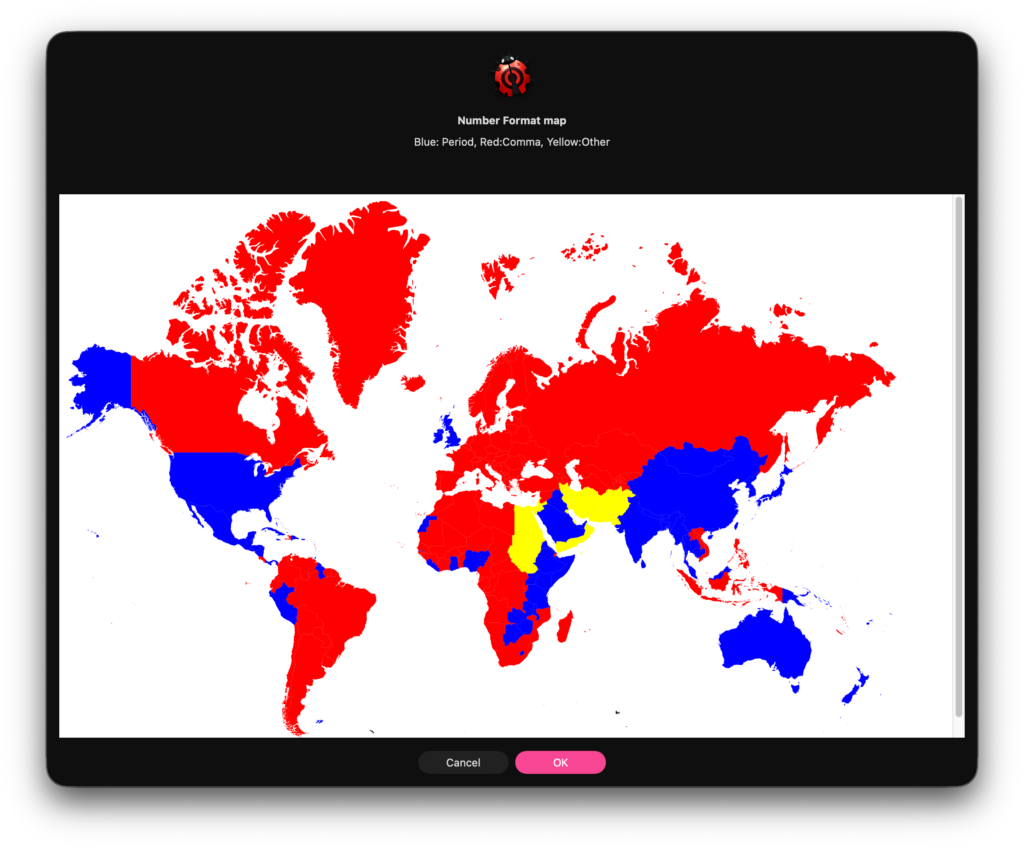
国単位でみると、小数点=ピリオドで表記するところは少数派で(でも、人口ベースで見ると少なくなさそう)、とくにヨーロッパ圏で英国以外がみんな「,」を使用しているのは衝撃でした。
ヨーロッパ系の数値表記をしている国で、小数点以下を含む数値を文字列で渡してきたらどうなる?
他の関数演算ライブラリを見たときに、パラメータをas realではなくas {integer, real}でcastしている様子が目に止まりました。
これは処理としてはおかしいのですが、どうもこの小数点以下を含む数値が、しかも文字列で指定された場合には、こういう予防措置を講じておくと、誤った演算を行わないのかもしれません。
ただ、演算内容自体はおかしくなるはず(小数点以下を含んだ数値を、文字列で渡すと小数点以下が無視される?)です。
仕方がないので、関数演算ライブラリ側でパラメータとして数値でも文字列でも受け取るようにしておいて、数値文字列を受け取った場合には、ヨーロッパ系の数値表現(小数点をカンマで記述する)を、米英風の小数点をピリオドで記述する表現に変換する処理を通すのがいいんでしょう(ChatGPTに書かせたので、自分のプログラムとはテイストが違うものの、こんな●●な処理にテイストも●●もないでしょう)。
世界は、まだ広かった……。
| AppleScript名:locNumFormatCalc_v2.scptd |
| — – Created by: Takaaki Naganoya – Created on: 2026/01/08 (Modified: 2026/01/09) — – Copyright © 2026 Piyomaru Software, All Rights Reserved — use AppleScript version "2.4" use scripting additions use framework "Foundation" property NSLocale : a reference to current application’s NSLocale property NSNumberFormatter : a reference to current application’s NSNumberFormatter property NSMutableArray : a reference to current application’s NSMutableArray property NSSortDescriptor : a reference to current application’s NSSortDescriptor set nRes to getLocaleNumFormat() of me –> {{|color|:"Red", cc:"001"}, {|color|:"Red", cc:"003"}, {|color|:"Blue", cc:"150"}, {|color|:"Blue", cc:"419"}, {|color|:"Red", cc:"AD"}, {|color|:"Blue", cc:"AE"}, {|color|:"Yellow", cc:"AF"}, {|color|:"Blue", cc:"AG"}, {|color|:"Blue", cc:"AI"}, {|color|:"Red", cc:"AL"}, {|color|:"Red", cc:"AM"}, {|color|:"Red", cc:"AO"}, {|color|:"Red", cc:"AR"}, {|color|:"Blue", cc:"AS"}, {|color|:"Red", cc:"AT"}, {|color|:"Blue", cc:"AU"}…} on getLocaleNumFormat() — 1. データの収集 set allId to NSLocale’s availableLocaleIdentifiers() set countryDataList to {} — 最終的な国別データ(レコードのリスト) repeat with ident in allId set aLocale to (NSLocale’s alloc()’s initWithLocaleIdentifier:ident) set countryCode to (aLocale’s objectForKey:(current application’s NSLocaleCountryCode)) as string if countryCode is not "missing value" and countryCode is not "" then set formatter to NSNumberFormatter’s alloc()’s init() (formatter’s setLocale:aLocale) set decimalSeparator to formatter’s decimalSeparator() as string — 色の判定 set col to "Yellow" if decimalSeparator is "." then set col to "Blue" else if decimalSeparator is "," then set col to "Red" end if — 既存データの上書きロジック set foundIndex to -1 repeat with i from 1 to count of countryDataList if cc of item i of countryDataList is countryCode then set foundIndex to i exit repeat end if end repeat if foundIndex is not -1 then — 既にデータがある場合、新しい色が「赤」なら上書きする if col is "red" then set item foundIndex of countryDataList to {cc:countryCode, |color|:col} — それ以外の場合は何もしない(最初に見つかった色を維持) end if else — 新しい国コードの場合はそのまま追加 set end of countryDataList to {cc:countryCode, |color|:col} end if end if end repeat — 2. 国コード順にソート(Cocoaの機能を利用) set nsList to NSMutableArray’s arrayWithArray:countryDataList set sortDesc to NSSortDescriptor’s sortDescriptorWithKey:"cc" ascending:true nsList’s sortUsingDescriptors:{sortDesc} return nsList as list end getLocaleNumFormat |
| AppleScript名:ヨーロッパ数値文字列形式をISO形式に変換する.scpt |
| — – Created by: Takaaki Naganoya – Created on: 2026/01/09 — – Copyright © 2026 Piyomaru Software, All Rights Reserved — set raw1 to "2,5" set raw2 to "1.234,56" set raw3 to "1234.5" — ISO形式でもOK set n1 to normalizeNumberString(raw1) — "2.5" set n2 to normalizeNumberString(raw2) — "1234.56" set n3 to normalizeNumberString(raw3) — "1234.5" log (n1 as number) log (n2 as number) log (n3 as number) — 数値文字列を強制的に「.」小数点に直して返す on normalizeNumberString(txt) — まず前後の空白・改行を削る(純AppleScript) set t to trimText(txt) — 「1.234,56」系: "." を千区切りとみなして除去 repeat while t contains "." set AppleScript’s text item delimiters to "." set t to text items of t set AppleScript’s text item delimiters to "" set t to t as text end repeat — 「,」を小数点として「.」に統一 set AppleScript’s text item delimiters to "," set toks to text items of t set AppleScript’s text item delimiters to "." set t to toks as text set AppleScript’s text item delimiters to "" return t end normalizeNumberString — 前後空白を除去(AppleScript標準のみ) on trimText(txt) set AppleScript’s text item delimiters to {space, return, linefeed, tab} set theText to txt as text — remove leading repeat while theText starts with space or theText starts with tab or theText starts with return or theText starts with linefeed set theText to text 2 thru -1 of theText end repeat — remove trailing repeat while theText ends with space or theText ends with tab or theText ends with return or theText ends with linefeed set theText to text 1 thru -2 of theText end repeat return theText end trimText |