
| AppleScript名:AirServer出力を停止する |
| tell application "AirServer" stop broadcast end tell |

| AppleScript名:AirServer出力を停止する |
| tell application "AirServer" stop broadcast end tell |
| AppleScript名:指定フォルダ以下のテキストファイルのファイル名冒頭についている数字から欠番を求める |
| — Created 2017-09-04 by Takaaki Naganoya — 2017 Piyomaru Software use AppleScript version "2.4" use framework "Foundation" use scripting additions use mdLib : script "Metadata Lib" version "1.0.0" –https://www.macosxautomation.com/applescript/apps/Script_Libs.html#Metadata_Lib use bPlus : script "BridgePlus" –https://www.macosxautomation.com/applescript/apps/BridgePlus.html property NSString : a reference to current application’s NSString property SMSForder : a reference to current application’s SMSForder property NSIndexSet : a reference to current application’s NSIndexSet property NSMutableSet : a reference to current application’s NSMutableSet property NSMutableArray : a reference to current application’s NSMutableArray property NSRegularExpression : a reference to current application’s NSRegularExpression property NSRegularExpressionAnchorsMatchLines : a reference to current application’s NSRegularExpressionAnchorsMatchLines property NSRegularExpressionDotMatchesLineSeparators : a reference to current application’s NSRegularExpressionDotMatchesLineSeparators load framework –BridgePlus’s force framework loading command –選択したフォルダ以下のPlain TextをすべてSpotlightで求める(POSIX path list) set theFolder to (choose folder) set a1Dat to current application’s NSDate’s timeIntervalSinceReferenceDate() set aRes to retMissingNumberFromEachFiles(theFolder, {"public.plain-text"}) of me –> {} set b1Dat to current application’s NSDate’s timeIntervalSinceReferenceDate() set c1Dat to b1Dat – a1Dat on retMissingNumberFromEachFiles(theFolder, fileTypeList) set theFiles to mdLib’s searchFolders:{theFolder} searchString:"kMDItemContentType IN[c] %@" searchArgs:fileTypeList if theFiles = {} then return –取得したPOSIX Pathのリストからファイル名の部分のみ抽出 set anArray to NSMutableArray’s arrayWithArray:theFiles set bArray to (anArray’s valueForKeyPath:"lastPathComponent") as list –各ファイルの名称の冒頭から1~3桁 の数字を取り出して、全角–>半角変換を行いつつリストに追加 set nArray to NSMutableArray’s new() repeat with i in bArray set j to contents of i set aRes to (my findPattern:"^\\d{1,3}" inString:j) if aRes is not equal to {} then set jj to (contents of first item of aRes) as string set jj2 to (SMSForder’s transformedFrom:jj ICUTransform:"Fullwidth-Halfwidth" inverse:false) as integer (nArray’s addObject:jj2) end if end repeat –最大値、最小値をもとに連番リストを作成し、ファイル名から得られた配列データとの補集合を求める set maxRes to (nArray’s valueForKeyPath:"@max.self")’s intValue() set minRes to (nArray’s valueForKeyPath:"@min.self")’s intValue() –最小値から最大値までの連番リスト作成 set theIndexSet to NSIndexSet’s indexSetWithIndexesInRange:{minRes, maxRes} set theList to (SMSForder’s arrayWithIndexSet:theIndexSet) as list set aSet to NSMutableSet’s setWithArray:theList set bSet to NSMutableSet’s setWithArray:nArray aSet’s minusSet:bSet –補集合 return (aSet’s allObjects() as list) end retMissingNumberFromEachFiles on findPattern:thePattern inString:theString set theOptions to ((NSRegularExpressionDotMatchesLineSeparators) as integer) + ((NSRegularExpressionAnchorsMatchLines) as integer) set theRegEx to NSRegularExpression’s regularExpressionWithPattern:thePattern options:theOptions |error|:(missing value) set theFinds to theRegEx’s matchesInString:theString options:0 range:{location:0, |length|:length of theString} set theFinds to theFinds as list set theResult to {} set theNSString to NSString’s stringWithString:theString repeat with i in theFinds set theRange to (contents of i)’s range() set end of theResult to (theNSString’s substringWithRange:theRange) as string end repeat return theResult end findPattern:inString: |
| AppleScript名:指定フォルダ以下の指定形式の書類をすべて もとめて拡張子をはずしたファ イル名に重複がないかチェック v2 |
| — Created 2017-10-28 by Takaaki Naganoya — 2017 Piyomaru Software use AppleScript version "2.4" use scripting additions use framework "Foundation" use mdLib : script "Metadata Lib" version "1.0.0" –https://www.macosxautomation.com/applescript/apps/Script_Libs.html#Metadata_Lib set docUTIList to {"net.daringfireball.markdown", "com.apple.iwork.pages.sffpages"} set origFol to (choose folder) set dRes to detectDocNameDuplicateWithoutExt(origFol, docUTIList) of me –> true / false –origFolはaliasでもPOSIX pathでも可 on detectDocNameDuplicateWithoutExt(origFol, docTypeList as list) script spdMD property allResList : {} end script set (allResList of spdMD) to {} repeat with i in docTypeList set j to contents of i set aResList to (mdLib’s searchFolders:{origFol} searchString:("kMDItemContentTypeTree CONTAINS %@") searchArgs:{j}) if aResList = missing value or aResList = {} then –Hitしなかった else set (allResList of spdMD) to (allResList of spdMD) & aResList end if end repeat set aLen to length of contents of (allResList of spdMD) if aLen = 0 then error "No match" set anArray to current application’s NSArray’s arrayWithArray:(allResList of spdMD) set aRes to anArray’s valueForKeyPath:"lastPathComponent.stringByDeletingPathExtension" set b1Res to uniquify1DList(aRes as list, true) of me set b1Len to length of b1Res if aLen = b1Len then return true — No Duplicates else return false –Some duplicates end if end detectDocNameDuplicateWithoutExt –1D/2D Listをユニーク化 on uniquify1DList(theList as list, aBool as boolean) set aArray to current application’s NSArray’s arrayWithArray:theList set bArray to aArray’s valueForKeyPath:"@distinctUnionOfObjects.self" return bArray as list end uniquify1DList |
| AppleScript名:指定フォルダ以下の指定形式の書類をすべてもとめてファイル名に重複がないかチェック |
| — Created 2017-10-28 by Takaaki Naganoya — 2017 Piyomaru Software use AppleScript version "2.4" use scripting additions use framework "Foundation" use mdLib : script "Metadata Lib" version "1.0.0" set origFol to POSIX path of (choose folder) set aResList to mdLib’s searchFolders:{origFol} searchString:("kMDItemContentTypeTree CONTAINS %@ || kMDItemContentTypeTree CONTAINS %@") searchArgs:{"net.daringfireball.markdown", "com.apple.iwork.pages.sffpages"} if aResList = missing value or aResList = {} then return false end if set anArray to current application’s NSArray’s arrayWithArray:aResList set aRes to anArray’s valueForKeyPath:"lastPathComponent" set bLen to length of (aRes as list) set b1Res to uniquify1DList(aRes as list, true) of me set b1Len to length of b1Res if bLen = b1Len then display dialog "No Duplicates" else display dialog "Some Duplicates" end if on getSameItemsInLists(aList as list, bList as list) –ASオブジェクトをCocoaオブジェクトに変換 set aArray to current application’s NSArray’s arrayWithArray:aList set bArray to current application’s NSArray’s arrayWithArray:bList — まとめる set allSet to current application’s NSMutableSet’s setWithArray:aArray allSet’s addObjectsFromArray:bArray –重複する要素のみ抜き出す set duplicateSet to current application’s NSMutableSet’s setWithArray:aArray duplicateSet’s intersectSet:(current application’s NSSet’s setWithArray:bArray) –重複部分だけを返す set resArray to duplicateSet’s allObjects() set resList to resArray as list return resList end getSameItemsInLists –1D/2D Listをユニーク化 on uniquify1DList(theList as list, aBool as boolean) set aArray to current application’s NSArray’s arrayWithArray:theList set bArray to aArray’s valueForKeyPath:"@distinctUnionOfObjects.self" return bArray as list end uniquify1DList |
| AppleScript名:Vanilla Scriptで指定ファイルのUTIを求める |
| set aFile to choose file
tell application "System Events" set aUTI to type identifier of aFile return aUTI end tell |
| AppleScript名:指定ファイルのUTIを取得 |
| — Created 2016-10-24 by Takaaki Naganoya — Modified 2016-10-25 by Shane Stanley — 2016 Piyomaru Software use AppleScript version "2.4" use scripting additions use framework "Foundation" use BridgePlus : script "BridgePlus" –https://www.macosxautomation.com/applescript/apps/BridgePlus.html set aFile to POSIX path of (choose file) set aUTI to retFileFormatUTIFromPath(aFile) of me on retFileFormatUTIFromPath(aPOSIXpath as string) load framework set aPath to current application’s NSString’s stringWithString:aPOSIXpath set aExt to (aPath’s pathExtension()) as string return (current application’s SMSForder’s UTIForExtension:aExt) as list of string or string –as anything end retFileFormatUTIFromPath |
| AppleScript名:指定ファイルのUTIを取得 v2.scptd |
| use AppleScript version "2.5" — El Capitan (10.11) or later use framework "Foundation" use scripting additions property |NSURL| : a reference to current application’s |NSURL| property NSURLTypeIdentifierKey : a reference to current application’s NSURLTypeIdentifierKey set aPath to POSIX path of (choose file) set utiRes to retUTIfromPath(aPath) of me on retUTIfromPath(aPOSIXPath) set aURL to |NSURL|’s fileURLWithPath:aPOSIXPath set {theResult, theValue} to aURL’s getResourceValue:(reference) forKey:NSURLTypeIdentifierKey |error|:(missing value) if theResult = true then return theValue as string else return theResult end if end retUTIfromPath |
| AppleScript名:GHKitのじっけん |
| — Created 2016-04-12 by Takaaki Naganoya — 2016 Piyomaru Software use AppleScript version "2.4" use scripting additions use framework "Foundation" use framework "GHKit" –https://github.com/gabriel/GHKit –AppleScriptObjC uses "_" as special character (equivalent to ":" in method names). So, I changed them in whole project. – Original Method Name: gh_parseISO8601: – Converted Method Name: GHparseISO8601: set aStr to current application’s NSString’s stringWithString:"Sun, 06 Nov 1994 08:49:37 +0000" set aDate to (current application’s NSDate’s GHparseRFC822:aStr) as date –> date "1994年11月6日日曜日 17:49:37" set bStr to current application’s NSString’s stringWithString:"1997-07-16T19:20:30.045Z" set bDate to (current application’s NSDate’s GHparseISO8601:bStr) as date –> date "1997年7月17日木曜日 4:20:30" set cDateStr to bDate’s GHformatHTTP() –> (NSString) "Wed, 16 Jul 1997 19:20:30 GMT" set dDate to current application’s NSDate’s GHparseTimeSinceEpoch:(1.23456789E+9) –> (NSDate) 2009-02-13 23:31:30 +0000 set eDate to current application’s NSDate’s |date|() eDate’s GHisToday() as boolean –> true —–GHyesterday() cause error.. set fDate to eDate’s GHaddDays:-1 fDate’s GHwasYesterday() as boolean –> true set ffRes to ((fDate’s GHtimeAgo:false)’s |description|()) as string –> "1 day" set anArray to current application’s NSArray’s arrayWithArray:{1, 1, 3} set cArray to anArray’s GHuniq() as list –> {1, 3} set aDic to current application’s NSDictionary’s dictionaryWithDictionary:{key1:2, key2:3.1, key3:true} set aJSONstr to (aDic’s GHtoJSON:(current application’s NSJSONWritingPrettyPrinted) |error|:(missing value)) as string (* –> (NSString) "{\n "key1" : 2,\n "key3" : true,\n "key2" : 3.1\n}" *) ( current application’s NSString’s GHisBlank:" ") as boolean–> true ( current application’s NSString’s GHisBlank:(missing value)) as boolean–> true set aStr to current application’s NSString’s stringWithString:" some text " set a1Str to (aStr’s GHstrip()) as string –> "some text" set a2Str to (aStr’s GHpresent()) as string –> " some text " set a3Str to aStr’s GHreverse() –> " txet emos " set a4Str to aStr’s GHcount:"e" –> 2 |
| AppleScript名:Absolute Timeを取得 |
| — Created 2016-07-12 by Takaaki Naganoya — 2016 Piyomaru Software use AppleScript version "2.4" use scripting additions use framework "Foundation" –タイムスタンプ取得(Jan 1 2001 00:00:00 GMTからの相対秒、Absolute Timeで取得) set aTime to current application’s NSString’s stringWithFormat_("%@", current application’s CFAbsoluteTimeGetCurrent()) as string –> "490022703.57607" |
NSDataDetectorを用いて、自然言語テキスト(ここでは日本語のテキスト)から日付の情報を抽出するAppleScriptです。
| AppleScript名:自然言語テキストから日付を抽出 |
| — Created 2015-10-08 by Takaaki Naganoya — 2015 Piyomaru Software use AppleScript version "2.5" use framework "Foundation" use scripting additions set theDate to my getDatesIn:"本テキストには次の火曜日という日付情報を含んでいる。" log theDate –> date "2015年10月13日火曜日 12:00:00" set theDate to my getDatesIn:"本テキストには今度の土曜日という日付情報を含んでいる。" log theDate –> date "2015年10月10日土曜日 12:00:00" set theDate to my getDatesIn:"昨日うな重を食べた。" log theDate –> date "2015年10月7日水曜日 12:00:00" –set theDate to my getDatesIn:"一昨日何を食べたか覚えていない。" –> error number -2700 No date found –set theDate to my getDatesIn:"The day after tommorow." –set theDate to my getDatesIn:"相対日付の認識能力は低い。明後日はいつだ?" –> error number -2700 No date found –set theDate to my getDatesIn:"本テキストには元旦という日付情報を含んでいる。" –This means 1/1 in next year –> error number -2700 No date found on getDatesIn:aString set anNSString to current application’s NSString’s stringWithString:aString set theDetector to current application’s NSDataDetector’s dataDetectorWithTypes:(current application’s NSTextCheckingTypeDate) |error|:(missing value) set theMatch to theDetector’s firstMatchInString:anNSString options:0 range:{0, anNSString’s |length|()} if theMatch = missing value then error "No date found with String:" & aString set theDate to theMatch’s |date|() return theDate as date end getDatesIn: |
| AppleScript名:GMTとの時差を求める |
| set tDIff to (time to GMT) / 3600 –> 9.0 |
| AppleScript名:UTCTime StringとNSDateの相互変換 |
| — Created 2015-02-24 by Shane Stanley — Changed 2015-02-25 By Takaaki Naganoya use AppleScript version "2.4" use scripting additions use framework "Foundation" set aStr to retUTCTimeString() –> "2018-02-13T12:40:01.936" set aNSDate to retNSDateFromUTCString(aStr) as date –> date "2018年2月13日火曜日 21:39:43" –Current Date -> UTCTime String on retUTCTimeString() –There is need to get Current Calendar in my Time Zone set aCalendar to current application’s NSCalendar’s currentCalendar() set aTimeZone to (aCalendar’s timeZone) set tDiff to (aTimeZone’s secondsFromGMT()) set theNSDateFormatter to current application’s NSDateFormatter’s alloc()’s init() theNSDateFormatter’s setDateFormat:"yyyy-MM-dd’T’HH:mm:ss.SSS" theNSDateFormatter’s setTimeZone:(current application’s NSTimeZone’s timeZoneForSecondsFromGMT:tDiff) return (theNSDateFormatter’s stringFromDate:(current application’s NSDate’s |date|())) as text end retUTCTimeString –UTCTime String -> NSDate on retNSDateFromUTCString(aText) set aStr to current application’s NSString’s stringWithString:aText set theNSDateFormatter to current application’s NSDateFormatter’s alloc()’s init() theNSDateFormatter’s setDateFormat:"yyyy-MM-dd’T’HH:mm:ss.SSS" theNSDateFormatter’s setTimeZone:(current application’s NSTimeZone’s timeZoneForSecondsFromGMT:0) return theNSDateFormatter’s dateFromString:aStr end retNSDateFromUTCString |
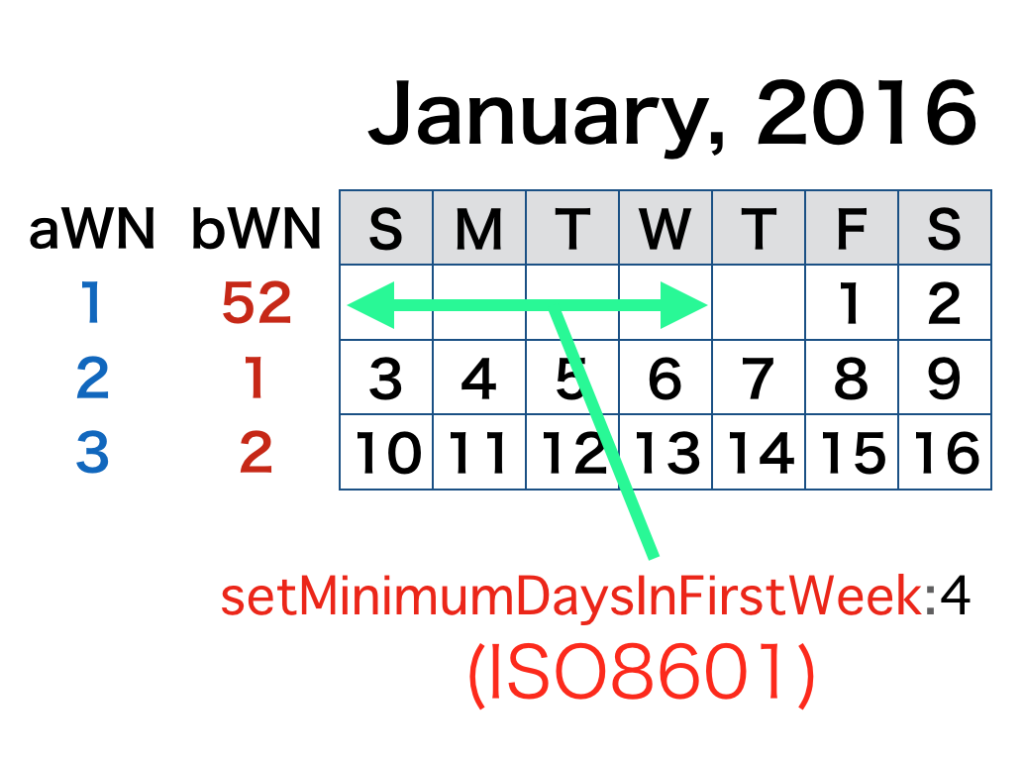
| AppleScript名:ISO8601を考慮した週カウント v2 |
| — Created 2016-02-10 by Takaaki Naganoya — Modified 2016-03-26 by Takaaki Naganoya — NSGregorianCalendar -> NSCalendarIdentifierGregorian — 2016 Piyomaru Software use AppleScript version "2.4" use scripting additions use framework "Foundation" set aNSDate to makeNSDate(2016, 1, 1) of me set aCal to current application’s NSCalendar’s currentCalendar() aCal’s setMinimumDaysInFirstWeek:1 set aWN to (aCal’s components:(current application’s NSWeekCalendarUnit) fromDate:aNSDate)’s week() aCal’s setMinimumDaysInFirstWeek:4 –ISO8601 Week Count set bWN to (aCal’s components:(current application’s NSWeekCalendarUnit) fromDate:aNSDate)’s week() return {aWN, bWN} –> {1, 52} –Y,M,Dを指定してNSDateを作成 on makeNSDate(aYear as integer, aMonth as integer, aDay as integer) set aComp to current application’s NSDateComponents’s alloc()’s init() aComp’s setDay:aDay aComp’s setMonth:aMonth aComp’s setYear:aYear set aGrego to current application’s NSCalendar’s calendarWithIdentifier:(current application’s NSCalendarIdentifierGregorian) set aDate to aGrego’s dateFromComponents:aComp return aDate end makeNSDate |
| AppleScript名:ISO8601フォーマット日付のテキストをdateに変換 |
| — Created 2015-08-28 20:19:04 +0900 by Takaaki Naganoya — 2015 Piyomaru Software — http://www.tondering.dk/claus/cal/iso8601.php use AppleScript version "2.4" use scripting additions use framework "Foundation" use BridgePlus : script "BridgePlus" –https://www.macosxautomation.com/applescript/apps/BridgePlus.html set aStr to "2010-12-01T21:35:43+09:00" BridgePlus’s datesFromStrings:{aStr} inFormat:"yyyy-MM-dd’T’HH:mm:ssZ" –> {date "2010年12月1日水曜日 21:35:43"} set aStr to "2010-12-01 21:35:43" BridgePlus’s datesFromStrings:{aStr} inFormat:"yyyy-MM-dd HH:mm:ss" –> {date "2010年12月1日水曜日 21:35:43"} |
| AppleScript名:ISO8601日付文字列を生成 v2 |
| use AppleScript version "2.5" use scripting additions use framework "Foundation" set aDate to getDateInternational(2018, 12, 18, 9, 59, 35, "CET") –―year, month, date, hour, minute, second, time zone abbreviation. set bStr to retISO8601DateTimeString(aDate, "CET") as string –> "2018-12-18T09:59:35+01:00" –NSDate -> ISO8601 Date & Time String on retISO8601DateTimeString(targDate, timeZoneAbbreviation) set theNSDateFormatter to current application’s NSDateFormatter’s alloc()’s init() theNSDateFormatter’s setDateFormat:"yyyy-MM-dd’T’HH:mm:ssZZZZZ" — Five zeds to get a colon in the time offset (except with GMT). theNSDateFormatter’s setTimeZone:(current application’s NSTimeZone’s timeZoneWithAbbreviation:(timeZoneAbbreviation)) return (theNSDateFormatter’s stringFromDate:targDate) as text end retISO8601DateTimeString –Make a GMT Date Object with parameters from a given time zone. on getDateInternational(aYear, aMonth, aDay, anHour, aMinute, aSecond, timeZoneAbbreviation) set theNSCalendar to current application’s NSCalendar’s currentCalendar() theNSCalendar’s setTimeZone:(current application’s NSTimeZone’s timeZoneWithAbbreviation:(timeZoneAbbreviation)) set theDate to theNSCalendar’s dateWithEra:1 |year|:aYear |month|:aMonth |day|:aDay hour:anHour minute:aMinute |second|:aSecond nanosecond:0 return theDate as date end getDateInternational |
| AppleScript名:date objectをRFC2822 date stringに変換 |
| — Created 2017-12-19 by Takaaki Naganoya — 2017 Piyomaru Software use AppleScript version "2.4" use scripting additions use framework "Foundation" set aDate to getDateInternational(2018, 2, 1) of me set bStr to rfc2822DateTimeString(aDate, "JST") as string –> "Thu, 01 Feb 2018 00:00:00 +0900" –date -> RFC2822 Date & Time String on rfc2822DateTimeString(targDate, timeZoneName as string) set theNSDateFormatter to current application’s NSDateFormatter’s alloc()’s init() theNSDateFormatter’s setDateFormat:"EEE, dd MMM yyyy HH:mm:ss Z" theNSDateFormatter’s setTimeZone:(current application’s NSTimeZone’s alloc()’s initWithName:timeZoneName) theNSDateFormatter’s setLocale:(current application’s NSLocale’s alloc()’s initWithLocaleIdentifier:"en_US_POSIX") return (theNSDateFormatter’s stringFromDate:targDate) as text end rfc2822DateTimeString –Make Date Object from parameters on getDateInternational(aYear as integer, aMonth as integer, aDay as integer) set theNSCalendar to current application’s NSCalendar’s currentCalendar() set theDate to theNSCalendar’s dateWithEra:1 |year|:aYear |month|:aMonth |day|:aDay hour:0 minute:0 |second|:0 nanosecond:0 return theDate as date end getDateInternational |
| AppleScript名:RFC822エンコーダー v0 |
| — Created 2016-02-07 by Takaaki Naganoya — 2016 Piyomaru Software use AppleScript version "2.5" use scripting additions use framework "Foundation" set aStr to "2016-02-06 11:00:00" set rfc822str to retRFC822StrFromDateStr(aStr) of me –> "Sat, 06 Feb 2016 11:00:00GMT" on retRFC822StrFromDateObj(aObj) set aFormat to "yyyy-MM-dd HH:mm:ss" set aTZ to "GMT" set bDate to retNSDateFromStringWithTimeZone(aStr, aFormat, aTZ) of me set aGMform to current application’s NSDateFormatter’s alloc()’s init() aGMform’s setDateFormat:"EEE, dd MMM yyyy HH:mm:ss" aGMform’s setTimeZone:(current application’s NSTimeZone’s timeZoneForSecondsFromGMT:0) set usLocale to current application’s NSLocale’s alloc()’s initWithLocaleIdentifier:"GMT" aGMform’s setLocale:usLocale set theDate to aGMform’s stringFromDate:bDate set theDate to theDate’s stringByAppendingString:"GMT" return theDate as string end retRFC822StrFromDateObj on retRFC822StrFromDateStr(aStr) set aFormat to "yyyy-MM-dd HH:mm:ss" set aTZ to "GMT" set bDate to retNSDateFromStringWithTimeZone(aStr, aFormat, aTZ) of me set aGMform to current application’s NSDateFormatter’s alloc()’s init() aGMform’s setDateFormat:"EEE, dd MMM yyyy HH:mm:ss" aGMform’s setTimeZone:(current application’s NSTimeZone’s timeZoneForSecondsFromGMT:0) set usLocale to current application’s NSLocale’s alloc()’s initWithLocaleIdentifier:"GMT" aGMform’s setLocale:usLocale set theDate to aGMform’s stringFromDate:bDate set theDate to theDate’s stringByAppendingString:" GMT" return theDate as string end retRFC822StrFromDateStr on retNSDateFromStringWithTimeZone(aText, aFormat, aTZ) set aStr to current application’s NSString’s stringWithString:aText set theNSDateFormatter to current application’s NSDateFormatter’s alloc()’s init() theNSDateFormatter’s setDateFormat:(current application’s NSString’s stringWithString:aFormat) theNSDateFormatter’s setTimeZone:(current application’s NSTimeZone’s timeZoneWithAbbreviation:(current application’s NSString’s stringWithString:aTZ)) return (theNSDateFormatter’s dateFromString:aStr) –as date end retNSDateFromStringWithTimeZone |
| AppleScript名:RFC822デコーダー v0 |
| — Created 2016-02-07 by Takaaki Naganoya — 2016 Piyomaru Software –http://stackoverflow.com/questions/1850824/parsing-a-rfc-822-date-with-nsdateformatter use AppleScript version "2.4" use scripting additions use framework "Foundation" set dateString to "Sun, 19 May 2002 15:21:36 GMT" –set dateString to "Tue, 01 Dec 2009 08:48:25 +0000" set aRes to rfc822StrDecode(dateString) of me –> date "2002年5月20日月曜日 0:21:36" –http://stackoverflow.com/questions/1850824/parsing-a-rfc-822-date-with-nsdateformatter on rfc822StrDecode(dateString) set aTZ to "GMT" set en_US_POSIX to current application’s NSLocale’s alloc()’s initWithLocaleIdentifier:"en_US_POSIX" set dateFormatter to current application’s NSDateFormatter’s alloc()’s init() dateFormatter’s setLocale:en_US_POSIX dateFormatter’s setTimeZone:(current application’s NSTimeZone’s timeZoneWithAbbreviation:(current application’s NSString’s stringWithString:aTZ)) set aDate to missing value set RFC822String to (current application’s NSString’s stringWithString:dateString)’s uppercaseString() if (RFC822String’s rangeOfString:",")’s location() is not equal to (current application’s NSNotFound) then if aDate is equal to missing value then — Sun, 19 May 2002 15:21:36 GMT dateFormatter’s setDateFormat:"EEE, d MMM yyyy HH:mm:ss zzz" set aDate to dateFormatter’s dateFromString:RFC822String end if if aDate is equal to missing value then — Sun, 19 May 2002 15:21 GMT dateFormatter’s setDateFormat:"EEE, d MMM yyyy HH:mm zzz" set aDate to dateFormatter’s dateFromString:RFC822String end if if aDate is equal to missing value then — Sun, 19 May 2002 15:21:36 dateFormatter’s setDateFormat:"EEE, d MMM yyyy HH:mm:ss" set aDate to dateFormatter’s dateFromString:RFC822String end if if aDate is equal to missing value then — Sun, 19 May 2002 15:21:36 dateFormatter’s setDateFormat:"EEE, d MMM yyyy HH:mm" set aDate to dateFormatter’s dateFromString:RFC822String end if else if aDate is equal to missing value then — 19 May 2002 15:21:36 GMT dateFormatter’s setDateFormat:"d MMM yyyy HH:mm:ss zzz" set aDate to dateFormatter’s dateFromString:RFC822String end if if aDate is equal to missing value then — 19 May 2002 15:21 GMT dateFormatter’s setDateFormat:"d MMM yyyy HH:mm zzz" set aDate to dateFormatter’s dateFromString:RFC822String end if if aDate is equal to missing value then — 19 May 2002 15:21:36 dateFormatter’s setDateFormat:"d MMM yyyy HH:mm:ss" set aDate to dateFormatter’s dateFromString:RFC822String end if if aDate is equal to missing value then — 19 May 2002 15:21 dateFormatter’s setDateFormat:"d MMM yyyy HH:mm" set aDate to dateFormatter’s dateFromString:RFC822String end if end if if aDate is equal to missing value then return false return aDate as date end rfc822StrDecode |
| AppleScript名:今日のYYYY,MM,DDを取得する |
| — Created 2015-12-26 by Takaaki Naganoya — 2015 Piyomaru Software use AppleScript version "2.4" use scripting additions use framework "Foundation" use framework "AppKit" set aCalend to current application’s NSCalendar’s currentCalendar() set aDate to current application’s NSDate’s |date|() set aYear to aCalend’s component:(current application’s NSCalendarUnitYear) fromDate:aDate set aYearStr to numToZeroPaddingStr(aYear, 4, "0") of me set aMonth to aCalend’s component:(current application’s NSCalendarUnitMonth) fromDate:aDate set aMonthStr to numToZeroPaddingStr(aMonth, 2, "0") of me set aDay to aCalend’s component:(current application’s NSCalendarUnitDay) fromDate:aDate set aDayStr to numToZeroPaddingStr(aDay, 2, "0") of me set dStr to aYearStr & aMonthStr & aDayStr –> "20171219" –整数の値に指定桁数ゼロパディングして文字列で返す on numToZeroPaddingStr(aNum as integer, aDigit as integer, paddingChar as text) set aNumForm to current application’s NSNumberFormatter’s alloc()’s init() aNumForm’s setPaddingPosition:(current application’s NSNumberFormatterPadBeforePrefix) aNumForm’s setPaddingCharacter:paddingChar aNumForm’s setMinimumIntegerDigits:aDigit set bNum to current application’s NSNumber’s numberWithInt:aNum set aStr to aNumForm’s stringFromNumber:bNum return aStr as text end numToZeroPaddingStr |
| AppleScript名:epoch timeをdateに変換 |
| — Created 2017-12-19 by Takaaki Naganoya — 2017 Piyomaru Software use AppleScript version "2.4" use scripting additions use framework "Foundation" set epochTimeStr to current application’s NSString’s stringWithString:"1401325412" set aDate to (current application’s NSDate’s alloc()’s initWithTimeIntervalSince1970:(epochTimeStr’s doubleValue())) as date –> (NSDate) 2014-05-29 01:03:32 +0000 –> date "2014年5月29日木曜日 10:03:32" |
| AppleScript名:現在時刻のepoch timeを取得する |
| — Created 2017-12-19 by Takaaki Naganoya — 2017 Piyomaru Software use AppleScript version "2.4" use scripting additions use framework "Foundation" set curDate to current application’s NSDate’s |date|() set epochSeconds to (curDate’s timeIntervalSince1970()) |
| AppleScript名:iBooksライブラリ中のepubファイルから情報を取得 v3 |
| — Created 2017/02/26 by Christopher Stone — Modified 2017/11/01 by Takaaki Naganoya use framework "Foundation" use scripting additions use mdLib : script "Metadata Lib" version "1.0.0" –https://www.macosxautomation.com/applescript/apps/Script_Libs.html#Metadata_Lib property NSString : a reference to current application’s NSString property NSMutableArray : a reference to current application’s NSMutableArray property NSPropertyListFormat : a reference to current application’s NSPropertyListFormat property NSUTF8StringEncoding : a reference to current application’s NSUTF8StringEncoding property NSPropertyListImmutable : a reference to current application’s NSPropertyListImmutable property NSPropertyListSerialization : a reference to current application’s NSPropertyListSerialization set aPath to POSIX path of (path to library folder from user domain) set sourceFolder to aPath & "Containers/com.apple.BKAgentService/Data/Documents/iBooks/Books/" set textFiles to mdLib’s searchFolders:{sourceFolder} searchString:"kMDItemContentType contains %@ || kMDItemContentType contains %@ " searchArgs:{"com.apple.ibooks-folder", "org.idpf.epub-container"} set outDicList to NSMutableArray’s new() repeat with i in textFiles set aFile to (i as string) if aFile ends with "/" then set aFullPath to aFile & "iTunesMetadata.plist" else set aFullPath to aFile & "/iTunesMetadata.plist" end if try set xmlData to read ((POSIX file aFullPath) as alias) as «class utf8» set xRes to readPlistFromStr(xmlData) of me log xRes as list of string or string –as anything (maybe record or missing value) (*cover-writing-mode:vertical, genre:教育, scroll-axis:default, sort-artist:あっぷる, BKITunesMigratedMetadata:PersistentID:6.68315366592803E+18, seriesTitle:Everyone Can Code, sort-name:Swiftによるあぷりけーしょん開発:入門編, itemId:1209648719, apple-id:xxxxxxxxxxxx@xxx.xxx, fileExtension:ibooks, year:2017, releaseDate:2017-03-19T07:00:00Z, BKInsertionDate:512115887, asset-info:flavor:pluspub, file-size:60642970, book-info:publication-version:162901775, PageProgression:default, asset-info:flavor:pluspub, file-size:60642970, package-file-hash:XXXXXXXXXXXXXXXXXXXXXXXXXXXXXXXX, BKAllocatedSize:82993152, longDescription:このコースでは、Swiftという言語を使って基本的なプログラミングの土台をしっかりと作り上げていきます。基本的なiOSアプリケーションを一から開発するために必要なツール、手法、概念を活用して、実践的な練習に取り組みます。さらに、プログラミングと優れたアプリケーション開発の土台となる、ユーザーインターフェイス設計の基本原則についても学習します。このコースを受講するにあたってプログラミングの経験は必要ありません。プログラミングの経験がある場合、レッスンの最初の方は簡単に読み進めていただくとよいでしょう。このブックではプログラミングの基礎にとどまらず、ソフトウェア開発ツールや概念、ベストプラクティスについても学習できます。, artistId:9.39801385E+8, artistName:Apple Education, isPreview:false, BKDisplayName:mzbf.eqmpijqw..d2.dlv.d2.dlv.ibooks, human-friendly-publication-version:1.1, shouldDisableTouchEmulation:true, vendorId:379015, drmVersionNumber:0, kind:ebook, s:143462, genreId:10037, explicit:2, seriesAdamId:1.118575554E+9, publisher:Apple Inc. – Education, versionRestrictions:16843008, BKGenerationCount:2, desktopSupportLevel:supported, primaryLanguage:ja, itemName:Swiftによるアプリケーション開発:入門編, purchaseDate:2017-03-25T06:21:26Z, shouldDisableOptimizeSpeed:true, obeyPageBreaks:1, pageCount:244*) if xRes is not equal to missing value then (outDicList’s addObject:xRes) end if end try end repeat return outDicList as list of string or string –as anything –stringのplistを読み込んでNSDictionaryに on readPlistFromStr(theString) set aSource to NSString’s stringWithString:theString set pListData to aSource’s dataUsingEncoding:(NSUTF8StringEncoding) set aPlist to NSPropertyListSerialization’s propertyListFromData:pListData mutabilityOption:(NSPropertyListImmutable) |format|:(NSPropertyListFormat) errorDescription:(missing value) return aPlist end readPlistFromStr |