

| AppleScript名:POST method REST API__Slack_auth.test.scptd |
| — Created 2016-03-23 by Takaaki Naganoya — 2016 Piyomaru Software use AppleScript version "2.4" use scripting additions use framework "Foundation" use BridgePlus : script "BridgePlus" –https://www.macosxautomation.com/applescript/apps/BridgePlus.html set accessToken to retAccessToken() —Access Token set reqURLStr to "https://slack.com/api/auth.test" set aRec to {token:accessToken} set aRes to callRestPOSTAPIAndParseResults(reqURLStr, aRec) of me set aRESTres to json of aRes set aRESCode to responseCode of aRes set aRESHeader to responseHeader of aRes –> {Content-Type:"application/json; charset=utf-8", Access-Control-Allow-Origin:"*", X-Amz-Cf-Id:"zOmILG860ZDWHHwDA5h7HtLNDqYd8nlQyL-Wf_dKfC-b5jDKkr_p8A==", Content-Security-Policy:"referrer no-referrer;", Content-Encoding:"gzip", Server:"Apache", X-XSS-Protection:"0", Transfer-Encoding:"Identity", Via:"1.1 f8ebfacf2280f8de661be7a1f87ba74e.cloudfront.net (CloudFront)", Date:"Tue, 19 Apr 2016 06:16:37 GMT", Strict-Transport-Security:"max-age=31536000; includeSubDomains; preload", Connection:"keep-alive", X-Content-Type-Options:"nosniff", Vary:"Accept-Encoding", X-Cache:"Miss from cloudfront"} aRESTres as list of string or string –> {user:"maro", team_id:"X99X9XX99", user_id:"X99XXXX9X", ok:1, url:"https://piyomarusoftware.slack.com/", team:"Piyomaru Software"} –POST methodのREST APIを呼ぶ on callRestPOSTAPIAndParseResults(aURL, aRec) load framework set aRes to retURLwithParams(aURL, aRec) of me if aRes = false then return false set aRequest to current application’s NSMutableURLRequest’s requestWithURL:(current application’s |NSURL|’s URLWithString:aRes) aRequest’s setHTTPMethod:"POST" aRequest’s setCachePolicy:(current application’s NSURLRequestReloadIgnoringLocalCacheData) aRequest’s setHTTPShouldHandleCookies:false aRequest’s setTimeoutInterval:60 –aRequest’s setValue:(token of aRec) forHTTPHeaderField:"token" –aRequest’s setValue:(channel of aRec) forHTTPHeaderField:"channel" –aRequest’s setValue:"application/json" forHTTPHeaderField:"Content-Type" –aRequest’s setHTTPBody:dataJson –CALL REST API set aRes to current application’s NSURLConnection’s sendSynchronousRequest:aRequest returningResponse:(reference) |error|:(missing value) –Parse Results set resList to aRes as list set bRes to contents of (first item of resList) set resStr to current application’s NSString’s alloc()’s initWithData:bRes encoding:(current application’s NSUTF8StringEncoding) log resStr set jsonString to current application’s NSString’s stringWithString:resStr set jsonData to jsonString’s dataUsingEncoding:(current application’s NSUTF8StringEncoding) set aJsonDict to current application’s NSJSONSerialization’s JSONObjectWithData:jsonData options:0 |error|:(missing value) –Get Response Code set dRes to contents of second item of resList set resCode to ASify from (dRes’s statusCode()) –Get Response Header set resHeaders to ASify from (dRes’s allHeaderFields()) return {json:aJsonDict, responseCode:resCode, responseHeader:resHeaders} end callRestPOSTAPIAndParseResults on retAccessToken() return "xxxx-XXXXXXXXXXX-XXXXXXXXXXX-XXXXXXXXXXX-XXxXxxXXXX" end retAccessToken on retURLwithParams(aBaseURL, aRec) set aDic to current application’s NSMutableDictionary’s dictionaryWithDictionary:aRec set aKeyList to (aDic’s allKeys()) as list set aValList to (aDic’s allValues()) as list set aLen to length of aKeyList set bLen to length of aValList if aLen is not equal to bLen then return false set qList to {} repeat with i from 1 to aLen set aName to contents of item i of aKeyList set aVal to contents of item i of aValList set the end of qList to (current application’s NSURLQueryItem’s queryItemWithName:aName value:aVal) end repeat set aComp to current application’s NSURLComponents’s alloc()’s initWithString:aBaseURL aComp’s setQueryItems:qList set aURL to (aComp’s |URL|()’s absoluteString()) as text return aURL end retURLwithParams |
POST method REST API__Slack_api.test
SlackのREST APIを呼び出してAPI呼び出しテスト(api.test)を実行するAppleScriptです。
SlackにサインアップしてAPIのアクセストークンを取得し、プログラムリスト中に記入して実行してください。
| AppleScript名:POST method REST API__Slack_api.test |
| — Created 2016-03-23 by Takaaki Naganoya — 2016 Piyomaru Software use AppleScript version "2.4" use scripting additions use framework "Foundation" use BridgePlus : script "BridgePlus" –https://www.macosxautomation.com/applescript/apps/BridgePlus.html set accessToken to retAccessToken() —Access Token set reqURLStr to "https://slack.com/api/api.test" set aRes to callRestPOSTAPIAndParseResults(reqURLStr, accessToken) of me set aRESTres to json of aRes set aRESCode to responseCode of aRes –> 200 set aRESHeader to responseHeader of aRes –> {Content-Type:"application/json; charset=utf-8", Access-Control-Allow-Origin:"*", X-Amz-Cf-Id:"zOmILG860ZDWHHwDA5h7HtLNDqYd8nlQyL-Wf_dKfC-b5jDKkr_p8A==", Content-Security-Policy:"referrer no-referrer;", Content-Encoding:"gzip", Server:"Apache", X-XSS-Protection:"0", Transfer-Encoding:"Identity", Via:"1.1 f8ebfacf2280f8de661be7a1f87ba74e.cloudfront.net (CloudFront)", Date:"Tue, 19 Apr 2016 06:16:37 GMT", Strict-Transport-Security:"max-age=31536000; includeSubDomains; preload", Connection:"keep-alive", X-Content-Type-Options:"nosniff", Vary:"Accept-Encoding", X-Cache:"Miss from cloudfront"} aRESTres as list of string or string –> {ok:1} –POST methodのREST APIを呼ぶ on callRestPOSTAPIAndParseResults(aURL, anAPIkey) load framework set aRequest to current application’s NSMutableURLRequest’s requestWithURL:(current application’s |NSURL|’s URLWithString:aURL) aRequest’s setHTTPMethod:"POST" aRequest’s setCachePolicy:(current application’s NSURLRequestReloadIgnoringLocalCacheData) aRequest’s setHTTPShouldHandleCookies:false aRequest’s setTimeoutInterval:60 aRequest’s setValue:anAPIkey forHTTPHeaderField:"Authorization" –aRequest’s setValue:jsonString forHTTPHeaderField:"Dropbox-API-Arg" –aRequest’s setValue:"application/json" forHTTPHeaderField:"Content-Type" –aRequest’s setHTTPBody:dataJson –CALL REST API set aRes to current application’s NSURLConnection’s sendSynchronousRequest:aRequest returningResponse:(reference) |error|:(missing value) –Parse Results set resList to aRes as list set bRes to contents of (first item of resList) set resStr to current application’s NSString’s alloc()’s initWithData:bRes encoding:(current application’s NSUTF8StringEncoding) log resStr set jsonString to current application’s NSString’s stringWithString:resStr set jsonData to jsonString’s dataUsingEncoding:(current application’s NSUTF8StringEncoding) set aJsonDict to current application’s NSJSONSerialization’s JSONObjectWithData:jsonData options:0 |error|:(missing value) –Get Response Code set dRes to contents of second item of resList set resCode to ASify from (dRes’s statusCode()) –Get Response Header set resHeaders to ASify from (dRes’s allHeaderFields()) return {json:aJsonDict, responseCode:resCode, responseHeader:resHeaders} end callRestPOSTAPIAndParseResults on retAccessToken() return "xxxx-XXXXXXXXXXX-XXXXXXXXXXX-XXXXXXXXXXX-XXxXxxXXXX" end retAccessToken |
(GET)OCR Spaceで指定URL上の画像を文字認識する
画像文字認識のREST API「OCR.Space」を呼び出して、指定URL上の画像を文字認識するAppleScriptです。
とりあえず試してみるためには、OCR.SpaceにレジストしてAPI Keyを取得し、プログラムリスト中に記入してください。
英数字の文字認識については実用性を感じましたが、日本語文字認識については実用的ではないと感じました。
| AppleScript名:(GET)OCR Spaceで指定URL上の画像を文字認識する |
| — Created 2016-10-27 by Takaaki Naganoya — 2016 Piyomaru Software use AppleScript version "2.4" use scripting additions use framework "Foundation" set aURL to "http://piyocast.com/as/wp-content/uploads/2018/02/604b4edd7a57544c85020973f4d46eca.png" set aText to recogTextFromImageURL(aURL) of me (* "Piyomaru Software Takaaki Machine Quit MacBook Pro MacBook Air Mac mini " set myAPIkey to "XxxxXXxxXXXXXXX" –API Key set reqURLStr to "https://api.ocr.space/parse/ImageUrl" –set aRec to {apikey:myAPIkey, |language|:"jpn", |url|:aURL}–日本語の文字認識はほぼ使い物にならない set aRec to {apikey:myAPIkey, |language|:"eng", |url|:aURL} set aURL to retURLwithParams(reqURLStr, aRec) of me set aRes to callRestGETAPIAndParseResults(aURL) of me set aRESCode to (responseCode of aRes) as integer set aRESTres to (json of aRes) as record set errorD to ErrorDetails of aRESTres if errorD is not equal to missing value then return "" set recogText to ParsedText of (first item of (ParsedResults of aRESTres)) return recogText end recogTextFromImageURL –GET methodのREST APIを呼ぶ on callRestGETAPIAndParseResults(aURL) set aRequest to current application’s NSMutableURLRequest’s requestWithURL:(current application’s |NSURL|’s URLWithString:aURL) aRequest’s setHTTPMethod:"GET" aRequest’s setCachePolicy:(current application’s NSURLRequestReloadIgnoringLocalCacheData) aRequest’s setHTTPShouldHandleCookies:false aRequest’s setTimeoutInterval:60 aRequest’s setValue:"application/json" forHTTPHeaderField:"Accept" aRequest’s setValue:"gzip" forHTTPHeaderField:"Content-Encoding" set aRes to current application’s NSURLConnection’s sendSynchronousRequest:aRequest returningResponse:(reference) |error|:(missing value) set resList to aRes as list set bRes to contents of (first item of resList) set resStr to current application’s NSString’s alloc()’s initWithData:bRes encoding:(current application’s NSUTF8StringEncoding) set jsonString to current application’s NSString’s stringWithString:resStr set jsonData to jsonString’s dataUsingEncoding:(current application’s NSUTF8StringEncoding) set aJsonDict to current application’s NSJSONSerialization’s JSONObjectWithData:jsonData options:0 |error|:(missing value) –Get Response Code & Header set dRes to contents of second item of resList if dRes is not equal to missing value then set resCode to (dRes’s statusCode()) as number set resHeaders to (dRes’s allHeaderFields()) as record else set resCode to 0 set resHeaders to {} end if return {json:aJsonDict, responseCode:resCode, responseHeader:resHeaders} end callRestGETAPIAndParseResults on retURLwithParams(aBaseURL, aRec) set aDic to current application’s NSMutableDictionary’s dictionaryWithDictionary:aRec set aKeyList to (aDic’s allKeys()) as list set aValList to (aDic’s allValues()) as list set aLen to length of aKeyList set qList to {} repeat with i from 1 to aLen set aName to contents of item i of aKeyList set aVal to contents of item i of aValList set the end of qList to (current application’s NSURLQueryItem’s queryItemWithName:aName value:aVal) end repeat set aComp to current application’s NSURLComponents’s alloc()’s initWithString:aBaseURL aComp’s setQueryItems:qList set aURL to (aComp’s |URL|()’s absoluteString()) as text return aURL end retURLwithParams |
(GET)openBDで複数冊の情報を取得する
日本国内の書籍データを提供するAPIサービス「openBD」のREST APIに問い合わせて複数冊の書籍情報を取得するAppleScriptです。
| AppleScript名:(GET)openBDで複数冊の情報を取得する |
| — Created 2016-03-03 by Takaaki Naganoya — 2016 Piyomaru Software use AppleScript version "2.4" use scripting additions use framework "Foundation" set isbnList to {"978-4-7808-0204-7", " 978-4621300251"} set isbnStr to retStrFromArrayWithDelimiter(isbnList, ", ") of me set aBaseURL to "https://api.openbd.jp/v1/get" set aRec to {isbn:isbnStr, pretty:""} set reqURLStr to retURLwithParams(aBaseURL, aRec) of me set aRes to callRestGETAPIAndParseResults(reqURLStr) of me set aRESCode to (responseCode of aRes) as integer if aRESCode is not equal to 200 then return false set aRESHeader to responseHeader of aRes set aRESTres to (json of aRes) as list –GET methodのREST APIを呼ぶ on callRestGETAPIAndParseResults(aURL) set aRequest to current application’s NSMutableURLRequest’s requestWithURL:(current application’s |NSURL|’s URLWithString:aURL) aRequest’s setHTTPMethod:"GET" aRequest’s setValue:"gzip" forHTTPHeaderField:"Content-Encoding" set aRes to current application’s NSURLConnection’s sendSynchronousRequest:aRequest returningResponse:(reference) |error|:(missing value) set resList to aRes as list set bRes to contents of (first item of resList) set resStr to current application’s NSString’s alloc()’s initWithData:bRes encoding:(current application’s NSUTF8StringEncoding) set jsonString to current application’s NSString’s stringWithString:resStr set jsonData to jsonString’s dataUsingEncoding:(current application’s NSUTF8StringEncoding) set aJsonDict to current application’s NSJSONSerialization’s JSONObjectWithData:jsonData options:0 |error|:(missing value) –Get Response Code & Header set dRes to contents of second item of resList if dRes is not equal to missing value then set resCode to (dRes’s statusCode()) as number set resHeaders to (dRes’s allHeaderFields()) as record else set resCode to 0 set resHeaders to {} end if return {json:aJsonDict, responseCode:resCode, responseHeader:resHeaders} end callRestGETAPIAndParseResults on retURLwithParams(aBaseURL, aRec) set aDic to current application’s NSMutableDictionary’s dictionaryWithDictionary:aRec set aKeyList to (aDic’s allKeys()) as list set aValList to (aDic’s allValues()) as list set aLen to length of aKeyList set qList to {} repeat with i from 1 to aLen set aName to contents of item i of aKeyList set aVal to contents of item i of aValList set the end of qList to (current application’s NSURLQueryItem’s queryItemWithName:aName value:aVal) end repeat set aComp to current application’s NSURLComponents’s alloc()’s initWithString:aBaseURL aComp’s setQueryItems:qList set aURL to (aComp’s |URL|()’s absoluteString()) as text return aURL end retURLwithParams –リストを指定デリミタをはさんでテキスト化 on retStrFromArrayWithDelimiter(aList, aDelim) set anArray to current application’s NSArray’s arrayWithArray:aList set aRes to anArray’s componentsJoinedByString:aDelim return aRes as text end retStrFromArrayWithDelimiter |
(GET)openBDで1冊分の情報を取得する
日本国内の書籍データを提供するAPIサービス「openBD」のREST APIに問い合わせて1冊分の書籍情報を取得するAppleScriptです。
| AppleScript名:(GET)openBDで1冊分の情報を取得する |
| — Created 2016-03-03 by Takaaki Naganoya — 2016 Piyomaru Software use AppleScript version "2.4" use scripting additions use framework "Foundation" set aBaseURL to "https://api.openbd.jp/v1/get" set aRec to {isbn:"978-4-7808-0204-7", pretty:""} set reqURLStr to retURLwithParams(aBaseURL, aRec) of me set aRes to callRestGETAPIAndParseResults(reqURLStr) of me set aRESCode to (responseCode of aRes) as integer if aRESCode is not equal to 200 then return false set aRESHeader to responseHeader of aRes set aRESTres to (json of aRes) as list –GET methodのREST APIを呼ぶ on callRestGETAPIAndParseResults(aURL) set aRequest to current application’s NSMutableURLRequest’s requestWithURL:(current application’s |NSURL|’s URLWithString:aURL) aRequest’s setHTTPMethod:"GET" aRequest’s setValue:"gzip" forHTTPHeaderField:"Content-Encoding" set aRes to current application’s NSURLConnection’s sendSynchronousRequest:aRequest returningResponse:(reference) |error|:(missing value) set resList to aRes as list set bRes to contents of (first item of resList) set resStr to current application’s NSString’s alloc()’s initWithData:bRes encoding:(current application’s NSUTF8StringEncoding) set jsonString to current application’s NSString’s stringWithString:resStr set jsonData to jsonString’s dataUsingEncoding:(current application’s NSUTF8StringEncoding) set aJsonDict to current application’s NSJSONSerialization’s JSONObjectWithData:jsonData options:0 |error|:(missing value) –Get Response Code & Header set dRes to contents of second item of resList if dRes is not equal to missing value then set resCode to (dRes’s statusCode()) as number set resHeaders to (dRes’s allHeaderFields()) as record else set resCode to 0 set resHeaders to {} end if return {json:aJsonDict, responseCode:resCode, responseHeader:resHeaders} end callRestGETAPIAndParseResults on retURLwithParams(aBaseURL, aRec) set aDic to current application’s NSMutableDictionary’s dictionaryWithDictionary:aRec set aKeyList to (aDic’s allKeys()) as list set aValList to (aDic’s allValues()) as list set aLen to length of aKeyList set qList to {} repeat with i from 1 to aLen set aName to contents of item i of aKeyList set aVal to contents of item i of aValList set the end of qList to (current application’s NSURLQueryItem’s queryItemWithName:aName value:aVal) end repeat set aComp to current application’s NSURLComponents’s alloc()’s initWithString:aBaseURL aComp’s setQueryItems:qList set aURL to (aComp’s |URL|()’s absoluteString()) as text return aURL end retURLwithParams |
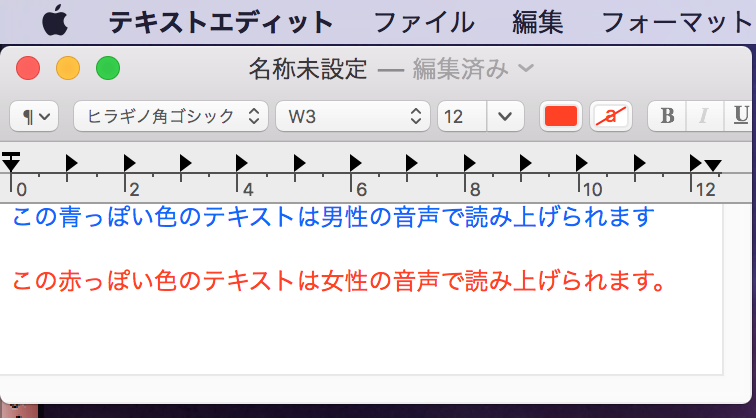
TextEdit本文色に応じて青っぽい色は男性の音声で、赤っぽい色は女性の音声で読み上げ
TextEditの本文内で文字色が青っぽい色の文字は男性の音声で、赤っぽい色の文字は女性の音声で読み上げる(sayコマンド)AppleScriptです。
実行時には日本語読み上げ音声のKyokoとOtoyaをインストールしてある必要があります。インストールしてあるかどうか、対象の言語、性別で検出を行い、存在していなかった場合には読み上げを行いません。

| AppleScript名:TextEdit本文色に応じて青っぽい色は男性の音声で、赤っぽい色は女性の音声で読み上げ |
| — Created 2018-02-15 by Takaaki Naganoya — 2018 Piyomaru Software use AppleScript version "2.5" use scripting additions use framework "Foundation" property NSColor : a reference to current application’s NSColor property NSArray : a reference to current application’s NSArray property NSSortDescriptor : a reference to current application’s NSSortDescriptor –TTS音声情報を取得する set curLang to "ja_JP" set v1List to getTTSVoiceNameWithLanguageAndGender(curLang, "Male") of me if length of v1List = 0 then return set v1 to contents of item 1 of v1List –Male Voice set v2List to getTTSVoiceNameWithLanguageAndGender(curLang, "Female") of me if length of v2List = 0 then return set v2 to contents of item 1 of v2List –Female Voice –TextEditの書類から情報を取得 set aResRec to (getTextStrAndColor() of me) set colList to colorDat of aResRec set strList to strList of aResRec set aLen to length of strList repeat with i from 1 to aLen set curColor to contents of item i of colList set curStr to contents of item i of strList set aColor to retColorDomainNameFromList(curColor, 65535) of me if aColor = "blue" then –Read by Male Voice say curStr using v1 else if aColor = "red" then –Read by Female Voice say curStr using v2 end if end repeat on getTextStrAndColor() tell application "TextEdit" if (count every document) = 0 then error "No Document" tell front document set colList to (color of every attribute run) set attList to every attribute run end tell return {colorDat:colList, strList:attList} end tell end getTextStrAndColor on retCocoaColorList(aColorList, aMax) set cocoaColorList to {} repeat with i in aColorList set the end of cocoaColorList to i / aMax end repeat set the end of cocoaColorList to 1.0 –Alpha return cocoaColorList end retCocoaColorList –数値の1D List with Recordをソート on sort1DRecList(aList as list, aKey as string, ascendingF as boolean) set aArray to NSArray’s arrayWithArray:aList set desc1 to NSSortDescriptor’s sortDescriptorWithKey:aKey ascending:ascendingF selector:"compare:" set bList to (aArray’s sortedArrayUsingDescriptors:{desc1}) as list return bList end sort1DRecList on getTTSVoiceNameWithLanguageAndGender(voiceLang, aGen) if aGen = "Male" then set aGender to "VoiceGenderMale" else if aGen = "Female" then set aGender to "VoiceGenderFemale" end if set outArray to current application’s NSMutableArray’s new() –Make Installed Voice List set aList to current application’s NSSpeechSynthesizer’s availableVoices() set bList to aList as list repeat with i in bList set j to contents of i set aDIc to (current application’s NSSpeechSynthesizer’s attributesForVoice:j) (outArray’s addObject:aDIc) end repeat set aPredicate to current application’s NSPredicate’s predicateWithFormat_("VoiceLocaleIdentifier == %@ && VoiceGender== %@", voiceLang, aGender) set filteredArray to outArray’s filteredArrayUsingPredicate:aPredicate set aResList to (filteredArray’s valueForKey:"VoiceName") as list return aResList end getTTSVoiceNameWithLanguageAndGender on retColorDomainNameFromList(aColList as list, aColMax as integer) set {rNum, gNum, bNum, aNum} to retCocoaColorList(aColList, aColMax) of me set aCol to NSColor’s colorWithCalibratedRed:rNum green:gNum blue:bNum alpha:aNum return retColorDomainNameFronNSColor(aCol) of me end retColorDomainNameFromList on retColorDomainNameFronNSColor(aCol) set hueVal to aCol’s hueComponent() set satVal to aCol’s saturationComponent() set brightVal to aCol’s brightnessComponent() if satVal ≤ 0.01 then set satVal to 0.0 set colName to "" if satVal = 0.0 then if brightVal ≤ 0.2 then set colName to "black" else if (brightVal > 0.95) then set colName to "white" else set colName to "gray" end if else if hueVal ≤ (15.0 / 360) or hueVal ≥ (330 / 360) then set colName to "red" else if hueVal ≤ (45.0 / 360) then set colName to "orange" else if hueVal < (70.0 / 360) then set colName to "yellow" else if hueVal < (150.0 / 360) then set colName to "green" else if hueVal < (190.0 / 360) then set colName to "light blue" –cyan else if (hueVal < 250.0 / 360.0) then set colName to "blue" else if (hueVal < 290.0 / 360.0) then set colName to "purple" else set colName to "pink" –magenta end if end if return colName end retColorDomainNameFronNSColor |
ステータスバーのじっけん v4
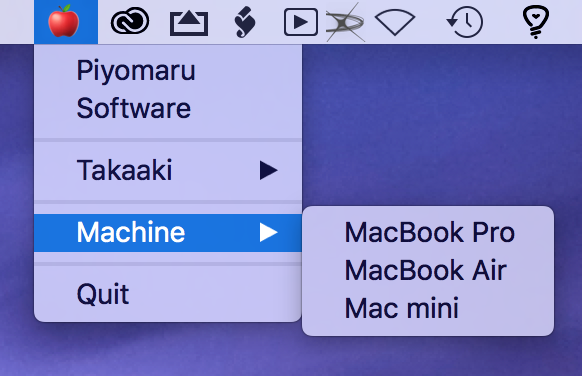
メニューバー上にステータスバーアイテムを作成し、サブメニューつきのメニューを生成するAppleScriptです。
2階層のサブメニューに対応したことで、より有用性が高まりました(Thanks Shane!)。
実行には、スクリプトエディタ上でControl-Command-Rの操作を行ってください。
set aList to {“Piyomaru”, “Software”, “”, “Takaaki”, {“Yes”, “No”}, “”, “Machine”, {“MacBook Pro”, “MacBook Air”, “Mac mini”}, “”, “Quit”}
のようなリストを与えると、

のようにメニューを生成。各メニューアイテムをクリックするとIDをNotification表示します。「Quit」を選択するとメニュー表示を終了します。
次はn階層のサブメニュー対応とか、ファイルシステム上のディレクトリ構造を反映させるとか、そういう機能がほしいところです。
| AppleScript名:ステータスバーのじっけん v4 |
| — Created 2017-03-03 by Takaaki Naganoya — Modified 2018-02-15 by Shane Stanley–Thanks!! — Modified 2018-02-15 by Takaaki Naganoya use AppleScript version "2.5" use scripting additions use framework "Foundation" use framework "AppKit" property aStatusItem : missing value on run init() of me end run on init() set aList to {"Piyomaru", "Software", "", "Takaaki", {"Yes", "No"}, "", "Machine", {"MacBook Pro", "MacBook Air", "Mac mini"}, "", "Quit"} set aStatusItem to current application’s NSStatusBar’s systemStatusBar()’s statusItemWithLength:(current application’s NSVariableStatusItemLength) aStatusItem’s setTitle:"🍎" aStatusItem’s setHighlightMode:true aStatusItem’s setMenu:(createMenu(aList) of me) end init on createMenu(aList) set aMenu to current application’s NSMenu’s alloc()’s init() set aCount to 10 set prevMenuItem to "" repeat with i in aList set j to contents of i set aClass to (class of j) as string if j is equal to "" then set aMenuItem to (current application’s NSMenuItem’s separatorItem()) (aMenu’s addItem:aMenuItem) else if (aClass = "text") or (aClass = "string") then if j = "Quit" then set aMenuItem to (current application’s NSMenuItem’s alloc()’s initWithTitle:j action:"actionHandler:" keyEquivalent:"") else set aMenuItem to (current application’s NSMenuItem’s alloc()’s initWithTitle:j action:"actionHandler:" keyEquivalent:"") end if (aMenuItem’s setTag:aCount) (aMenuItem’s setTarget:me) (aMenu’s addItem:aMenuItem) set aCount to aCount + 10 copy aMenuItem to prevMenuItem else if aClass = "list" then –Generate Submenu set subMenu to current application’s NSMenu’s new() (aMenuItem’s setSubmenu:subMenu) set subCounter to 1 repeat with ii in j set jj to contents of ii set subMenuItem1 to (current application’s NSMenuItem’s alloc()’s initWithTitle:jj action:"actionHandler:" keyEquivalent:"") (subMenuItem1’s setTarget:me) (subMenuItem1’s setTag:(aCount + subCounter)) (subMenu’s addItem:subMenuItem1) set subCounter to subCounter + 1 end repeat end if end if end repeat return aMenu end createMenu on actionHandler:sender set aTag to tag of sender as string set aTitle to title of sender as string if aTitle is equal to "Quit" then current application’s NSStatusBar’s systemStatusBar()’s removeStatusItem:aStatusItem else display notification (aTag as string) end if end actionHandler: |
テキストのキーワード検索(ファイルから読み込んで検索。複数結果対応)
| AppleScript名:テキストの複数検索(ファイルから読み込んで検索) |
| — Created 2017-08-09 by Takaaki Naganoya — 2017 Piyomaru Software use AppleScript version "2.4" use scripting additions use framework "Foundation" property NSString : a reference to current application’s NSString property NSMutableArray : a reference to current application’s NSMutableArray property NSDate : a reference to current application’s NSDate property NSLiteralSearch : a reference to current application’s NSLiteralSearch set aFile to POSIX path of (choose file) set a1Dat to NSDate’s timeIntervalSinceReferenceDate() set aStr to NSString’s stringWithContentsOfFile:aFile encoding:(current application’s NSUTF8StringEncoding) |error|:(missing value) set aRes to searchWordRanges(aStr, "子供") of me as list –> {{location:1159, length:2}, {location:1242, length:2}, {location:1261, length:2}, ….. set b1Dat to NSDate’s timeIntervalSinceReferenceDate() set c1Dat to b1Dat – a1Dat on searchWordRanges(aTargText as string, aSearchStr as string) set aStr to NSString’s stringWithString:aTargText set bStr to NSString’s stringWithString:aSearchStr set hitArray to NSMutableArray’s alloc()’s init() set cNum to (aStr’s |length|()) as integer set aRange to current application’s NSMakeRange(0, cNum) repeat set detectedRange to aStr’s rangeOfString:bStr options:(NSLiteralSearch) range:aRange if detectedRange’s location is equal to current application’s NSNotFound then exit repeat hitArray’s addObject:detectedRange set aNum to (detectedRange’s location) as integer set bNum to (detectedRange’s |length|) as integer set aRange to current application’s NSMakeRange(aNum + bNum, cNum – (aNum + bNum)) end repeat return hitArray end searchWordRanges |
テキストのキーワード検索(結果をNSRangeのlistで返す)
| AppleScript名:テキストのキーワード検索(結果をNSRangeのlistで返す) |
| — Created 2017-08-09 by Takaaki Naganoya — 2017 Piyomaru Software use AppleScript version "2.4" use scripting additions use framework "Foundation" –http://piyocast.com/as/archives/4771 property NSString : a reference to current application’s NSString property NSMutableArray : a reference to current application’s NSMutableArray property NSLiteralSearch : a reference to current application’s NSLiteralSearch set aStr to "ATGC ACGT ATGC AGTC ATGC ACGT ATGC AGTC ATGC ACGT ATGC AGTC ATGC ACGT ATGC AGTC " set aRes to searchWordRanges(aStr, "ATGC") of me as list –> {{location:0, length:4}, {location:10, length:4}, {location:20, length:4}, {location:30, length:4}, {location:40, length:4}, {location:50, length:4}, {location:60, length:4}, {location:70, length:4}} on searchWordRanges(aTargText as string, aSearchStr as string) set aStr to NSString’s stringWithString:aTargText set bStr to NSString’s stringWithString:aSearchStr set hitArray to NSMutableArray’s alloc()’s init() set cNum to (aStr’s |length|()) as integer set aRange to current application’s NSMakeRange(0, cNum) repeat set detectedRange to aStr’s rangeOfString:bStr options:(NSLiteralSearch) range:aRange if (detectedRange’s location) is equal to (current application’s NSNotFound) then exit repeat hitArray’s addObject:detectedRange set aNum to (detectedRange’s location) as integer set bNum to (detectedRange’s |length|) as integer set aRange to current application’s NSMakeRange(aNum + bNum, cNum – (aNum + bNum)) end repeat return hitArray end searchWordRanges |
stringFrom_makingIt のサンプル v2
| AppleScript名:stringFrom_makingIt のサンプル v2 |
| — Created 2015-01-04 by Takaaki Naganoya — 2015 Piyomaru Software use AppleScript version "2.4" use scripting additions use framework "Foundation" use bPlus : script "BridgePlus" –https://www.macosxautomation.com/applescript/apps/BridgePlus.html load framework set res0 to current application’s SMSForder’s |description|() as text –> "SMSForder” –Calculates the MD5 hash of a string set aStr to "0123456789" set a to bPlus’s MD5From:aStr –> "781e5e245d69b566979b86e28d23f2c7" –Converts straight quote marks into typographer’s quote marks set bStr to "’a’" set b to bPlus’s smartQuotedFrom:bStr –> "‘a’" –Converts typographer’s quote marks into straight quote marks set cStr to "‘a’" set c to bPlus’s unsmartQuotedFrom:cStr –> "’a’" –Encodes the five reserved XML characters only set d1Str to "&\"<>’" set d1 to bPlus’s encodedXMLFrom:d1Str –> "&"<>'" –Decode the five reserved XML characters only set d2Str to "&"<>'" set d2 to bPlus’s unencodedForXMLFrom:d2Str –> "&\"<>’" –Encodes characters outside ASCII 32-126 in hexadecimal form (&#xHHHH;) set eStr to "あいうえお" set e to bPlus’s encodedHexFrom:eStr –> "あいうえお" –Encodes characters outside ASCII 32-126 in decimal form (&#DD;), for use in HTML set fStr to "あいうえお" set f to bPlus’s encodedDecimalFrom:fStr –> "あいうえお" –Decodes characters that appear in decimal form (&#DD;) or hexidecimal form (&#xHHHH;), as used in XML and HTML set gStr to "あいうえお" set g to bPlus’s decodedDecimalFrom:gStr –> "あいうえお" –Deletes any paragraphs that are empty or contain only spaces and/or tabs set hStr to "a aaa a a " set h to bPlus’s emptyLineFreeFrom:hStr –> (* "a aaa a a a" *) –Converts runs of more than one space to a single space character, and trims spaces from the beginning and end of paragraphs. set hStr to " aaaaa bbbb ccccc " set h to bPlus’s cleanSpacedFrom:hStr –> "aaaaa bbbb ccccc" |
ICUTransformのサンプル v2
| AppleScript名:ICUTransformのサンプル v2 |
| –Sample Code — Created 2015-01-06 by Takaaki Naganoya use AppleScript version "2.4" use scripting additions use framework "Foundation" use bPlus : script "BridgePlus" –https://www.macosxautomation.com/applescript/apps/BridgePlus.html set theString to "ながのや, たかあき" –Hiragana set aRes to (bPlus’s transformedFrom:theString ICUTransform:"Hiragana-Latin" inverse:false) as text –> "naganoya, takaaki" set theString to "ながのや, たかあき" –Hiragana set aRes to (bPlus’s transformedFrom:theString ICUTransform:"Hiragana-Katakana" inverse:false) as text –> "ナガノヤ, タカアキ"–Katakana set theString to "Takaaki, Naganoya" set aRes to (bPlus’s transformedFrom:theString ICUTransform:"Latin-Hiragana" inverse:false) as text –> "たかあき、 ながのや"–Hiragana set theString to "Takaaki, Naganoya" set aRes to (bPlus’s transformedFrom:theString ICUTransform:"Latin-Katakana" inverse:false) as text –> "タカアキ、 ナガノヤ"–Katakana set theString to "Shane, Stanley" set aRes to (bPlus’s transformedFrom:theString ICUTransform:"Latin-Katakana" inverse:false) as text –> "シャネ、 スタンレイ"–Katakana…..this seems odd. "シェーン, スタンリー" will be a right spelling set theString to "Takaaki, Naganoya" set aRes to (bPlus’s transformedFrom:theString ICUTransform:"Halfwidth-Fullwidth" inverse:false) as text –> "Takaaki, Naganoya"–Double Width Alphabet set theString to "Naganoya, Takaaki" set aRes to (bPlus’s transformedFrom:theString ICUTransform:"Latin-Hangul" inverse:false) as text –> "나가노야, 타카아키"–Hangul |
文字列の長さを求める
| AppleScript名:文字列の長さを求める |
| — Created 2015-09-02 by Takaaki Naganoya — 2015 Piyomaru Software use AppleScript version "2.4" use scripting additions use framework "Foundation" set a to current application’s NSMutableString’s stringWithString:"あいうえお" set b to a’s |length|() –> 5 set c to "あいうえお" set d to length of c –> 5 |
considering numeric strings
| AppleScript名:considering numeric strings |
| set aVer to "10.10.1" set bVer to "10.9.5" –OS X 10.4で導入されたconsidering numeric strings considering numeric strings if aVer > bVer then display dialog "Yosemite is newer than Mavericks" else display dialog "Whoa!" end if end considering if aVer > bVer then display dialog "Yosemite is newer than Mavericks" else display dialog "Whoa!" end if |
NSStringによりバージョン文字列比較
| AppleScript名:NSStringによりバージョン文字列比較 |
| — Created 2015-07-27 by Takaaki Naganoya — 2015 Piyomaru Software use AppleScript version "2.4" use scripting additions use framework "Foundation" set aVer to "10.10.0" set bVer to "10.10" set aVerStr to current application’s NSString’s stringWithString:aVer set bVerStr to current application’s NSString’s stringWithString:bVer set aRes to aVerStr’s compare:bVer options:(current application’s NSNumericSearch) –> 1 –1:aVer > bVer, 0:aVer = bVer, -1:bVer > aVer |
バージョン番号文字列の正確な比較
| AppleScript名:バージョン番号文字列の正確な比較 |
| — Created 2015-07-27 by Takaaki Naganoya — 2015 Piyomaru Software use AppleScript version "2.4" use scripting additions use framework "Foundation" set a to "10.10" set b to "10.10.0" set aRes to compareVersionNumericStrings(a, b) of me –> "A=B" set a to "10.10" set b to "10.10.0.1" set aRes to compareVersionNumericStrings(a, b) of me –> "B>A" set a to "10.10.1" set b to "10.10.0.1" set aRes to compareVersionNumericStrings(a, b) of me –> "A>B" set a to "10.10.1" set b to "10.9.1.1" set aRes to compareVersionNumericStrings(a, b) of me –> "A>B" –バージョン番号文字列の正確な比較 on compareVersionNumericStrings(a, b) set aList to parseVersionNumber(a) of me –> {"10", "10"} set bList to parseVersionNumber(b) of me –> {"10", "10", "0"} set aLen to length of aList set bLen to length of bList if aLen = bLen then –何もしない set buryTimes to 0 else if aLen > bLen then set buryTimes to (aLen – bLen) set bList to addNullItems(bList, "0", buryTimes) of me else if bLen > aLen then set buryTimes to (bLen – aLen) set aList to addNullItems(aList, "0", buryTimes) of me end if set cLen to length of aList –aListもbListも同じ長さなのでこれでいい repeat with i from 1 to cLen set aItem to contents of item i of aList set bItem to contents of item i of bList considering numeric strings if aItem > bItem then return "A>B" else if aItem < bItem then return "B>A" end if end considering end repeat return "A=B" end compareVersionNumericStrings –バージョン番号文字列からメジャーバージョンを取り出し数値として返す on parseVersionNumber(a) set aStr to current application’s NSString’s stringWithString:a set aRes to (aStr’s componentsSeparatedByString:".") set bRes to aRes’s allObjects() return bRes as list end parseVersionNumber –指定リストの末尾に指定個数、埋め草を追加する on addNullItems(aList, anItem, aTimes) copy aList to bList repeat aTimes times set the end of bList to anItem end repeat return bList end addNullItems |
NFKC Casefoldの影響を除外した文字列比較
| AppleScript名:NFKC Casefoldの影響を除外した文字列比較 |
| use AppleScript version "2.4" use framework "Foundation" use scripting additions set a to "㍑" set b to "リットル" log (a = b) –AppleScriptネイティブの文字列比較だとこれらが混同されることに注意 –> true set c to compStrA_B_(a, b) –> false set a to "バビブベボ" set b to "ハヒフヘホ" log (a = b) –> false set c to compStrA_B_(a, b) –> false set a to "あいうえお" set b to "アイウエオ" log (a = b) –AppleScriptネイティブの文字列比較だとこれらが混同されることに注意 –> true set c to compStrA_B_(a, b) –> false –文字列比較をASOC(Cocoa)とAppleScriptで実施するテストルーチン on compStrA:a b:b set aStr to current application’s NSString’s stringWithString:a set bStr to current application’s NSString’s stringWithString:b return (aStr’s isEqualToString:bStr) as boolean end compStrA:b: |
Umlautを無視した文字列比較(NSDiacriticInsensitiveSearch)
| AppleScript名:Umlautを無視した文字列比較(NSDiacriticInsensitiveSearch) |
| — Created 2015-03-28 by Shane Stanley use AppleScript version "2.4" use scripting additions use framework "Foundation" set aRes to compareIgnoringDiacriticals("AbC", "ÂbC") –> true set aRes to compareIgnoringDiacriticals("Abc", "Ábc") –> true set aRes to compareIgnoringDiacriticals("abc", "åbc") –> true –Strings Compare with ignoring Umlaut on compareIgnoringDiacriticals(aText as text, bText as text) set aStr to current application’s NSString’s stringWithString:aText return (aStr’s compare:bText options:((current application’s NSCaseInsensitiveSearch) + (current application’s NSDiacriticInsensitiveSearch as integer))) = current application’s NSOrderedSame end compareIgnoringDiacriticals |
テキストからリガチャーを削除する v2
| AppleScript名:テキストからリガチャーを削除する v2 |
| — Created 2017-01-17 by Takaaki Naganoya — 2017 Piyomaru Software use AppleScript version "2.4" use scripting additions use framework "Foundation" set inputStringWithLigatures to "ꜲꜳÆæꜴꜵꜶꜷꜸꜹꜺꜻꜼꜽffffifflfiflŒœꝎstꜨꜩᵫꝠꝡ" & "LJLjNJNjnjDZDzdzIJij" set aRes to removeLigaturesFromString(inputStringWithLigatures) of me –> "AAaaAEaeAOaoAUauAVavAVavAYayffffifflfiflOEoeOOstTZtzueVYvyLJLjNJNjnjDZDzdzIJij" on removeLigaturesFromString(inputStringWithLigatures) set theString to current application’s NSString’s stringWithString:inputStringWithLigatures # Convert what may be done applying transform "ÆæffffifflfiflŒœᵫ" & "LJLjNJNjnjDZDzdzIJij" set inputStringWithLigatures to (theString’s stringByApplyingTransform:"Latin-ASCII" |reverse|:false) as text # Treat the remaining ligatures set searchStrings to {"Ꜳ", "ꜳ", "Ꜵ", "ꜵ", "Ꜷ", "ꜷ", "Ꜹ", "ꜹ", "Ꜻ", "ꜻ", "Ꜽ", "ꜽ", "Ꝏ", "Ꜩ", "ꜩ", "Ꝡ", "ꝡ"} — if you find others, add them here set replaceStrings to {"AA", "aa", "AO", "ao", "AU", "au", "AV", "av", "AV", "av", "AY", "ay", "OO", "TZ", "tz", "VY", "vy"} — if you find others, add them here set saveTID to AppleScript’s text item delimiters considering case set i to 0 repeat with lig in searchStrings set i to i + 1 set AppleScript’s text item delimiters to {lig} set inputStringWithLigatures to text items of inputStringWithLigatures set AppleScript’s text item delimiters to {item i of replaceStrings} set inputStringWithLigatures to inputStringWithLigatures as text end repeat end considering set AppleScript’s text item delimiters to saveTID return inputStringWithLigatures end removeLigaturesFromString |
指定キーワードの出現回数のカウント
| AppleScript名:指定キーワードの出現回数のカウント |
| set origText to "このテキストはいずれ何らかの指定キーワードが何回出現するかという見地から評価される運命にある。評価されるということは、何がしかの文法的評価体系によって分析されるということである(すんごい、いいかげんな日本語)。" set aKeyText to "何" set freqNum to retFrequency(origText, aKeyText) of me –指定文字列内の指定キーワードの出現回数を取得する on retFrequency(origText, aKeyText) set aRes to parseByDelim(origText, aKeyText) of me return ((count every item of aRes) – 1) end retFrequency on parseByDelim(aData, aDelim) set curDelim to AppleScript’s text item delimiters set AppleScript’s text item delimiters to aDelim set dList to text items of aData set AppleScript’s text item delimiters to curDelim return dList end parseByDelim |
ASOCで文字を逆順に v2(CJK文字などマルチバイト対応)
| AppleScript名:ASOCで文字を逆順に v2(CJK文字などマルチバイト対応) |
| — Created 2015-09-01 by Takaaki Naganoya — Modified 2015-09-01 by Shane Stanley –Consider CJK Characters & Emoji –http://stackoverflow.com/questions/6720191/reverse-nsstring-text use AppleScript version "2.4" use scripting additions use framework "Foundation" set aUUID to (current application’s NSUUID’s UUID()’s UUIDString()) as text –> "46EF17B7-CB3E-4DD9-BA8A-013D3B30A80A" set aUUID to "😀😐" & aUUID & "😀😐" –> "😀😐46EF17B7-CB3E-4DD9-BA8A-013D3B30A80A😀😐" set revUUID to reversedStr(aUUID) as text –> "😐😀A08A03B3D310-A8AB-9DD4-E3BC-7B71FE64😐😀" on reversedStr(paramStr as text) set aStr to current application’s NSString’s stringWithString:paramStr set strLength to aStr’s |length|() set revStr to current application’s NSMutableString’s stringWithCapacity:strLength set charIndex to strLength – 1 repeat while charIndex > -1 set subStrRange to aStr’s rangeOfComposedCharacterSequenceAtIndex:charIndex revStr’s appendString:(aStr’s substringWithRange:subStrRange) set charIndex to (location of subStrRange) – 1 end repeat return revStr end reversedStr |
