
| AppleScript名:表示中のCotEditor書類の「次」のファイルを縦書きでオープン |
| — Created 2017-12-15 by Takaaki Naganoya — 2017 Piyomaru Software use AppleScript version "2.4" use scripting additions use framework "Foundation" use bPlus : script "BridgePlus" –http://piyocast.com/as/archives/5034 property |NSURL| : a reference to current application’s |NSURL| property NSArray : a reference to current application’s NSArray property NSString : a reference to current application’s NSString property SMSForder : a reference to current application’s SMSForder property NSPredicate : a reference to current application’s NSPredicate property NSFileManager : a reference to current application’s NSFileManager property NSMutableArray : a reference to current application’s NSMutableArray property NSSortDescriptor : a reference to current application’s NSSortDescriptor property NSURLIsPackageKey : a reference to current application’s NSURLIsPackageKey property NSURLIsDirectoryKey : a reference to current application’s NSURLIsDirectoryKey property NSDirectoryEnumerationSkipsHiddenFiles : a reference to current application’s NSDirectoryEnumerationSkipsHiddenFiles property NSDirectoryEnumerationSkipsPackageDescendants : a reference to current application’s NSDirectoryEnumerationSkipsPackageDescendants property NSDirectoryEnumerationSkipsSubdirectoryDescendants : a reference to current application’s NSDirectoryEnumerationSkipsSubdirectoryDescendants load framework tell application "CotEditor" set dCount to count every document if dCount = 0 then return tell front document set curPath to path end tell tell window 1 set aBounds to bounds end tell end tell set aPath to NSString’s stringWithString:curPath set fileName to (aPath’s lastPathComponent()) –ファイル名 set pathExtension to aPath’s pathExtension() as string set parentFol to (aPath’s stringByDeletingLastPathComponent()) as string —親フォルダ –同じフォルダから同じ拡張子のファイルのファイル名を取得 set fList to my getFilesByIncludedStringInName:(pathExtension) fromDirectory:(parentFol) exceptPackages:(true) –昇順ソート set aArray to NSArray’s arrayWithArray:fList set desc1 to NSSortDescriptor’s sortDescriptorWithKey:"self" ascending:true selector:"localizedCaseInsensitiveCompare:" set bArray to aArray’s sortedArrayUsingDescriptors:{desc1} –ファイル名検索 set aIndex to (SMSForder’s indexesOfItem:fileName inArray:bArray inverting:false) as list if aIndex = {} then display notification "Error: File Not Found" return end if set bIndex to (contents of first item of aIndex) + 1 + 1 –0 based to 1 based conversion & next one set aLen to length of (bArray as list) if bIndex > aLen then display notification "Error: Out of bounds" return end if set newFile to contents of item bIndex of (bArray as list) set newPath to parentFol & "/" & newFile tell application "CotEditor" set oldDoc to front document open (POSIX file newPath) as alias tell window 1 set bounds to aBounds end tell close oldDoc without saving end tell makeWinVertical() of me –縦書き表示 –指定フォルダ内の指定文字列を含むファイル名のlistを抽出する on getFilesByIncludedStringInName:(fileNameStr as string) fromDirectory:(sourceFolder) exceptPackages:(packageF as boolean) set fileManager to NSFileManager’s defaultManager() set aURL to |NSURL|’s fileURLWithPath:sourceFolder set theOptions to (NSDirectoryEnumerationSkipsPackageDescendants as integer) + (NSDirectoryEnumerationSkipsHiddenFiles as integer) + (NSDirectoryEnumerationSkipsSubdirectoryDescendants as integer) set directoryContents to fileManager’s contentsOfDirectoryAtURL:aURL includingPropertiesForKeys:{} options:theOptions |error|:(missing value) set findPredicates to NSPredicate’s predicateWithFormat_("lastPathComponent CONTAINS %@", fileNameStr) set foundItemList to directoryContents’s filteredArrayUsingPredicate:findPredicates –Remove Folders From found URL Array set anArray to NSMutableArray’s alloc()’s init() repeat with i in foundItemList set j to contents of i set {theResult, isDirectory} to (j’s getResourceValue:(reference) forKey:(NSURLIsDirectoryKey) |error|:(missing value)) –Collect files if (isDirectory as boolean = false) then (anArray’s addObject:j) else if (packageF = false) then –Allow Package files? set {theResult, isPackage} to (j’s getResourceValue:(reference) forKey:(NSURLIsPackageKey) |error|:(missing value)) if (isPackage as boolean) = true then (anArray’s addObject:j) end if end if end repeat return (anArray’s valueForKey:"lastPathComponent") as list end getFilesByIncludedStringInName:fromDirectory:exceptPackages: –Make CotEditor’s front window to Vertical display mode (Tategaki) on makeWinVertical() activate application "CotEditor" tell application "System Events" tell process "CotEditor" try click menu item "縦書きで表示" of menu 1 of menu bar item "フォーマット" of menu bar 1 end try end tell end tell end makeWinVertical |

CotEditorですべてのドキュメントを破棄してクローズ
| AppleScript名:CotEditorですべてのドキュメントを破棄してクローズ |
| tell application "CotEditor" tell every document close without saving end tell end tell |
CotEditorで指定テキストによる新規ドキュメント作成
| AppleScript名:CotEditorで指定テキストによる新規ドキュメント作成 |
| set aCon to "あ" makeNewCotEditorDoc(aCon) of me on makeNewCotEditorDoc(aCon) tell application "CotEditor" activate set newDoc to make new document tell newDoc set contents to aCon end tell end tell end makeNewCotEditorDoc |
CotEditorでPOSIX pathをオープンする
| AppleScript名:CotEditorでPOSIX pathをオープンする |
| set aPath to "/System/Library/Frameworks/Quartz.framework" & "/Versions/A/Frameworks/PDFKit.framework/Resources/" & "BridgeSupport/PDFKit.bridgesupport"
tell application "CotEditor" open aPath end tell |
CotEditorのコンソールにログ出力
CotEditorのログウィンドウに指定の文字をログ出力するAppleScriptです。
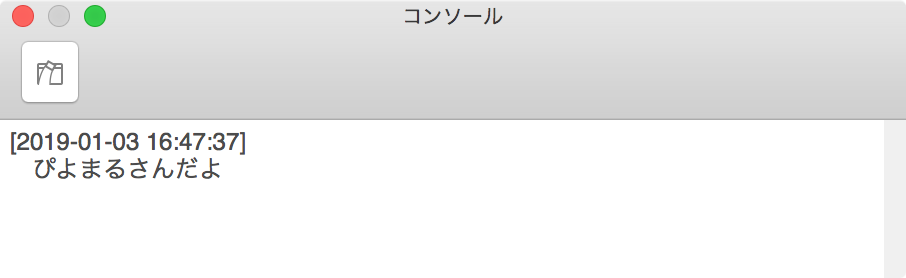
| AppleScript名:CotEditorのコンソールにログ出力 |
| tell application "CotEditor" activate write to console "ぴよまるさんだよ" end tell |
CotEditor 3.2.8のじっけん〜Selection
| AppleScript名:CotEditor 3.2.8のじっけん〜Selection |
| tell application "CotEditor" tell document 1 set aSel to properties of selection end tell end tell –> (* {range:{51, 25}, class:text selection, line range:{4, 1}, contents:"cessibility Inspectorの使い方"} *) |
CotEditor 3.2.8のじっけん
| AppleScript名:CotEditor 3.2.8のじっけん |
| tell application "CotEditor" properties —> {frontmost:false, class:application, name:"CotEditor", version:"3.2.8"} set a to count every window –> 1 tell front document properties (* {selection:sleep "" of document "名称未設定", path:missing value, text:"Book1 URLs http://piyocast.com/as/archives/2599 Accessibility Inspectorの使い方 ", encoding:"Unicode(UTF-8)", wrap lines:true, class:document, length:77, file:missing value, modified:true, coloring style:"Plain Text", line ending:LF, tab width:4, contents:"Book1 URLs http://piyocast.com/as/archives/2599 Accessibility Inspectorの使い方 ", IANA charset:"utf-8", name:"名称未設定", expands tab:false} *) end tell tell window 1 properties –> {zoomable:true, closeable:true, zoomed:false, class:window, index:1, visible:true, name:"名称未設定", view opacity:0.895218579235, miniaturizable:true, id:19863, miniaturized:false, resizable:true, bounds:{45, 70, 645, 768}, document:document "名称未設定"} end tell end tell |
CotEditor 3でHooking Script
| AppleScript名:CotEditor 3でHooking Script |
| use AppleScript version "2.4" use scripting additions –use framework "Foundation" using terms from application "CotEditor" on document opened theDocument tell application "CotEditor" set thePath to file of theDocument display notification "Opened " & thePath end tell end document opened on document saved theDocument tell application "CotEditor" set thePath to file of theDocument display notification "Saved " & thePath end tell end document saved end using terms from |
CotEditorで文字を取得する
| AppleScript名:CotEditorで文字を取得する |
| tell application "CotEditor" tell document 1 set aList to every character of contents end tell end tell –> (* {"て", "す", "と", "だ", "よ", " ", "日", "本", "語", "を", "打", "つ", "テ", "ス", "ト", "。"} *) |
CotEditorでdocumentのparagraphを取得する
| AppleScript名:CotEditorでdocumentのparagraphを取得する |
| tell application "CotEditor" tell document 1 set aList to every paragraph of contents end tell end tell –> (* {"てすとだよ ", "日本語を打つテスト。"} *) |
CotEditorでdocumentのプロパティを取得する
| AppleScript名:CotEditorでdocumentのプロパティを取得する |
| tell application "CotEditor" tell document 1 properties end tell end tell –> (* {selection:sleep "" of document "book1&2でAS Holeに対して張られていたリンク.txt" of application "CotEditor", path:"/Users/maro/Desktop/book1&2でAS Holeに対して張られていたリンク.txt", text:"Book1 URLs ", encoding:"Unicode(UTF-8)", wrap lines:true, class:document, length:2123, file:file "Cherry:Users:maro:Desktop:book1&2でAS Holeに対して張られていたリンク.txt", modified:false, coloring style:"Plain Text", line ending:LF, tab width:4, contents:"Book1 URLs ", IANA charset:"utf-8", name:"book1&2でAS Holeに対して張られていたリンク.txt", expands tab:false} *) |
CotEditorでウィンドウの透明度を連続的に変更する
| AppleScript名:CotEditorでウィンドウの透明度を連続的に変更する |
| tell application "CotEditor" tell window 1 repeat with i from 10 to 1 by -1 set view opacity to (i / 10) delay 0.1 end repeat set view opacity to 1.0 end tell end tell |
CotEditorでdocumentのselectionを取得
| AppleScript名:CotEditorでdocumentのselectionを取得 |
| tell application "CotEditor" tell document 1 set aSel to properties of selection –> {range:{78, 36}, class:text selection, line range:{6, 1}, contents:"http://piyocast.com/as/archives/3526"} set aCon to contents of selection –> "cessibility Inspectorの使い方" end tell end tell |
CotEditorでWindowの枚数をカウント
CotEditorのウィンドウの枚数をカウントするAppleScriptです。ただし、visibleがfalseのウィンドウをカウントしてしまう場合もあるので、visibleがtrueのもののみをカウントするようにしたほうがよいでしょう。
また、最前面のドキュメントを指定したい場合には、Window 1が所属しているdocumentを探すよりは、front documentでアクセスしたほうが簡単で確実です。
| AppleScript名:CotEditorでWindowの枚数をカウント |
| tell application "CotEditor" set a to count every window end tell –> 1 |
CotEditorのアプリケーションのプロパティを取得
| AppleScript名:CotEditorのアプリケーションのプロパティを取得 |
| tell application "CotEditor" properties end tell –> {name:"CotEditor", frontmost:false, class:application, version:"3.2.8"} |
CotEditorの最前面のドキュメントの内容から前後にある空白文字列をトリミングして文字リスト化
| AppleScript名:CotEditorの最前面のドキュメントの内容から前後にある空白文字列をトリミングして文字リスト化 |
| use AppleScript version "2.5" use scripting additions use framework "Foundation" property NSString : a reference to current application’s NSString property NSCharacterSet : a reference to current application’s NSCharacterSet tell application "CotEditor" tell front document set aCon to contents end tell end tell set aList to paragraphs of aCon set outList to {} repeat with i in aList set j to trimWhiteSpaceFromHeadAndTail(i) of me set the end of outList to j end repeat outList –指定文字列の前後から空白をトリミング on trimWhiteSpaceFromHeadAndTail(aStr as string) set aString to NSString’s stringWithString:aStr set bString to aString’s stringByTrimmingCharactersInSet:(NSCharacterSet’s whitespaceAndNewlineCharacterSet()) return bString as list of string or string –as anything end trimWhiteSpaceFromHeadAndTail |