
Menu

Skip to content
AppleScriptの穴
  • Home
  • Products
  • Books
  • Docs
  • Events
  • Forum
  • About This Blog
  • License
  • 仕事依頼

AppleScriptの穴

Useful & Practical AppleScript archive. Click '★Click Here to Open This Script' Link to download each AppleScript

カテゴリー: Sound

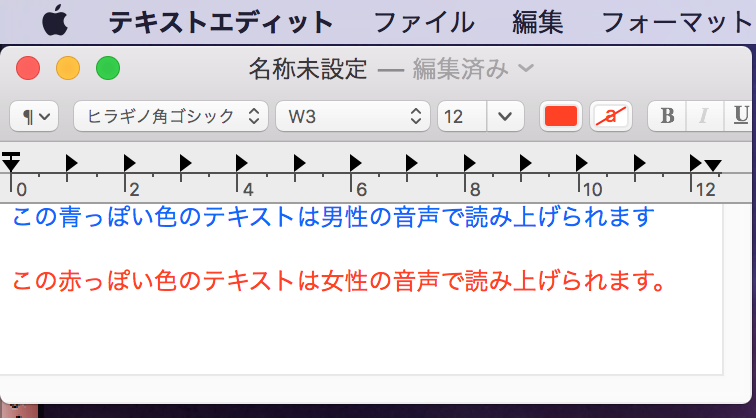
TextEdit本文色に応じて青っぽい色は男性の音声で、赤っぽい色は女性の音声で読み上げ

Posted on 2月 16, 2018 by Takaaki Naganoya

TextEditの本文内で文字色が青っぽい色の文字は男性の音声で、赤っぽい色の文字は女性の音声で読み上げる(sayコマンド)AppleScriptです。

実行時には日本語読み上げ音声のKyokoとOtoyaをインストールしてある必要があります。インストールしてあるかどうか、対象の言語、性別で検出を行い、存在していなかった場合には読み上げを行いません。
AppleScript名:TextEdit本文色に応じて青っぽい色は男性の音声で、赤っぽい色は女性の音声で読み上げ
— Created 2018-02-15 by Takaaki Naganoya
— 2018 Piyomaru Software
use AppleScript version "2.5"
use scripting additions
use framework "Foundation"

property NSColor : a reference to current application’s NSColor
property NSArray : a reference to current application’s NSArray
property NSSortDescriptor : a reference to current application’s NSSortDescriptor

–TTS音声情報を取得する
set curLang to "ja_JP"

set v1List to getTTSVoiceNameWithLanguageAndGender(curLang, "Male") of me
if length of v1List = 0 then return
set v1 to contents of item 1 of v1List –Male Voice

set v2List to getTTSVoiceNameWithLanguageAndGender(curLang, "Female") of me
if length of v2List = 0 then return
set v2 to contents of item 1 of v2List –Female Voice

–TextEditの書類から情報を取得
set aResRec to (getTextStrAndColor() of me)
set colList to colorDat of aResRec
set strList to strList of aResRec

set aLen to length of strList

repeat with i from 1 to aLen
  set curColor to contents of item i of colList
  
set curStr to contents of item i of strList
  
set aColor to retColorDomainNameFromList(curColor, 65535) of me
  
  
if aColor = "blue" then
    –Read by Male Voice
    
say curStr using v1
  else if aColor = "red" then
    –Read by Female Voice  
    
say curStr using v2
  end if
  
end repeat

on getTextStrAndColor()
  tell application "TextEdit"
    if (count every document) = 0 then error "No Document"
    
    
tell front document
      set colList to (color of every attribute run)
      
set attList to every attribute run
    end tell
    
return {colorDat:colList, strList:attList}
  end tell
  
end getTextStrAndColor

on retCocoaColorList(aColorList, aMax)
  set cocoaColorList to {}
  
repeat with i in aColorList
    set the end of cocoaColorList to i / aMax
  end repeat
  
set the end of cocoaColorList to 1.0 –Alpha
  
return cocoaColorList
end retCocoaColorList

–数値の1D List with Recordをソート
on sort1DRecList(aList as list, aKey as string, ascendingF as boolean)
  set aArray to NSArray’s arrayWithArray:aList
  
set desc1 to NSSortDescriptor’s sortDescriptorWithKey:aKey ascending:ascendingF selector:"compare:"
  
set bList to (aArray’s sortedArrayUsingDescriptors:{desc1}) as list
  
return bList
end sort1DRecList

on getTTSVoiceNameWithLanguageAndGender(voiceLang, aGen)
  if aGen = "Male" then
    set aGender to "VoiceGenderMale"
  else if aGen = "Female" then
    set aGender to "VoiceGenderFemale"
  end if
  
  
set outArray to current application’s NSMutableArray’s new()
  
  
–Make Installed Voice List
  
set aList to current application’s NSSpeechSynthesizer’s availableVoices()
  
set bList to aList as list
  
  
repeat with i in bList
    set j to contents of i
    
set aDIc to (current application’s NSSpeechSynthesizer’s attributesForVoice:j)
    (
outArray’s addObject:aDIc)
  end repeat
  
  
set aPredicate to current application’s NSPredicate’s predicateWithFormat_("VoiceLocaleIdentifier == %@ && VoiceGender== %@", voiceLang, aGender)
  
set filteredArray to outArray’s filteredArrayUsingPredicate:aPredicate
  
set aResList to (filteredArray’s valueForKey:"VoiceName") as list
  
  
return aResList
end getTTSVoiceNameWithLanguageAndGender

on retColorDomainNameFromList(aColList as list, aColMax as integer)
  set {rNum, gNum, bNum, aNum} to retCocoaColorList(aColList, aColMax) of me
  
set aCol to NSColor’s colorWithCalibratedRed:rNum green:gNum blue:bNum alpha:aNum
  
return retColorDomainNameFronNSColor(aCol) of me
end retColorDomainNameFromList

on retColorDomainNameFronNSColor(aCol)
  set hueVal to aCol’s hueComponent()
  
set satVal to aCol’s saturationComponent()
  
set brightVal to aCol’s brightnessComponent()
  
  
if satVal ≤ 0.01 then set satVal to 0.0
  
  
set colName to ""
  
  
if satVal = 0.0 then
    if brightVal ≤ 0.2 then
      set colName to "black"
    else if (brightVal > 0.95) then
      set colName to "white"
    else
      set colName to "gray"
    end if
  else
    if hueVal ≤ (15.0 / 360) or hueVal ≥ (330 / 360) then
      set colName to "red"
    else if hueVal ≤ (45.0 / 360) then
      set colName to "orange"
    else if hueVal < (70.0 / 360) then
      set colName to "yellow"
    else if hueVal < (150.0 / 360) then
      set colName to "green"
    else if hueVal < (190.0 / 360) then
      set colName to "light blue" –cyan
    else if (hueVal < 250.0 / 360.0) then
      set colName to "blue"
    else if (hueVal < 290.0 / 360.0) then
      set colName to "purple"
    else
      set colName to "pink" –magenta
    end if
  end if
  
  
return colName
end retColorDomainNameFronNSColor

★Click Here to Open This Script 

Posted in Color Sound Text | Tagged 10.11savvy 10.12savvy 10.13savvy Sorting TextEdit | Leave a comment

Post navigation

  • Newer posts

電子書籍(PDF)をオンラインストアで販売中!

Google Search

Popular posts

  • macOS 26, Tahoe
  • 【続報】macOS 15.5で特定ファイル名パターンのfileをaliasにcastすると100%クラッシュするバグ
  • Xcode上のAppleScriptObjCのプログラムから、Xcodeのログ欄へのメッセージ出力を実行
  • Script Debuggerがフリーダウンロードで提供されることに
  • AppleScript Dropletのバグっぽい動作が「復活」(macOS 15.5β)
  • macOS 26, 15.5でShortcuts.app「AppleScriptを実行」アクションのバグが修正される
  • Appleに買収されたPixelmator ProがAppleとしての初アップデート
  • Dock Menu
  • Applicationのactivateを記録する v2
  • Numbersで選択範囲のdateの年を+1する
  • Claris FileMaker Pro 2025(v22)がリリースされた
  • macOS 15.5beta5(24F74)でaliasのキャスティングバグが修正された???
  • シンプルな文字置換
  • 複数の重複検出ルーチンを順次速度計測
  • macOS 15.7.2 スクリプトメニューから実行できなくなった地図系ライブラリ?
  • Apple Creator Studioに含まれるKeynote/Pages/Numbersは新バージョン?
  • NaturalLanguage.frameworkを用いて日本語テキストの形態素解析を行う
  • 画像をAppleScriptでアスキーアート化
  • デフォルトタイトルと重なっているものと指定サイズのものを抽出
  • Adobe InDesignのAppleScript実行エンジンがCarbonからCocoaベースに書き換えられる

Tags

10.11savvy (1101) 10.12savvy (1242) 10.13savvy (1391) 10.14savvy (587) 10.15savvy (438) 11.0savvy (283) 12.0savvy (212) 13.0savvy (204) 14.0savvy (159) 15.0savvy (170) 26.0savvy (42) CotEditor (68) Finder (53) Keynote (122) NSAlert (61) NSArray (51) NSBitmapImageRep (20) NSBundle (20) NSButton (34) NSColor (53) NSDictionary (28) NSFileManager (23) NSFont (21) NSImage (41) NSJSONSerialization (21) NSMutableArray (63) NSMutableDictionary (22) NSPredicate (36) NSRunningApplication (56) NSScreen (30) NSScrollView (22) NSString (119) NSURL (98) NSURLRequest (23) NSUTF8StringEncoding (30) NSView (33) NSWorkspace (20) Numbers (80) Pages (58) Safari (44) Script Editor (27) WKUserContentController (21) WKUserScript (20) WKWebView (23) WKWebViewConfiguration (22)

カテゴリー

  • 2D Bin Packing
  • 3D
  • AirDrop
  • AirPlay
  • Animation
  • AppleScript Application on Xcode
  • Beginner
  • Benchmark
  • beta
  • Bluetooth
  • Books
  • boolean
  • bounds
  • Bug
  • Calendar
  • call by reference
  • check sum
  • Clipboard
  • Cocoa-AppleScript Applet
  • Code Sign
  • Color
  • Custom Class
  • date
  • dialog
  • diff
  • drive
  • Droplet
  • exif
  • file
  • File path
  • filter
  • folder
  • Font
  • Font
  • GAME
  • geolocation
  • GUI
  • GUI Scripting
  • Hex
  • History
  • How To
  • iCloud
  • Icon
  • Image
  • Input Method
  • Internet
  • iOS App
  • JavaScript
  • JSON
  • JXA
  • Keychain
  • Keychain
  • Language
  • Library
  • list
  • Locale
  • Localize
  • Machine Learning
  • Map
  • Markdown
  • Menu
  • Metadata
  • MIDI
  • MIME
  • Natural Language Processing
  • Network
  • news
  • Newt On Project
  • Noification
  • Notarization
  • Number
  • Object control
  • OCR
  • OSA
  • parallel processing
  • PDF
  • Peripheral
  • process
  • PRODUCTS
  • QR Code
  • Raw AppleEvent Code
  • Record
  • rectangle
  • recursive call
  • regexp
  • Release
  • Remote Control
  • Require Control-Command-R to run
  • REST API
  • Review
  • RTF
  • Sandbox
  • Screen Saver
  • Script Libraries
  • Scripting Additions
  • sdef
  • search
  • Security
  • selection
  • shell script
  • Shortcuts Workflow
  • Sort
  • Sound
  • Spellchecker
  • Spotlight
  • SVG
  • System
  • Tag
  • Telephony
  • Text
  • Text to Speech
  • timezone
  • Tools
  • Update
  • URL
  • UTI
  • Web Contents Control
  • WiFi
  • XML
  • XML-RPC
  • イベント(Event)
  • 未分類

アーカイブ

  • 2026年2月
  • 2026年1月
  • 2025年12月
  • 2025年11月
  • 2025年10月
  • 2025年9月
  • 2025年8月
  • 2025年7月
  • 2025年6月
  • 2025年5月
  • 2025年4月
  • 2025年3月
  • 2025年2月
  • 2025年1月
  • 2024年12月
  • 2024年11月
  • 2024年10月
  • 2024年9月
  • 2024年8月
  • 2024年7月
  • 2024年6月
  • 2024年5月
  • 2024年4月
  • 2024年3月
  • 2024年2月
  • 2024年1月
  • 2023年12月
  • 2023年11月
  • 2023年10月
  • 2023年9月
  • 2023年8月
  • 2023年7月
  • 2023年6月
  • 2023年5月
  • 2023年4月
  • 2023年3月
  • 2023年2月
  • 2023年1月
  • 2022年12月
  • 2022年11月
  • 2022年10月
  • 2022年9月
  • 2022年8月
  • 2022年7月
  • 2022年6月
  • 2022年5月
  • 2022年4月
  • 2022年3月
  • 2022年2月
  • 2022年1月
  • 2021年12月
  • 2021年11月
  • 2021年10月
  • 2021年9月
  • 2021年8月
  • 2021年7月
  • 2021年6月
  • 2021年5月
  • 2021年4月
  • 2021年3月
  • 2021年2月
  • 2021年1月
  • 2020年12月
  • 2020年11月
  • 2020年10月
  • 2020年9月
  • 2020年8月
  • 2020年7月
  • 2020年6月
  • 2020年5月
  • 2020年4月
  • 2020年3月
  • 2020年2月
  • 2020年1月
  • 2019年12月
  • 2019年11月
  • 2019年10月
  • 2019年9月
  • 2019年8月
  • 2019年7月
  • 2019年6月
  • 2019年5月
  • 2019年4月
  • 2019年3月
  • 2019年2月
  • 2019年1月
  • 2018年12月
  • 2018年11月
  • 2018年10月
  • 2018年9月
  • 2018年8月
  • 2018年7月
  • 2018年6月
  • 2018年5月
  • 2018年4月
  • 2018年3月
  • 2018年2月

https://piyomarusoft.booth.pm/items/301502

メタ情報

  • ログイン
  • 投稿フィード
  • コメントフィード
  • WordPress.org

Forum Posts

  • 人気のトピック
  • 返信がないトピック

メタ情報

  • ログイン
  • 投稿フィード
  • コメントフィード
  • WordPress.org
Proudly powered by WordPress
Theme: Flint by Star Verte LLC