

Menu

Skip to content
AppleScriptの穴
  • Home
  • Products
  • Books
  • Docs
  • Events
  • Forum
  • About This Blog
  • License
  • 仕事依頼

AppleScriptの穴

Useful & Practical AppleScript archive. Click '★Click Here to Open This Script' Link to download each AppleScript

YouTubeムービー再生実験 v2c

Posted on 11月 14, 2025 by Takaaki Naganoya

メイン環境をmacOS 26にアップデートしたところ、display youtubeライブラリが動作しなくなっていたので、対処のために作った試作品の改良版です。

# 2a→2bで機能に関係ない範囲の微修正をしました
# 2b→2cでレスポンシブルモードで表示するようにHTML部分を変更しました
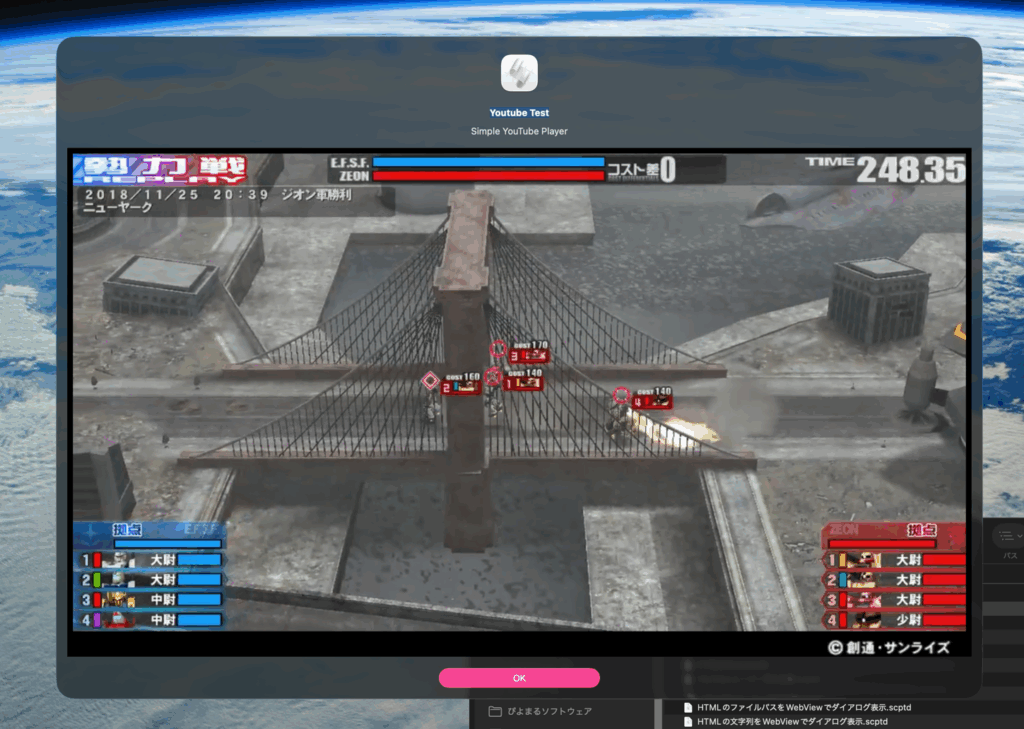
edama2さんからYouTubeムービー再生用の改良Scriptを送っていただいて、なんで動かなくなっていたのかの理由がわかりました。HTMLを文字列で与えるのは、問題ないものの……リファラーを「https://www.youtube.com」ではなく「https://www.google.com」にする必要があったのだとか(検索エンジンの検索結果から表示できるように、という話に見えます)。

結局、local web serverを起動する必要はなかったので起動せず、起動していないのでkillもせず、htmlの書き出しも行わないのでファイルの削除もせず、かなりシンプルな内容に戻りましたし、ダイアログ表示と同時にYouTubeムービーの再生を開始する機能も復活。

Thanks!>edama2氏

AppleScript名:YouTubeムービー再生実験 v2c.scpt
—
–  Created by: Takaaki Naganoya
–  Created on: 2025/11/13
–  Modified by edama2 & Takaaki Naganoya on: 2025/11/13
—
–  Copyright © 2025 Piyomaru Software, All Rights Reserved
—

use AppleScript version "2.8"
use framework "Cocoa"
use framework "WebKit"
use scripting additions

property |NSURL| : a reference to current application’s |NSURL|
property WKWebView : a reference to current application’s WKWebView
property NSURLRequest : a reference to current application’s NSURLRequest
property NSRunningApplication : a reference to current application’s NSRunningApplication
property NSUTF8StringEncoding : a reference to current application’s NSUTF8StringEncoding
property WKWebViewConfiguration : a reference to current application’s WKWebViewConfiguration

property returnCode : 0

set mainMessage to "Youtube Test"
set subMessage to "Simple YouTube Player"
set viewSizeArray to {1280, 720}
set vId to "GP_tVXTYdmY"
set startSec to 32

set htmlString to "<body style=’background-color:red;overflow:hidden;margin:auto 0;padding:auto 0;’><div id=’ytplayer’></div>
<script>
var tag=document.createElement(’script’);
tag.src=’https://www.youtube.com/player_api’;
var firstScriptTag=document.getElementsByTagName(’script’)[0];
firstScriptTag.parentNode.insertBefore(tag, firstScriptTag);
var player;
function onYouTubePlayerAPIReady() {player = new YT.Player(’ytplayer’,{height:’100%’,width:’100%’,videoId:’"
& vId & "’,playerVars:{autoplay:1,mute:0,start:" & (startSec as string) & "}});}
</script>"

set paramObj to {myMessage:mainMessage, mySubMessage:subMessage, viewSize:viewSizeArray, myHTML:htmlString}
–my browseURLContents:paramObj–For Debug with Script Editor
my performSelectorOnMainThread:"browseURLContents:" withObject:(paramObj) waitUntilDone:true

— WKWebView表示用ハンドラ
on browseURLContents:paramObj
  set webSize to viewSize of paramObj
  
copy webSize to {aWidth, aHeight}
  
set htmlString to myHTML of paramObj
  
  
set idConf to current application’s WKWebViewConfiguration’s new()
  
set aWebView to current application’s WKWebView’s alloc()’s initWithFrame:(current application’s NSMakeRect(0, 0, aWidth, aHeight)) configuration:idConf
  
set baseURL to (current application’s NSURL’s URLWithString:"https://www.google.com/")
  
aWebView’s loadHTMLString:htmlString baseURL:baseURL
  
  
— アラートに埋め込む
  
set theAlert to current application’s NSAlert’s new()
  
tell theAlert
    –addButtonWithTitle_("Cancel")
    
its setMessageText:(myMessage of paramObj)
    
its setInformativeText:(mySubMessage of paramObj)
    
its addButtonWithTitle:"OK"
    
its setAccessoryView:aWebView
    
set myWindow to its |window|
    
tell myWindow
      its setLevel:(current application’s NSScreenSaverWindowLevel)
      
setInitialFirstResponder_(aWebView)
    end tell
  end tell
  
  
— モーダル表示
  
NSRunningApplication’s currentApplication()’s activateWithOptions:0
  
set returnCode to (theAlert’s runModal()) as number
  
  
— WKWebViewの後始末
  
aWebView’s loadHTMLString:"" baseURL:(missing value)
end browseURLContents:

★Click Here to Open This Script 

(Visited 35 times, 1 visits today)
Posted in dialog Web Contents Control | Tagged 26.0savvy | 1 Comment

1 thoughts on “<span>YouTubeムービー再生実験 v2c</span>”

  1. 12/30/25
    12:41 AM
    2025年12月30日
    12:41 AM

    Reply

    2025年に書いた価値あるAppleScript – AppleScriptの穴 says:

    […] YouTubeムービー再生実験 v2c […]

Leave a Reply to 2025年に書いた価値あるAppleScript – AppleScriptの穴 Cancel reply

Your email address will not be published. Required fields are marked *

You may use these HTML tags and attributes: <a href="" title=""> <abbr title=""> <acronym title=""> <b> <blockquote cite=""> <cite> <code> <del datetime=""> <em> <i> <q cite=""> <s> <strike> <strong>

電子書籍(PDF)をオンラインストアで販売中!

Google Search

Popular posts

  • macOS 26, Tahoe
  • 【続報】macOS 15.5で特定ファイル名パターンのfileをaliasにcastすると100%クラッシュするバグ
  • Xcode上のAppleScriptObjCのプログラムから、Xcodeのログ欄へのメッセージ出力を実行
  • Script Debuggerがフリーダウンロードで提供されることに
  • AppleScript Dropletのバグっぽい動作が「復活」(macOS 15.5β)
  • macOS 26, 15.5でShortcuts.app「AppleScriptを実行」アクションのバグが修正される
  • Dock Menu
  • Applicationのactivateを記録する v2
  • Appleに買収されたPixelmator ProがAppleとしての初アップデート
  • Numbersで選択範囲のdateの年を+1する
  • macOS 15.5beta5(24F74)でaliasのキャスティングバグが修正された???
  • Claris FileMaker Pro 2025(v22)がリリースされた
  • シンプルな文字置換
  • 複数の重複検出ルーチンを順次速度計測
  • AS書類を書式で分解して再構成
  • macOS 15.7.2 スクリプトメニューから実行できなくなった地図系ライブラリ?
  • NaturalLanguage.frameworkを用いて日本語テキストの形態素解析を行う
  • スタイルつきテキストでスタイルつきテキストを検索 v1.1
  • Apple Creator Studioに含まれるKeynote/Pages/Numbersは新バージョン?
  • デフォルトタイトルと重なっているものと指定サイズのものを抽出

Tags

10.11savvy (1101) 10.12savvy (1242) 10.13savvy (1391) 10.14savvy (587) 10.15savvy (438) 11.0savvy (283) 12.0savvy (212) 13.0savvy (204) 14.0savvy (159) 15.0savvy (168) 26.0savvy (40) CotEditor (67) Finder (53) Keynote (122) NSAlert (61) NSArray (51) NSBitmapImageRep (20) NSBundle (20) NSButton (34) NSColor (53) NSDictionary (28) NSFileManager (23) NSFont (21) NSImage (41) NSJSONSerialization (21) NSMutableArray (63) NSMutableDictionary (22) NSPredicate (36) NSRunningApplication (56) NSScreen (30) NSScrollView (22) NSString (119) NSURL (98) NSURLRequest (23) NSUTF8StringEncoding (30) NSView (33) NSWorkspace (20) Numbers (80) Pages (58) Safari (44) Script Editor (27) WKUserContentController (21) WKUserScript (20) WKWebView (23) WKWebViewConfiguration (22)

カテゴリー

  • 2D Bin Packing
  • 3D
  • AirDrop
  • AirPlay
  • Animation
  • AppleScript Application on Xcode
  • Beginner
  • Benchmark
  • beta
  • Bluetooth
  • Books
  • boolean
  • bounds
  • Bug
  • Calendar
  • call by reference
  • check sum
  • Clipboard
  • Cocoa-AppleScript Applet
  • Code Sign
  • Color
  • Custom Class
  • date
  • dialog
  • diff
  • drive
  • Droplet
  • exif
  • file
  • File path
  • filter
  • folder
  • Font
  • Font
  • GAME
  • geolocation
  • GUI
  • GUI Scripting
  • Hex
  • History
  • How To
  • iCloud
  • Icon
  • Image
  • Input Method
  • Internet
  • iOS App
  • JavaScript
  • JSON
  • JXA
  • Keychain
  • Keychain
  • Language
  • Library
  • list
  • Locale
  • Localize
  • Machine Learning
  • Map
  • Markdown
  • Menu
  • Metadata
  • MIDI
  • MIME
  • Natural Language Processing
  • Network
  • news
  • Newt On Project
  • Noification
  • Notarization
  • Number
  • Object control
  • OCR
  • OSA
  • parallel processing
  • PDF
  • Peripheral
  • process
  • PRODUCTS
  • QR Code
  • Raw AppleEvent Code
  • Record
  • rectangle
  • recursive call
  • regexp
  • Release
  • Remote Control
  • Require Control-Command-R to run
  • REST API
  • Review
  • RTF
  • Sandbox
  • Screen Saver
  • Script Libraries
  • Scripting Additions
  • sdef
  • search
  • Security
  • selection
  • shell script
  • Shortcuts Workflow
  • Sort
  • Sound
  • Spellchecker
  • Spotlight
  • SVG
  • System
  • Tag
  • Telephony
  • Text
  • Text to Speech
  • timezone
  • Tools
  • Update
  • URL
  • UTI
  • Web Contents Control
  • WiFi
  • XML
  • XML-RPC
  • イベント(Event)
  • 未分類

アーカイブ

  • 2026年2月
  • 2026年1月
  • 2025年12月
  • 2025年11月
  • 2025年10月
  • 2025年9月
  • 2025年8月
  • 2025年7月
  • 2025年6月
  • 2025年5月
  • 2025年4月
  • 2025年3月
  • 2025年2月
  • 2025年1月
  • 2024年12月
  • 2024年11月
  • 2024年10月
  • 2024年9月
  • 2024年8月
  • 2024年7月
  • 2024年6月
  • 2024年5月
  • 2024年4月
  • 2024年3月
  • 2024年2月
  • 2024年1月
  • 2023年12月
  • 2023年11月
  • 2023年10月
  • 2023年9月
  • 2023年8月
  • 2023年7月
  • 2023年6月
  • 2023年5月
  • 2023年4月
  • 2023年3月
  • 2023年2月
  • 2023年1月
  • 2022年12月
  • 2022年11月
  • 2022年10月
  • 2022年9月
  • 2022年8月
  • 2022年7月
  • 2022年6月
  • 2022年5月
  • 2022年4月
  • 2022年3月
  • 2022年2月
  • 2022年1月
  • 2021年12月
  • 2021年11月
  • 2021年10月
  • 2021年9月
  • 2021年8月
  • 2021年7月
  • 2021年6月
  • 2021年5月
  • 2021年4月
  • 2021年3月
  • 2021年2月
  • 2021年1月
  • 2020年12月
  • 2020年11月
  • 2020年10月
  • 2020年9月
  • 2020年8月
  • 2020年7月
  • 2020年6月
  • 2020年5月
  • 2020年4月
  • 2020年3月
  • 2020年2月
  • 2020年1月
  • 2019年12月
  • 2019年11月
  • 2019年10月
  • 2019年9月
  • 2019年8月
  • 2019年7月
  • 2019年6月
  • 2019年5月
  • 2019年4月
  • 2019年3月
  • 2019年2月
  • 2019年1月
  • 2018年12月
  • 2018年11月
  • 2018年10月
  • 2018年9月
  • 2018年8月
  • 2018年7月
  • 2018年6月
  • 2018年5月
  • 2018年4月
  • 2018年3月
  • 2018年2月

https://piyomarusoft.booth.pm/items/301502

メタ情報

  • ログイン
  • 投稿フィード
  • コメントフィード
  • WordPress.org

Forum Posts

  • 人気のトピック
  • 返信がないトピック

メタ情報

  • ログイン
  • 投稿フィード
  • コメントフィード
  • WordPress.org
Proudly powered by WordPress
Theme: Flint by Star Verte LLC