

Menu

Skip to content
AppleScriptの穴
  • Home
  • Products
  • Books
  • Docs
  • Events
  • Forum
  • About This Blog
  • License
  • 仕事依頼

AppleScriptの穴

Useful & Practical AppleScript archive. Click '★Click Here to Open This Script' Link to download each AppleScript

クリップボード内のテキストをSayコマンドで読み上げて音声ファイル化

Posted on 5月 27, 2020 by Takaaki Naganoya

読み上げ対象のテキストをコピーした状態で実行するAppleScriptです。クリップボード内のテキストをSayコマンドで読み上げて、音声ファイルにレンダリングします。出力後、読み上げ所要時間を出力ファイルから求めてダイアログ表示します。

音声レンダリング処理は実際の音声読み上げ処理よりも短い時間で完了します。

–> Downlad Script With library within its bundle

掲載のリストを実行しても、スライダー入力ライブラリが含まれていないため、そのままでは実行できません。↑のScriptをまるごとダウンロードして展開すると、ライブラリ入りのScriptになります。実行にはダウンロードしたScriptをご利用ください。プログラムリスト掲載は参考のために行なっているものです。
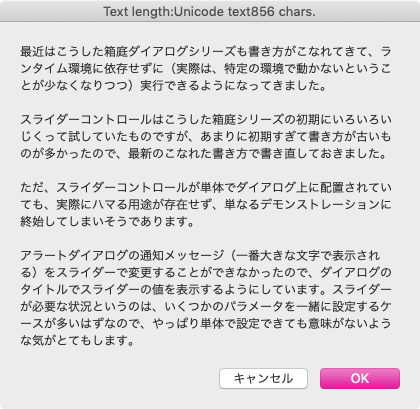

▲ステップ1:念のために、読み上げ対象テキストをダイアログ表示


▲ステップ2:読み上げ時の速度をスライダーで選択
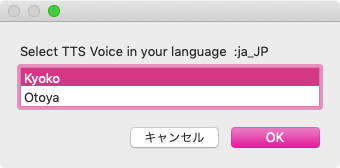

▲ステップ3:読み上げ音声を選択
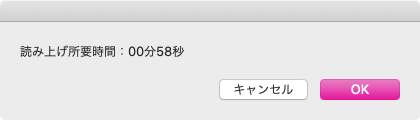

▲ステップ4:読み上げ所要時間をダイアログ表示
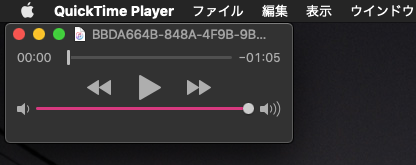

▲ステップ5:音声レンダリングしたファイルをQuickTime Playerでオープン

AppleScript名:クリップボード内のテキストをSayコマンドで読み上げて音声ファイル化.scptd
—
–  Created by: Takaaki Naganoya
–  Created on: 2020/05/27
—
–  Copyright © 2020 Piyomaru Software, All Rights Reserved
—

use AppleScript version "2.4" — Yosemite (10.10) or later
use framework "Foundation"
use framework "AppKit"
use framework "AVFoundation"
use scripting additions
use slLib : script "sliderLib"

property |NSURL| : a reference to current application’s |NSURL|
property NSDate : a reference to current application’s NSDate
property NSUUID : a reference to current application’s NSUUID
property NSFileManager : a reference to current application’s NSFileManager
property AVAudioPlayer : a reference to current application’s AVAudioPlayer
property NSDateFormatter : a reference to current application’s NSDateFormatter
property NSSpeechSynthesizer : a reference to current application’s NSSpeechSynthesizer

set aInfo to clipboard info
set uCount to (clipboard info for Unicode text)
if uCount = {} then
  display dialog "There is no text information in the clipboard" with title "Terminate information" buttons {"OK"} default button 1 with icon 2
  
return
end if

set totalCount to item 2 of item 1 of uCount

set aStr to the clipboard as text

–読み上げ内容の確認
display dialog aStr with title "Text length:" & (uCount as string) & " chars."

–読み上げ速度をSliderで入力
set rRes to slLib’s chooseBySlider(180, 220, "Select TTS reading pitch (small number:slow)")

–読み上げTTSキャラクタの選択
set aLoc to (current application’s NSLocale’s currentLocale()’s identifier()) as string –>  "ja_JP"
set vList to getTTSVoiceNameWithLanguage(aLoc) of me
set vRes to choose from list vList with prompt ("Select TTS Voice in your language :" & aLoc) without empty selection allowed
if vRes = false then return

set vCharacter to contents of first item of vRes

–音声ファイルの作成先パスを求める
set aUUID to NSUUID’s UUID()’s UUIDString() as string
set aPath to (((path to movies folder) as string) & aUUID & ".aif")
set aPOSIX to POSIX path of aPath

–音声レンダリング
tell current application
  say aStr using vCharacter saving to (aPOSIX) speaking rate rRes without waiting until completion
end tell

–レンダリングした音声の読み上げ所要時間を計算
set aDur to getDuration(aPath as alias) of me

–レンダリングした音声ファイルをオープン
tell application "QuickTime Player"
  open aPath
end tell

–完了報告
display dialog "読み上げ所要時間:" & my formatHMS(aDur)

on getTTSVoiceNameWithLanguage(voiceLang)
  set outArray to current application’s NSMutableArray’s new()
  
  
set aList to NSSpeechSynthesizer’s availableVoices()
  
set bList to aList as list
  
  
repeat with i in bList
    set j to contents of i
    
set aDIc to (NSSpeechSynthesizer’s attributesForVoice:j)
    (
outArray’s addObject:aDIc)
  end repeat
  
  
set aPredicate to current application’s NSPredicate’s predicateWithFormat_("VoiceLocaleIdentifier == %@", voiceLang)
  
set filteredArray to outArray’s filteredArrayUsingPredicate:aPredicate
  
set aResList to (filteredArray’s valueForKey:"VoiceName") as list
  
  
return aResList
end getTTSVoiceNameWithLanguage

on getDuration(aFile)
  set aURL to |NSURL|’s fileURLWithPath:(POSIX path of aFile)
  
  
repeat 1000 times
    set aAudioPlayer to AVAudioPlayer’s alloc()’s initWithContentsOfURL:aURL |error|:(missing value)
    
set aRes to aAudioPlayer’s prepareToPlay()
    
if aRes as boolean = true then exit repeat
    
delay 0.5
  end repeat
  
  
set channelCount to aAudioPlayer’s numberOfChannels()
  
set aDuration to aAudioPlayer’s duration()
  
return aDuration as real
end getDuration

on retAvailableTTSnames()
  set outList to {}
  
  
set aList to NSSpeechSynthesizer’s availableVoices()
  
set bList to aList as list
  
  
repeat with i in bList
    set j to contents of i
    
set aInfo to (NSSpeechSynthesizer’s attributesForVoice:j)
    
set aInfoRec to aInfo as record
    
set aName to VoiceName of aInfoRec
    
set the end of outList to aName
  end repeat
  
  
return outList
end retAvailableTTSnames

on formatHMS(aTime)
  set aDate to NSDate’s dateWithTimeIntervalSince1970:aTime
  
set aFormatter to NSDateFormatter’s alloc()’s init()
  
  
—This formatter text is localized in Japanese.
  
if aTime < hours then
    aFormatter’s setDateFormat:"mm分ss秒"
  else if aTime < days then
    aFormatter’s setDateFormat:"HH時間mm分ss秒"
  else
    aFormatter’s setDateFormat:"DD日HH時間mm分ss秒"
  end if
  
  
set timeStr to (aFormatter’s stringFromDate:aDate) as string
  
return timeStr
end formatHMS

★Click Here to Open This Script 

(Visited 310 times, 1 visits today)
Posted in dialog file Language Locale Text | Tagged 10.13savvy 10.14savvy 10.15savvy AVAudioPlayer NSDate NSDateFormatter NSFileManager NSMutableArray NSPredicate NSSpeechSynthesizer NSURL NSUUID | Leave a comment

Leave a Reply Cancel reply

Your email address will not be published. Required fields are marked *

You may use these HTML tags and attributes: <a href="" title=""> <abbr title=""> <acronym title=""> <b> <blockquote cite=""> <cite> <code> <del datetime=""> <em> <i> <q cite=""> <s> <strike> <strong>

電子書籍(PDF)をオンラインストアで販売中!

Google Search

Popular posts

  • macOS 26, Tahoe
  • Xcode上のAppleScriptObjCのプログラムから、Xcodeのログ欄へのメッセージ出力を実行
  • Script Debuggerがフリーダウンロードで提供されることに
  • macOS 26, 15.5でShortcuts.app「AppleScriptを実行」アクションのバグが修正される
  • シンプルな文字置換
  • Appleに買収されたPixelmator ProがAppleとしての初アップデート
  • Apple Creator Studioに含まれるKeynote/Pages/Numbersは新バージョン?
  • Applicationのactivateを記録する v2
  • macOS(Mac OS X/OS X)上のAppleScriptの歴史
  • Claris FileMaker Pro 2025(v22)がリリースされた
  • macOS 15.5beta5(24F74)でaliasのキャスティングバグが修正された???
  • macOS 15.7.2 スクリプトメニューから実行できなくなった地図系ライブラリ?
  • Adobe InDesignのAppleScript実行エンジンがCarbonからCocoaベースに書き換えられる
  • 指定フォルダ内から指定拡張子のファイルを取得し、エイリアスだったらオリジナルのパスをPOSIX pathで取得
  • デフォルトタイトルと重なっているものと指定サイズのものを抽出
  • 開始時刻から終了時刻までhh:mm形式の文字列を15分単位でリスト出力
  • MacBook Air/MacBook Proのディスプレイ開閉角度を取得
  • 「AppleScriptセキュリティ実践ガイド」を発売
  • 暗黙のuseコマンド
  • 各種GUIアプリ書類のオープン速度を向上するためにUIアニメーションの一時停止を

Tags

10.11savvy (1101) 10.12savvy (1242) 10.13savvy (1391) 10.14savvy (587) 10.15savvy (439) 11.0savvy (283) 12.0savvy (212) 13.0savvy (204) 14.0savvy (159) 15.0savvy (171) 26.0savvy (48) CotEditor (68) Finder (53) Keynote (122) NSAlert (61) NSArray (51) NSBitmapImageRep (20) NSBundle (20) NSButton (34) NSColor (53) NSDictionary (28) NSFileManager (23) NSFont (21) NSImage (41) NSJSONSerialization (21) NSMutableArray (63) NSMutableDictionary (22) NSPredicate (36) NSRunningApplication (56) NSScreen (30) NSScrollView (22) NSString (119) NSURL (98) NSURLRequest (23) NSUTF8StringEncoding (30) NSView (33) NSWorkspace (20) Numbers (80) Pages (58) Safari (45) Script Editor (27) WKUserContentController (21) WKUserScript (20) WKWebView (23) WKWebViewConfiguration (22)

カテゴリー

  • 2D Bin Packing
  • 3D
  • AirDrop
  • AirPlay
  • Animation
  • AppleScript Application on Xcode
  • Beginner
  • Benchmark
  • beta
  • Bluetooth
  • Books
  • boolean
  • bounds
  • Bug
  • Calendar
  • call by reference
  • check sum
  • Clipboard
  • Cocoa-AppleScript Applet
  • Code Sign
  • Color
  • Custom Class
  • date
  • dialog
  • diff
  • drive
  • Droplet
  • exif
  • file
  • File path
  • filter
  • folder
  • Font
  • Font
  • GAME
  • geolocation
  • GUI
  • GUI Scripting
  • Hex
  • History
  • How To
  • iCloud
  • Icon
  • Image
  • Input Method
  • Internet
  • iOS App
  • JavaScript
  • JSON
  • JXA
  • Keychain
  • Keychain
  • Language
  • Library
  • list
  • Locale
  • Localize
  • Machine Learning
  • Map
  • Markdown
  • Menu
  • Metadata
  • MIDI
  • MIME
  • Natural Language Processing
  • Network
  • news
  • Newt On Project
  • NFC
  • Noification
  • Notarization
  • Number
  • Object control
  • OCR
  • OSA
  • parallel processing
  • PDF
  • Peripheral
  • process
  • PRODUCTS
  • QR Code
  • Raw AppleEvent Code
  • Record
  • rectangle
  • recursive call
  • regexp
  • Release
  • Remote Control
  • Require Control-Command-R to run
  • REST API
  • Review
  • RTF
  • Sandbox
  • Screen Saver
  • Script Libraries
  • Scripting Additions
  • sdef
  • search
  • Security
  • selection
  • shell script
  • Shortcuts Workflow
  • Sort
  • Sound
  • Spaces
  • Spellchecker
  • Spotlight
  • SVG
  • Swift
  • System
  • Tag
  • Telephony
  • Text
  • Text to Speech
  • timezone
  • Tools
  • Update
  • URL
  • UTI
  • Web Contents Control
  • WiFi
  • XML
  • XML-RPC
  • イベント(Event)
  • 未分類

アーカイブ

  • 2026年5月
  • 2026年3月
  • 2026年2月
  • 2026年1月
  • 2025年12月
  • 2025年11月
  • 2025年10月
  • 2025年9月
  • 2025年8月
  • 2025年7月
  • 2025年6月
  • 2025年5月
  • 2025年4月
  • 2025年3月
  • 2025年2月
  • 2025年1月
  • 2024年12月
  • 2024年11月
  • 2024年10月
  • 2024年9月
  • 2024年8月
  • 2024年7月
  • 2024年6月
  • 2024年5月
  • 2024年4月
  • 2024年3月
  • 2024年2月
  • 2024年1月
  • 2023年12月
  • 2023年11月
  • 2023年10月
  • 2023年9月
  • 2023年8月
  • 2023年7月
  • 2023年6月
  • 2023年5月
  • 2023年4月
  • 2023年3月
  • 2023年2月
  • 2023年1月
  • 2022年12月
  • 2022年11月
  • 2022年10月
  • 2022年9月
  • 2022年8月
  • 2022年7月
  • 2022年6月
  • 2022年5月
  • 2022年4月
  • 2022年3月
  • 2022年2月
  • 2022年1月
  • 2021年12月
  • 2021年11月
  • 2021年10月
  • 2021年9月
  • 2021年8月
  • 2021年7月
  • 2021年6月
  • 2021年5月
  • 2021年4月
  • 2021年3月
  • 2021年2月
  • 2021年1月
  • 2020年12月
  • 2020年11月
  • 2020年10月
  • 2020年9月
  • 2020年8月
  • 2020年7月
  • 2020年6月
  • 2020年5月
  • 2020年4月
  • 2020年3月
  • 2020年2月
  • 2020年1月
  • 2019年12月
  • 2019年11月
  • 2019年10月
  • 2019年9月
  • 2019年8月
  • 2019年7月
  • 2019年6月
  • 2019年5月
  • 2019年4月
  • 2019年3月
  • 2019年2月
  • 2019年1月
  • 2018年12月
  • 2018年11月
  • 2018年10月
  • 2018年9月
  • 2018年8月
  • 2018年7月
  • 2018年6月
  • 2018年5月
  • 2018年4月
  • 2018年3月
  • 2018年2月

https://piyomarusoft.booth.pm/items/301502

メタ情報

  • ログイン
  • 投稿フィード
  • コメントフィード
  • WordPress.org

Forum Posts

  • 人気のトピック
  • 返信がないトピック

メタ情報

  • ログイン
  • 投稿フィード
  • コメントフィード
  • WordPress.org
Proudly powered by WordPress
Theme: Flint by Star Verte LLC