

現時点でMacに接続されているディスプレイ情報を取得して、座標値からその位置関係や大きさを計算して画像にレンダリングし、ポップアップメニューから処理対象のディスプレイを選択してNSRectを返すAppleScriptです。
まだ試作品レベルですが、macOS 27 beta上で動作しています。ただ、NSAlertによるダイアログを表示させた場合に、アイコンもタイトルもサブタイトルもすべて左寄せになってしまうところがいまひとつです。
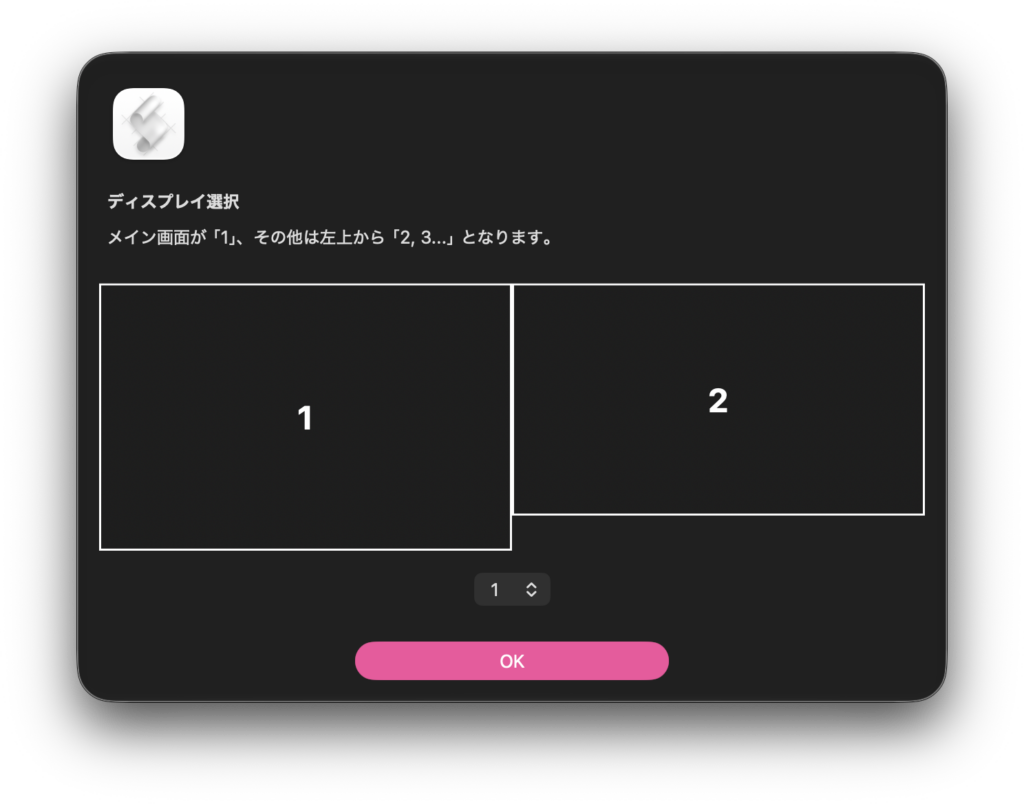
なんでこんなものを作ったかといえば、複数ディスプレイがつながっているMac上で任意のディスプレイ上に表示されているウィンドウ(に含まれるdocument)だけを処理対象とし、他のディスプレイ上のウィンドウを無視するといった処理をしたいと考えたからです。
少々AIにお願いしてコードを書いてもらっていますが、そのためにやや不要な処理までやっているような気もします。
| AppleScript名:ディスプレイ情報を取得して、位置関係を画像化_take2_1b.scptd |
| — – Created by: Takaaki Naganoya – Created on: 2026/07/19 — – Copyright © 2026 Piyomaru Software, All Rights Reserved — use AppleScript version "2.8" use scripting additions use framework "Foundation" use framework "AppKit" property K_MAX_WIDTH : 600.0 property K_MAX_HEIGHT : 300.0 property selectedDispRes : missing value set {aInfoList, aIMG, aSizeList} to drawDisplayLayout() of me –return aIMG set aInfoList to aInfoList as list if length of aInfoList = 1 then return set aParamRec to {myDispInfo:aInfoList, myImgView:aIMG, mySizeList:aSizeList, mymainTitle:"ディスプレイ選択", mySubTitle:"メイン画面が「1」、その他は左上から「2, 3…」となります。"} –my dispLayoutAndPopup:aParamRec–for debugging on Script Editor my performSelectorOnMainThread:"dispLayoutAndPopup:" withObject:(aParamRec) waitUntilDone:true return (visibleFrame of selectedDispRes)’s |description|() as string –For Debugging –Macに接続されているディスプレイ一覧から処理対象を選択するダイアログを表示 on dispLayoutAndPopup:aParam set dList to (myDispInfo of aParam) as list set aIMG to myImgView of aParam set aMainTitle to (mymainTitle of aParam) as string set aSubTitle to (mySubTitle of aParam) as string set {imgWidth, imgHeight} to (mySizeList of aParam) as list set dNum to length of dList set numStrList to makeNumberStringList(dNum) of me set currentAlert to current application’s NSAlert’s alloc()’s init() currentAlert’s setMessageText:aMainTitle currentAlert’s setInformativeText:aSubTitle set imageView to current application’s NSImageView’s alloc()’s initWithFrame:(current application’s NSMakeRect(0, 0, imgWidth, imgHeight)) imageView’s setImage:aIMG set a1Button to (current application’s NSPopUpButton’s alloc()’s initWithFrame:(current application’s NSMakeRect(0, 0, imgWidth – 100, 30)) pullsDown:false) a1Button’s removeAllItems() (a1Button’s addItemsWithTitles:(numStrList)) — 画像ビュー set imageView to current application’s NSImageView’s alloc()’s initWithFrame:(current application’s NSMakeRect(0, 0, imgWidth, imgHeight)) imageView’s setImage:aIMG imageView’s setImageScaling:(current application’s NSImageScaleProportionallyUpOrDown) — ポップアップ set popupWidth to imgWidth – 80 set a1Button to (current application’s NSPopUpButton’s alloc()’s initWithFrame:(current application’s NSMakeRect(0, 0, popupWidth, 30)) pullsDown:false) a1Button’s removeAllItems() (a1Button’s addItemsWithTitles:(numStrList)) — OKボタン幅に合わせると見た目がよい a1Button’s setControlSize:(current application’s NSControlSizeRegular) ————————————————– — 中央寄せコンテナ ————————————————– set containerWidth to imgWidth set containerHeight to imgHeight + 60 set containerView to current application’s NSView’s alloc()’s initWithFrame:(current application’s NSMakeRect(0, 0, containerWidth, containerHeight)) — StackView set stackView to current application’s NSStackView’s alloc()’s initWithFrame:(containerView’s |bounds|()) stackView’s setOrientation:(current application’s NSUserInterfaceLayoutOrientationVertical) stackView’s setAlignment:(current application’s NSLayoutAttributeCenterX) stackView’s setDistribution:(current application’s NSStackViewDistributionGravityAreas) stackView’s setSpacing:16.0 — Auto Layout stackView’s setTranslatesAutoresizingMaskIntoConstraints:false — 追加 stackView’s addArrangedSubview:imageView stackView’s addArrangedSubview:a1Button containerView’s addSubview:stackView ————————————————– — StackViewをコンテナ中央へ固定 ————————————————– set centerX to (stackView’s centerXAnchor()) (centerX’s constraintEqualToAnchor:(containerView’s centerXAnchor()))’s setActive:true set centerY to (stackView’s centerYAnchor()) (centerY’s constraintEqualToAnchor:(containerView’s centerYAnchor()))’s setActive:true ————————————————– — accessoryView設定 ————————————————– currentAlert’s setAccessoryView:containerView currentAlert’s runModal() –popup buttonの選択肢を取得する set tmpSegSel to (a1Button’s indexOfSelectedItem()) as number set tRes to (tmpSegSel + 1) set selectedDispRes to (contents of item tRes of dList) end dispLayoutAndPopup: on makeNumberStringList(aMax) set aList to {} set aCount to 1 repeat aMax times set the end of aList to (aCount as string) set aCount to aCount + 1 end repeat return aList end makeNumberStringList on drawDisplayLayout() set allScreens to current application’s NSScreen’s screens() if allScreens is missing value or allScreens’s |count|() = 0 then return — 1. メイン画面(配列の先頭)を取得 set mainScreen to allScreens’s firstObject() — 2. サブ画面たちをリストとして抽出 set otherScreensList to {} repeat with i from 1 to (allScreens’s |count|()) – 1 copy (allScreens’s objectAtIndex:i) to end of otherScreensList end repeat — 3. サブ画面を「左上から順(Y座標の降順 > X座標の昇順)」に手動ソート — ※AppleScript側でハンドリングした方がCocoaの構造体ネスト問題を回避できて確実です repeat with i from 1 to (count otherScreensList) repeat with j from i + 1 to (count otherScreensList) set scrI to item i of otherScreensList set scrJ to item j of otherScreensList set frameI to scrI’s frame() set frameJ to scrJ’s frame() set yI to current application’s NSMinY(frameI) set yJ to current application’s NSMinY(frameJ) set xI to current application’s NSMinX(frameI) set xJ to current application’s NSMinX(frameJ) — Yが小さい(下にある)か、Yが同じでXが大きい(右にある)場合は入れ替え if (yI < yJ) or (yI = yJ and xI > xX) then set item i of otherScreensList to scrJ set item j of otherScreensList to scrI end if end repeat end repeat — 4. 最終的な順序の配列を作成(1番目がメイン、2番目以降がサブ) set sortedScreens to current application’s NSMutableArray’s array() (sortedScreens’s addObject:mainScreen) repeat with aScr in otherScreensList (sortedScreens’s addObject:aScr) end repeat — 5. 全体を含むバウンディングボックスの計算 set minX to 9.9999E+4 set maxX to -9.9999E+4 set minY to 9.9999E+4 set maxY to -9.9999E+4 repeat with aScreen in sortedScreens set f to aScreen’s frame() set sx to current application’s NSMinX(f) set sy to current application’s NSMinY(f) set sw to current application’s NSWidth(f) set sh to current application’s NSHeight(f) if sx < minX then set minX to sx if sy < minY then set minY to sy if (sx + sw) > maxX then set maxX to (sx + sw) if (sy + sh) > maxY then set maxY to (sy + sh) end repeat set totalWidth to maxX – minX set totalHeight to maxY – minY — 6. スケール比率の計算 set scaleX to K_MAX_WIDTH / totalWidth set scaleY to K_MAX_HEIGHT / totalHeight set theScale to scaleX if scaleY < theScale then set theScale to scaleY set imgWidth to totalWidth * theScale set imgHeight to totalHeight * theScale set canvasSize to current application’s NSMakeSize(imgWidth, imgHeight) set displayImage to current application’s NSImage’s alloc()’s initWithSize:canvasSize — 7. 描画処理 displayImage’s lockFocus() current application’s NSColor’s clearColor()’s |set|() current application’s NSRectFill(current application’s NSMakeRect(0, 0, imgWidth, imgHeight)) set screenCount to sortedScreens’s |count|() repeat with idx from 0 to screenCount – 1 set aScreen to (sortedScreens’s objectAtIndex:idx) set f to aScreen’s frame() set rx to ((current application’s NSMinX(f)) – minX) * theScale set ry to ((current application’s NSMinY(f)) – minY) * theScale set rw to (current application’s NSWidth(f)) * theScale set rh to (current application’s NSHeight(f)) * theScale set drawRect to current application’s NSMakeRect(rx, ry, rw, rh) — 枠と背景 current application’s NSColor’s windowBackgroundColor()’s |set|() current application’s NSRectFill(drawRect) current application’s NSColor’s textColor()’s |set|() current application’s NSFrameRectWithWidth(drawRect, 1.5) — ★【修正】数字の文字列生成方法をNSNumber経由に修正 set numObj to (current application’s NSNumber’s numberWithInteger:(idx + 1)) set numStr to numObj’s stringValue() set fontHeight to rh * 0.4 if fontHeight > 24.0 then set fontHeight to 24.0 if fontHeight < 12.0 then set fontHeight to 12.0 set numFont to (current application’s NSFont’s systemFontOfSize:fontHeight weight:(current application’s NSFontWeightBold)) set paraStyle to current application’s NSMutableParagraphStyle’s alloc()’s init() (paraStyle’s setAlignment:(current application’s NSTextAlignmentCenter)) set attrDict to current application’s NSMutableDictionary’s dictionary() (attrDict’s setObject:numFont forKey:(current application’s NSFontAttributeName)) (attrDict’s setObject:paraStyle forKey:(current application’s NSParagraphStyleAttributeName)) (attrDict’s setObject:(current application’s NSColor’s textColor()) forKey:(current application’s NSForegroundColorAttributeName)) set strSize to (numStr’s sizeWithAttributes:attrDict) set textY to ry + ((rh – (strSize’s height)) / 2.0) set textRect to current application’s NSMakeRect(rx, textY, rw, strSize’s height) (numStr’s drawInRect:textRect withAttributes:attrDict) end repeat displayImage’s unlockFocus() return {sortedScreens, displayImage, {imgWidth, imgHeight}} end drawDisplayLayout |
(Visited 15 times, 1 visits today)