

Menu

Skip to content
AppleScriptの穴
  • Home
  • Products
  • Books
  • Docs
  • Events
  • Forum
  • About This Blog
  • License
  • 仕事依頼

AppleScriptの穴

Useful & Practical AppleScript archive. Click '★Click Here to Open This Script' Link to download each AppleScript

Excelの書類上に置かれているpictureが置かれているセルのアドレスを推定する v2

Posted on 8月 9, 2023 by Takaaki Naganoya

Excelのワークシート上にドラッグ&ドロップして配置された画像のセルのアドレスを推定するAppleScriptの強化版です。

このぐらい作り込んでおけば実用性のある部品になることでしょう。Microsoft Excel 16.76を対象に検証を行なっています。テストは1つのExcel書類上に1つだけ画像を配置(Finderからドラッグ&ドロップで配置)した状態、1つのセルの上に乗っているように見える状態に大きさを調整して実行しました。
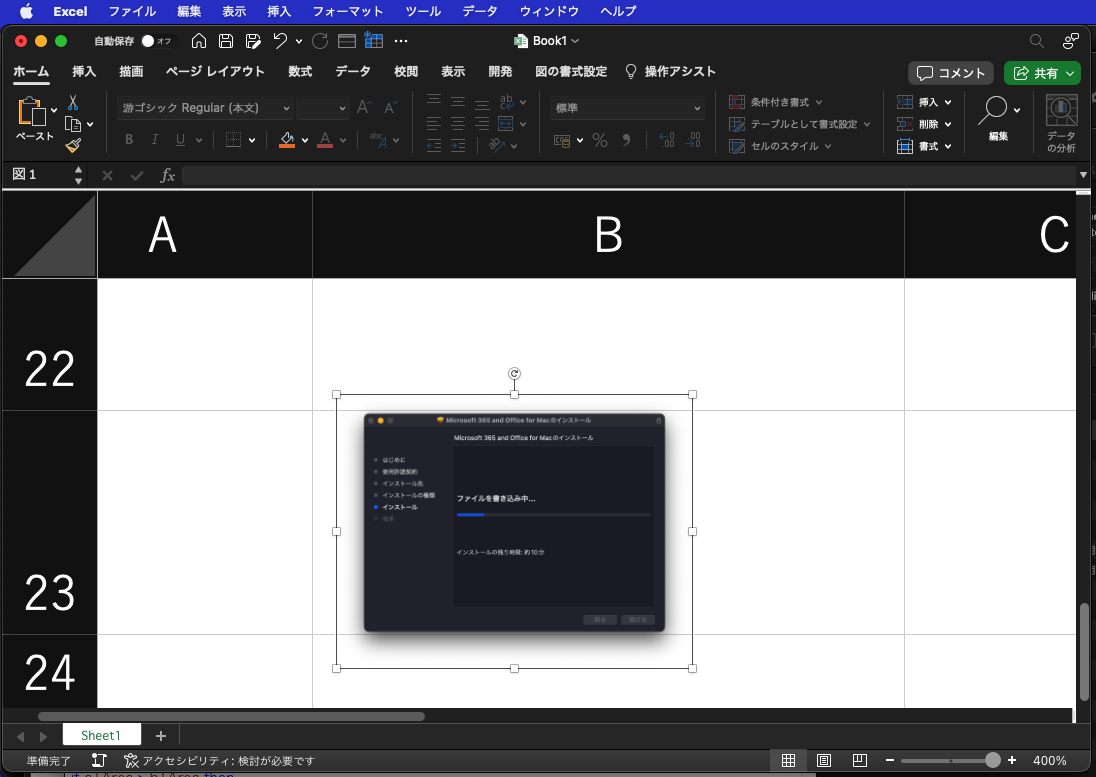
まず、大前提でpictureのID(1から始まる通し番号)、pictureの始点座標が存在するExcel上のセルのrow(行)とcolumn(列)。これはあらかじめ各Pictureの始点座標をもとにあらかじめ計算しておいたものを使います。

本Scriptは、この「始点座標から存在するセルを計算」する処理の後処理として、実際に画像が重なっているセルを重なっている部分の面積をもとに最大の面積のものを「配置されているセル」として計算で推定します。

この処理には前提条件があって、複数のセルにまたがりすぎているような(数十のセルにまたがってpictureが配置されている)場合には計算そのものが無意味です。「1セルに1画像ぐらい」の調子で配置されていないと、こうした処理を行なっても無駄になってしまいます。
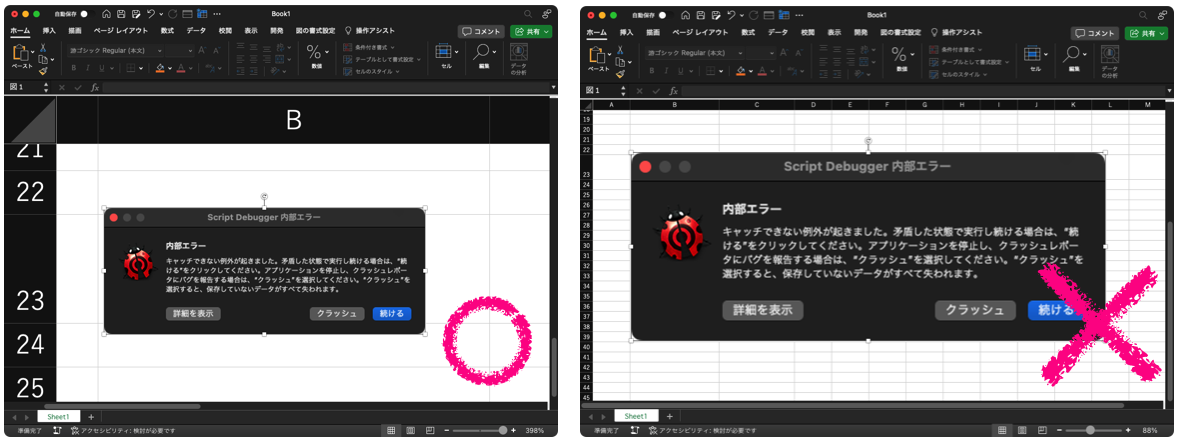
本Scriptでは、Excelワークシートの対象のpictureのID、pictureの始点座標から求めたセルのrow(行)とcolumn(列)を与えて呼び出します。すると、始点セルを基準に3×3のセルの矩形エリア(NSRect)を求め、pictureの矩形(NSRect)との重なっている面積を計算。もっとも面積が大きいものを対象セルとしてrow, columnを返します。

こうしたScriptを作ってほうがよいと考えた理由は、このExcelシート上に貼り付けた画像に対してさまざまな文字データが隣のセルに入力され、セル上のデータと画像を関連づけてデータ取得するような処理を考えたときに必要と考えたためです。

AppleScript名:pictureが置かれているセルのアドレスを推定する v2.scpt
—
–  Created by: Takaaki Naganoya
–  Created on: 2023/08/07
—
–  Copyright © 2023 Piyomaru Software, All Rights Reserved
—
use AppleScript
use scripting additions
use framework "Foundation"

set targRow to 22
set targCol to 2
set targPictureID to 1

set tCell to getPictureLocatedCellRowColByItsPosition(targRow, targCol, targPictureID) of me
–> {rowNum:23, columnNum:2}

–ループで指定セルを左上とした3×3の範囲のセルから、指定のPictureと重なっている面積が最も大きいものを返す
on getPictureLocatedCellRowColByItsPosition(targRow as integer, targCol as integer, targPictureID as integer)
  
  
–Picture 1のNSRectを求める
  
set pRect to getAPictureRectByID(targPictureID) of me
  
  
set tmpList to {}
  
  
–始点座標から3×3の範囲のセルとPictureの重なる面積を計算
  
repeat with x from 0 to 2
    repeat with y from 0 to 2
      
      
set tmpRow to (targRow + y)
      
set tmpCol to (targCol + x)
      
      
set tmpRect to retExcelCellRect(tmpRow, tmpCol) of me
      
      
–指定Pictureと指定Cellの共通部分の矩形座標を計算
      
set a1Res to (current application’s NSIntersectionRect(tmpRect, pRect)) as {record, list}
      
      
–指定Pictureと指定Cellの共通部分の面積を計算
      
set a1Area to calcAnArea(a1Res) of me
      
if a1Area > 0 then
        set the end of tmpList to {columnNum:tmpCol, rowNum:tmpRow, interAreaWithPict:a1Area}
      end if
      
    end repeat
  end repeat
  
  
–面積で降順ソート
  
set zList to (sortRecListByLabel(tmpList, {"interAreaWithPict"}, {false}) of me) as list
  
–> {{columnNum:2, rowNum:23, interAreaWithPict:4973.377807617188}, {columnNum:2, rowNum:24, interAreaWithPict:747.665495456778}, {columnNum:2, rowNum:22, interAreaWithPict:333.296168677043}}
  
  
set resCell to first item of zList
  
set resCol to columnNum of resCell
  
set resRow to rowNum of resCell
  
  
return {rowNum:resRow, columnNum:resCol}
end getPictureLocatedCellRowColByItsPosition

–IDで指定したPictureのNSRectを返す
on getAPictureRectByID(anID as integer)
  tell application "Microsoft Excel"
    tell active workbook
      tell active sheet
        set anImage to picture anID
        
        
set tmpX to left position of anImage
        
set tmpY to top of anImage
        
set tmpW to width of anImage
        
set tmpH to height of anImage
      end tell
    end tell
  end tell
  
  
set aZRect to current application’s NSMakeRect(tmpX, tmpY, tmpW, tmpH)
  
return aZRect
end getAPictureRectByID

–NSRectの面積を計算する
on calcAnArea(aRect)
  if class of aRect = list then
    set xWidth to (item 1 of item 2 of aRect)
    
set yHeight to (item 2 of item 2 of aRect)
  else
    set xWidth to (aRect’s |size|’s width)
    
set yHeight to (aRect’s |size|’s height)
  end if
  
  
set anArea to xWidth * yHeight
  
return anArea
end calcAnArea

–指定Row, ColumnのCellのNSRectを返す
on retExcelCellRect(y as integer, x as integer)
  tell application "Microsoft Excel"
    tell active workbook
      tell active sheet
        tell row y
          tell cell x
            set xMin0 to left position
            
set yMin0 to top
            
set xWidth0 to width
            
set yHeight0 to height
          end tell
        end tell
      end tell
    end tell
  end tell
  
  
set a1Rect to current application’s NSMakeRect(xMin0, yMin0, xWidth0, yHeight0)
  
return a1Rect
end retExcelCellRect

–リストに入れたレコードを、指定の属性ラベルの値でソート
on sortRecListByLabel(aRecList as list, aLabelStr as list, ascendF as list)
  set aArray to current application’s NSArray’s arrayWithArray:aRecList
  
  
set aCount to length of aLabelStr
  
set sortDescArray to current application’s NSMutableArray’s new()
  
repeat with i from 1 to aCount
    set aLabel to (item i of aLabelStr)
    
set aKey to (item i of ascendF)
    
set sortDesc to (current application’s NSSortDescriptor’s alloc()’s initWithKey:aLabel ascending:aKey)
    (
sortDescArray’s addObject:sortDesc)
  end repeat
  
  
return (aArray’s sortedArrayUsingDescriptors:sortDescArray)
end sortRecListByLabel

★Click Here to Open This Script 

(Visited 119 times, 1 visits today)
Posted in rectangle | Tagged 13.0savvy Excel | 1 Comment

1 thoughts on “<span>Excelの書類上に置かれているpictureが置かれているセルのアドレスを推定する v2</span>”

  1. 1/29/24
    8:50 AM
    2024年1月29日
    8:50 AM

    Reply

    2023年に書いた価値あるAppleScript – AppleScriptの穴 says:

    […] Excelの書類上に置かれているpictureが置かれているセルのアドレスを推定する v2 […]

Leave a Reply Cancel reply

Your email address will not be published. Required fields are marked *

You may use these HTML tags and attributes: <a href="" title=""> <abbr title=""> <acronym title=""> <b> <blockquote cite=""> <cite> <code> <del datetime=""> <em> <i> <q cite=""> <s> <strike> <strong>

電子書籍(PDF)をオンラインストアで販売中!

Google Search

Popular posts

  • macOS 26, Tahoe
  • Script Debuggerがフリーダウンロードで提供されることに
  • シンプルな文字置換
  • macOS 26, 15.5でShortcuts.app「AppleScriptを実行」アクションのバグが修正される
  • Appleに買収されたPixelmator ProがAppleとしての初アップデート
  • macOS(Mac OS X/OS X)上のAppleScriptの歴史
  • Apple Creator Studioに含まれるKeynote/Pages/Numbersは新バージョン?
  • 最初期に書かれた書籍「AppleScript道入門」の序文をいま振り返る
  • Claris FileMaker Pro 2025(v22)がリリースされた
  • Applicationのactivateを記録する v2
  • 指定フォルダ内から指定拡張子のファイルを取得し、エイリアスだったらオリジナルのパスをPOSIX pathで取得
  • macOS 15.7.2 スクリプトメニューから実行できなくなった地図系ライブラリ?
  • MacBook Air/MacBook Proのディスプレイ開閉角度を取得
  • Adobe InDesignのAppleScript実行エンジンがCarbonからCocoaベースに書き換えられる
  • 暗黙のuseコマンド
  • ASCII ART QR Encoder
  • 開始時刻から終了時刻までhh:mm形式の文字列を15分単位でリスト出力
  • 「AppleScriptセキュリティ実践ガイド」を発売
  • 各種GUIアプリ書類のオープン速度を向上するためにUIアニメーションの一時停止を
  • ASCII ARTで円を線で描く

Tags

10.11savvy (1101) 10.12savvy (1242) 10.13savvy (1391) 10.14savvy (587) 10.15savvy (439) 11.0savvy (283) 12.0savvy (212) 13.0savvy (204) 14.0savvy (159) 15.0savvy (172) 26.0savvy (49) CotEditor (68) Finder (53) Keynote (123) NSAlert (61) NSArray (51) NSBitmapImageRep (20) NSBundle (20) NSButton (34) NSColor (53) NSDictionary (28) NSFileManager (23) NSFont (21) NSImage (41) NSJSONSerialization (21) NSMutableArray (63) NSMutableDictionary (22) NSPredicate (36) NSRunningApplication (56) NSScreen (30) NSScrollView (22) NSString (119) NSURL (98) NSURLRequest (23) NSUTF8StringEncoding (30) NSView (33) NSWorkspace (20) Numbers (80) Pages (58) Safari (45) Script Editor (27) WKUserContentController (21) WKUserScript (20) WKWebView (23) WKWebViewConfiguration (22)

カテゴリー

  • 2D Bin Packing
  • 3D
  • AirDrop
  • AirPlay
  • Animation
  • AppleScript Application on Xcode
  • Beginner
  • Benchmark
  • beta
  • Bluetooth
  • Books
  • boolean
  • bounds
  • Bug
  • Calendar
  • call by reference
  • check sum
  • Clipboard
  • Cocoa-AppleScript Applet
  • Code Sign
  • Color
  • Custom Class
  • date
  • dialog
  • diff
  • drive
  • Droplet
  • exif
  • file
  • File path
  • filter
  • folder
  • Font
  • Font
  • GAME
  • geolocation
  • GUI
  • GUI Scripting
  • Hex
  • History
  • How To
  • iCloud
  • Icon
  • Image
  • Input Method
  • Internet
  • iOS App
  • JavaScript
  • JSON
  • JXA
  • Keychain
  • Keychain
  • Language
  • Library
  • list
  • Locale
  • Localize
  • Machine Learning
  • Map
  • Markdown
  • Menu
  • Metadata
  • MIDI
  • MIME
  • Natural Language Processing
  • Network
  • news
  • Newt On Project
  • NFC
  • Noification
  • Notarization
  • Number
  • Object control
  • OCR
  • OSA
  • parallel processing
  • PDF
  • Peripheral
  • process
  • PRODUCTS
  • QR Code
  • Raw AppleEvent Code
  • Record
  • rectangle
  • recursive call
  • regexp
  • Release
  • Remote Control
  • Require Control-Command-R to run
  • REST API
  • Review
  • RTF
  • Sandbox
  • Screen Saver
  • Script Libraries
  • Scripting Additions
  • sdef
  • search
  • Security
  • selection
  • shell script
  • Shortcuts Workflow
  • Sort
  • Sound
  • Spaces
  • Spellchecker
  • Spotlight
  • SVG
  • Swift
  • System
  • Tag
  • Telephony
  • Text
  • Text to Speech
  • timezone
  • Tools
  • Update
  • URL
  • UTI
  • Web Contents Control
  • WiFi
  • XML
  • XML-RPC
  • イベント(Event)
  • 未分類

アーカイブ

  • 2026年7月
  • 2026年6月
  • 2026年5月
  • 2026年3月
  • 2026年2月
  • 2026年1月
  • 2025年12月
  • 2025年11月
  • 2025年10月
  • 2025年9月
  • 2025年8月
  • 2025年7月
  • 2025年6月
  • 2025年5月
  • 2025年4月
  • 2025年3月
  • 2025年2月
  • 2025年1月
  • 2024年12月
  • 2024年11月
  • 2024年10月
  • 2024年9月
  • 2024年8月
  • 2024年7月
  • 2024年6月
  • 2024年5月
  • 2024年4月
  • 2024年3月
  • 2024年2月
  • 2024年1月
  • 2023年12月
  • 2023年11月
  • 2023年10月
  • 2023年9月
  • 2023年8月
  • 2023年7月
  • 2023年6月
  • 2023年5月
  • 2023年4月
  • 2023年3月
  • 2023年2月
  • 2023年1月
  • 2022年12月
  • 2022年11月
  • 2022年10月
  • 2022年9月
  • 2022年8月
  • 2022年7月
  • 2022年6月
  • 2022年5月
  • 2022年4月
  • 2022年3月
  • 2022年2月
  • 2022年1月
  • 2021年12月
  • 2021年11月
  • 2021年10月
  • 2021年9月
  • 2021年8月
  • 2021年7月
  • 2021年6月
  • 2021年5月
  • 2021年4月
  • 2021年3月
  • 2021年2月
  • 2021年1月
  • 2020年12月
  • 2020年11月
  • 2020年10月
  • 2020年9月
  • 2020年8月
  • 2020年7月
  • 2020年6月
  • 2020年5月
  • 2020年4月
  • 2020年3月
  • 2020年2月
  • 2020年1月
  • 2019年12月
  • 2019年11月
  • 2019年10月
  • 2019年9月
  • 2019年8月
  • 2019年7月
  • 2019年6月
  • 2019年5月
  • 2019年4月
  • 2019年3月
  • 2019年2月
  • 2019年1月
  • 2018年12月
  • 2018年11月
  • 2018年10月
  • 2018年9月
  • 2018年8月
  • 2018年7月
  • 2018年6月
  • 2018年5月
  • 2018年4月
  • 2018年3月
  • 2018年2月

https://piyomarusoft.booth.pm/items/301502

メタ情報

  • ログイン
  • 投稿フィード
  • コメントフィード
  • WordPress.org

Forum Posts

  • 人気のトピック
  • 返信がないトピック

メタ情報

  • ログイン
  • 投稿フィード
  • コメントフィード
  • WordPress.org
Proudly powered by WordPress
Theme: Flint by Star Verte LLC