
| AppleScript名:2Dリスト内の要素のうち最小値を求める |
| — Created 2017-10-01 by Takaaki Naganoya — 2017 Piyomaru Software use AppleScript version "2.4" use scripting additions use framework "Foundation" set aList to {{1, 2, 3, 4, 5, 6, 4}, {1, 2, 3, 4, 5, 6}, {1, 2, 3, 4, 5, 16, 0, 0}} –7,6, 8 items set aRes to getMinValueFrom2DArray(aList) of me –> 0 –min value is 0 on getMinValueFrom2DArray(aList) set anArray to current application’s NSArray’s arrayWithArray:aList set eRes to (anArray’s valueForKeyPath:"@unionOfArrays.self")’s valueForKeyPath:"@min.self" return eRes as integer end getMinValueFrom2DArray |

ASOCでテキストとリストの変換
| AppleScript名:ASOCでテキストとリストの変換 |
| — Created 2015-10-14 by Takaaki Naganoya — 2015 Piyomaru Software use AppleScript version "2.4" use scripting additions use framework "Foundation" set aList to {"あああああ", "いいいいいいいい", "ううううううううううう", "えええええええええええ", "おおおおおおおおおお"} set aRes to my retStrFromArrayWithDelimiter(aList, return) (* "あああああ いいいいいいいい ううううううううううう えええええええええええ おおおおおおおおおお" *) set bList to my parseByDelim(aRes, return) –> {"あああああ", "いいいいいいいい", "ううううううううううう", "えええええええええええ", "おおおおおおおおおお"} –リストを指定デリミタをはさんでテキスト化 on retStrFromArrayWithDelimiter(aList, aDelim) set anArray to current application’s NSArray’s arrayWithArray:aList set aRes to anArray’s componentsJoinedByString:aDelim return aRes as text end retStrFromArrayWithDelimiter on retArrowText(aList, aDelim) –自分のASでよく使うハンドラ名称なので、同じものを用意 return my retStrFromArrayWithDelimiter(aList, aDelim) end retArrowText –テキストを指定デリミタでリスト化 on parseByDelim(aData, aDelim) set aText to current application’s NSString’s stringWithString:aData set aList to aText’s componentsSeparatedByString:aDelim return aList as list end parseByDelim |
1Dリストを指定個数ごとにリスト化して2D化 v3.2
| AppleScript名:1Dリストを指定個数ごとにリスト化して2D化 v3.2 |
| use AppleScript version "2.4" use scripting additions use framework "Foundation" use bPlus : script "BridgePlus" –https://www.macosxautomation.com/applescript/apps/BridgePlus.html script spd property aList : {} end script –テストデータ作成 set aList of spd to {} repeat 100000 times set the end of aList of spd to (random number from 10000 to 9999) end repeat set a1Dat to current application’s NSDate’s timeIntervalSinceReferenceDate() –時間計測 set aGroupNum to 100000 set b to (current application’s SMSForder’s subarraysFrom:(aList of spd) groupedBy:aGroupNum |error|:(missing value)) as list set b1Dat to current application’s NSDate’s timeIntervalSinceReferenceDate() –時間計測 set c1Dat to b1Dat – a1Dat –> 0.688337981701 |
2Dリストから、指定カラムのデータを削除する v3
| AppleScript名:2Dリストから、指定カラムのデータを削除する v3 |
| — Created 2017-11-25 by Takaaki Naganoya — 2017 Piyomaru Software use AppleScript version "2.4" use scripting additions use framework "Foundation" –http://piyocast.com/as/archives/5000 set aList to {{1, 2, 3}, {2, 3, 4}, {3, 4, 5}} set removeIndex to 3 –1 based index set bList to removeColumnFrom2DArray(aList, removeIndex) of me –> {{1, 2}, {2, 3}, {3, 4}} on removeColumnFrom2DArray(aList as list, removeIndex as integer) set newArray to {} set realIndex to removeIndex – 1 –index conversion from 1-based to 0-based repeat with i in aList set anArray to (current application’s NSMutableArray’s arrayWithArray:i) (anArray’s removeObjectAtIndex:realIndex) set the end of newArray to anArray as list of string or string –as anything end repeat return newArray end removeColumnFrom2DArray |
リスト中の指定アイテムを削除する(登場アイテム番号自動検索)
| AppleScript名:リスト中の指定アイテムを削除する(登場アイテム番号自動検索) |
| — Created 2017-04-11 by Takaaki Naganoya — 2017 Piyomaru Software use AppleScript version "2.4" use scripting additions use framework "Foundation" set aTargValue to 2 set anArray to current application’s NSMutableArray’s arrayWithArray:{5, 2, 1, 3, 4} set aInd to anArray’s indexOfObject:aTargValue if aInd = current application’s NSNotFound or (aInd as real > 9.99999999E+8) then return {} anArray’s removeObjectAtIndex:aInd return anArray as list –> {5, 1, 3, 4} |
2つの1D List同士の消し込み
| AppleScript名:2つの1D List同士の消し込み |
| — Created 2017-10-29 by Takaaki Naganoya — 2017 Piyomaru Software use AppleScript version "2.4" use scripting additions use framework "Foundation" set list1 to {5, 1, 2, 3, 1, 6, 2, 7, 8, 2, 6, 5, 4} set list2 to {6, 7, 8} set result1 to my removeItemsInList:list2 fromList:list1 –> {5, 3, 1, 4, 2} set result2 to removeItems for list2 from list1 –> {5, 3, 1, 4, 2} set result3 to removeItemsFrom(list1, list2) of me –> {5, 3, 1, 4, 2} –Objective-Cライクなパラメータ記述 on removeItemsInList:list2 fromList:list1 set set2 to current application’s NSSet’s setWithArray:list2 set set1 to current application’s NSMutableSet’s setWithArray:list1 set1’s minusSet:set2 return (set1’s allObjects()) as list end removeItemsInList:fromList: –無意味区による装飾 on removeItems for list2 from list1 return my removeItemsInList:list2 fromList:list1 end removeItems –Pure AS風のパラメータ記述 on removeItemsFrom(list1, list2) return my removeItemsInList:list2 fromList:list1 end removeItemsFrom |
指定要素のみを削除(predicateでfilter) v3
| AppleScript名:指定要素のみを削除(predicateでfilter) v3 |
| — Created 2017-11-03 by Takaaki Naganoya — Modified 2017-11-05 by Shane Stanley use AppleScript version "2.4" use scripting additions use framework "Foundation" use framework "AppKit" property NSPredicate : a reference to current application’s NSPredicate property NSArray : a reference to current application’s NSArray set aList to {"Apple", "Lemon", "Aple", "Lum", "Apple"} set aTarg to "Apple" –string set rList to removeElementsFrom1DArray(aList, aTarg) of me –> {"Lemon", "Aple", "Lum"} set bList to {1, 2, 3, 1, 5} set bTarg to 1 –number set rList to removeElementsFrom1DArray(bList, bTarg) of me –> {2, 3, 5} set cList to {1, 2, 3, 1, 5} set cTarg to {1, 2, 3} –list of number set rList to removeElementsFrom1DArray(cList, cTarg) of me –> {5} set dList to {"Apple", "Lemon", "Aple", "Lum", "Apple"} set dTarg to {"Apple", "Lemon"} –list of string set rList to removeElementsFrom1DArray(dList, dTarg) of me –> {"Aple", "Lum"} on removeElementsFrom1DArray(aList as list, aTarg as {number, string, list}) set anArray to NSArray’s arrayWithArray:aList set aClass to class of aTarg if aClass = list then set thePred to NSPredicate’s predicateWithFormat_("NOT SELF IN %@", aTarg) else set thePred to NSPredicate’s predicateWithFormat_("SELF != %@", aTarg) end if set bList to (anArray’s filteredArrayUsingPredicate:thePred) as list return bList end removeElementsFrom1DArray |
1D List中のアイテムが指定リストに入っていたら抽出
| AppleScript名:1D List中のアイテムが指定リストに入っていたら抽出 |
| — Created 2017-11-03 by Takaaki Naganoya — 2017 Piyomaru Software use AppleScript version "2.4" use scripting additions use framework "Foundation" property NSPredicate : a reference to current application’s NSPredicate property NSArray : a reference to current application’s NSArray set aList to {"Apple", "Lemon", "Apple", "Water Melon"} set aTarg to {"Apple", "Lemon"} –データの表記ゆらぎ対策に使える? set anArray to NSArray’s arrayWithArray:aList set aPred to NSPredicate’s predicateWithFormat_("SELF IN %@", aTarg) set bRes to (anArray’s filteredArrayUsingPredicate:aPred) as list –> {"Apple", "Lemon", "Apple"} |
1D Listから条件抽出(正規表現2)
| AppleScript名:1D Listから条件抽出(正規表現2) |
| — Created 2017-11-03 by Takaaki Naganoya — 2017 Piyomaru Software use AppleScript version "2.4" use scripting additions use framework "Foundation" –http://piyocast.com/as/archives/4949 property NSPredicate : a reference to current application’s NSPredicate property NSArray : a reference to current application’s NSArray set aList to {"123456789X", "9876x", "987654321x", "1234567890", "12345X", "1234567890X", "999999999X", "1111111111", "222222222X"} set anArray to NSArray’s arrayWithArray:aList set aPred to NSPredicate’s predicateWithFormat:"SELF MATCHES ’\\\\d{10}|\\\\d{9}[Xx]’" set bRes to (anArray’s filteredArrayUsingPredicate:aPred) as list –> {"123456789X", "987654321x", "1234567890", "999999999X", "1111111111", "222222222X"} |
1D Listから条件抽出(正規表現1)
| AppleScript名:1D Listから条件抽出(正規表現1) |
| — Created 2017-11-03 by Takaaki Naganoya — 2017 Piyomaru Software use AppleScript version "2.4" use scripting additions use framework "Foundation" –http://piyocast.com/as/archives/4949 property NSPredicate : a reference to current application’s NSPredicate property NSArray : a reference to current application’s NSArray set aList to {"TATACCATGGGCCATCATCATCATCATCATCATCATCATCATCACAG", "CGGGATCCCTATCAAGGCACCTCTTCG", "CATGCCATGGATACCAACGAGTCCGAAC", "CAT", "CATCATCATGTCT", "DOG"} set anArray to NSArray’s arrayWithArray:aList set aPred to NSPredicate’s predicateWithFormat:"SELF MATCHES ’.*(CAT){3,}(?!CA).*’" set bRes to (anArray’s filteredArrayUsingPredicate:aPred) as list –> {"CATCATCATGTCT"} |
2D Listから条件抽出(パラメータ外部指定)
| AppleScript名:2D Listから条件抽出(パラメータ外部指定) |
| — Created 2017-11-03 by Takaaki Naganoya — 2017 Piyomaru Software use AppleScript version "2.4" use scripting additions use framework "Foundation" property NSPredicate : a reference to current application’s NSPredicate property NSArray : a reference to current application’s NSArray set aList to {{"Apple", 2}, {"Lemon", 3}, {"Apple", 4}, {"Water Melon", 2}} set aTarg to {"Apple", 2} set anArray to NSArray’s arrayWithArray:aList set aPred to NSPredicate’s predicateWithFormat_("SELF[0] = %@ && SELF[1] >= %@", item 1 of aTarg, item 2 of aTarg) set bRes to (anArray’s filteredArrayUsingPredicate:aPred) as list –> {{"Apple", 2}, {"Apple", 4}} |
2D List中の特定アイテムが指定リストに入っていたら抽出
2D List(2次元配列)からの条件抽出です。
Predicates文で対象を指定できるので、表記は手軽だし簡潔に記述できるのですが、実行速度がいまひとつです。
AppleScriptの処理系はGUIアプリケーションとのプロセス間通信を行わないかぎりは、処理系が(いまとなっては)コンパクトなため相当に高速に処理してくれるので(大規模データの扱いに難はありますが)、AppleScriptの単純ループ処理で抽出したほうがCocoa呼び出しよりも高速というケースが多々あります。
数万件規模のデータになるとCocoaの機能を用いるべきですが、ごくごく小規模なデータを扱う(1万件以下)場合であれば、AppleScriptの単純ループ処理のほうが高速です。
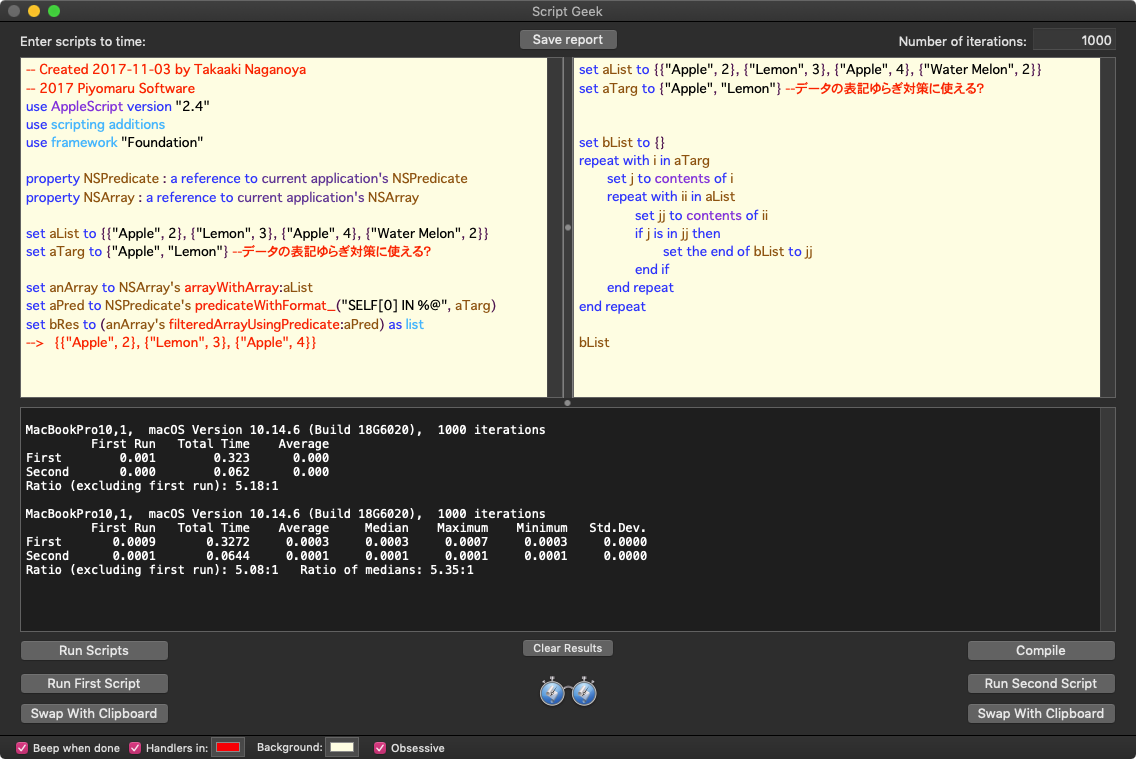
Cocoaの呼び出し処理は初回に時間がかかって、繰り返し呼び出すことでキャッシュされてスピードが向上する傾向がありますが、このような小規模なデータが対象だとPlaneなAppleScriptの処理のほうが5倍以上高速という結果が出ます。
画像の空白検出のような大規模データの処理だとCocoaの機能を呼び出したほうが高速なので、そのあたりは使い分け・見極めがきわめて重要といえます。
| AppleScript名:2D List中の特定アイテムが指定リストに入っていたら抽出 |
| — Created 2017-11-03 by Takaaki Naganoya — 2017 Piyomaru Software use AppleScript version "2.4" use scripting additions use framework "Foundation" property NSPredicate : a reference to current application’s NSPredicate property NSArray : a reference to current application’s NSArray set aList to {{"Apple", 2}, {"Lemon", 3}, {"Apple", 4}, {"Water Melon", 2}} set aTarg to {"Apple", "Lemon"} –データの表記ゆらぎ対策に使える? set anArray to NSArray’s arrayWithArray:aList set aPred to NSPredicate’s predicateWithFormat_("SELF[0] IN %@", aTarg) set bRes to (anArray’s filteredArrayUsingPredicate:aPred) as list –> {{"Apple", 2}, {"Lemon", 3}, {"Apple", 4}} |
矩形座標同士の衝突判定 v3
| AppleScript名:矩形座標同士の衝突判定 v3 |
| — Created 2017-03-06 by Takaaki Naganoya — 2017 Piyomaru Software use AppleScript version "2.4" use scripting additions use framework "Foundation" set a1Rect to {origin:{x:10, y:10}, |size|:{width:100, height:100}} set b1Rect to {origin:{x:30, y:30}, |size|:{width:100, height:100}} set a1Res to detectRectanglesCollision(a1Rect, b1Rect) of me –> true set a4Rect to {origin:{x:0, y:20}, |size|:{width:100, height:10}} set b4Rect to {origin:{x:1000, y:10000}, |size|:{width:50, height:100}} set a2Res to detectRectanglesCollision(a4Rect, b4Rect) of me –> false set a3Rect to {origin:{x:30, y:30}, |size|:{width:50, height:50}} set b3Rect to {origin:{x:10, y:10}, |size|:{width:100, height:100}} set a3Res to detectRectanglesCollision(a3Rect, b3Rect) of me –> true set a4Rect to {origin:{x:0, y:20}, |size|:{width:100, height:10}} set b4Rect to {origin:{x:10, y:10}, |size|:{width:50, height:100}} set a4Res to detectRectanglesCollision(a4Rect, b4Rect) of me –> true –NSRect同士の衝突判定 on detectRectanglesCollision(aRect, bRect) set a1Res to current application’s NSIntersectionRect(aRect, bRect) return not (a1Res = {origin:{x:0.0, y:0.0}, |size|:{width:0.0, height:0.0}}) end detectRectanglesCollision |
矩形座標同士の合計
| AppleScript名:矩形座標同士の合計 |
| — Created 2017-03-06 by Takaaki Naganoya — 2017 Piyomaru Software use AppleScript version "2.4" use scripting additions use framework "Foundation" set a1Rect to {origin:{x:10, y:10}, |size|:{width:40, height:40}} set b1Rect to {origin:{x:30, y:30}, |size|:{width:40, height:40}} set a1Res to current application’s NSUnionRect(a1Rect, b1Rect) –> {origin:{x:10.0, y:10.0}, size:{width:60.0, height:60.0}} |
指定矩形内に含まれるデータをリストで返す v3
| AppleScript名:指定矩形内に含まれるデータをリストで返す v3 |
| — Created 2017-06-22 by Takaaki Naganoya — 2017 Piyomaru Software use AppleScript version "2.4" use scripting additions use framework "Foundation" set aList to {{507, 162}, {338, 166}, {389, 166}, {448, 166}, {286, 110}, {504, 109}, {558, 108}, {341, 113}, {394, 115}, {447, 112}, {234, 107}, {611, 110}, {286, 58}, {501, 63}, {556, 58}, {337, 59}, {391, 60}, {448, 63}, {611, 58}} set rangeList to {{500, 100}, {550, 180}} –{{x1,y1}, {x2,y2}} set resList to withinRange(rangeList, aList) of me –> {{507, 162}, {504, 109}} on withinRange(rangeList as list, targetList as list) set aRect to makeNSRect(rangeList) of me set includedList to {} repeat with i in targetList copy i to {x, y} set aPoint to current application’s NSMakePoint(x, y) set aRes to (current application’s NSPointInRect(aPoint, aRect)) as boolean if aRes = true then set the end of includedList to contents of i end if end repeat return includedList end withinRange on makeNSRect(aList as list) try copy aList to {{x1, y1}, {x2, y2}} set xWidth to (x2 – x1) set yHeight to (y2 – y1) set a1Rect to {origin:{x:x1, y:y1}, |size|:{width:xWidth, height:yHeight}} return a1Rect on error return missing value end try end makeNSRect |
NSRectからの各種情報取得
| AppleScript名:NSRectからの各種情報取得 |
| use AppleScript version "2.4" use scripting additions use framework "Foundation" set aRect to current application’s NSMakeRect(0, 0, 100, 80) –> {origin:{x:0.0, y:0.0}, |size|:{width:100.0, height:80.0}} set aWidth to current application’s NSWidth(aRect) –> 100.0 set aHeight to current application’s NSHeight(aRect) –> 80.0 set aMinX to current application’s NSMinX(aRect) –> 0.0 set aMaxX to current application’s NSMaxX(aRect) –> 100.0 set aMidX to current application’s NSMidX(aRect) –> 50.0 set aMinY to current application’s NSMinY(aRect) –> 0.0 set aMaxY to current application’s NSMaxY(aRect) –> 80.0 set aMidY to current application’s NSMidY(aRect) –> 40.0 |
macOS 10.13以降は(何の説明もなく)NSMakeRectの返り値が変わっているので、注意が必要です。
use AppleScript version "2.4"
use scripting additions
use framework "Foundation"
set aRect to current application’s NSMakeRect(0, 0, 100, 80)
–> {origin:{x:0.0, y:0.0}, |size|:{width:100.0, height:80.0}}
–> {{0.0, 0.0}, {100.0, 80.0}}–macOS 10.13 or later
配列の要素数を取得する
Cocoaの配列の要素数を取得するAppleScriptです。
AppleScriptの配列であるリスト型変数については、length ofやcount ofで要素数を求められますが、
set aList to {1, 3, 5, 7, 9}
length of aList
--> 5

count of aList
--> 5
Cocoaの配列であるNSArrayやNSMutableArrayについてはこのように求めます。
AppleScriptのリスト型変数には、GUIアプリケーションのオブジェクトやAppleScriptのScriptオブジェクトを格納することが可能ですが、Cocoaの配列であるNSArrayやNSMutableArrayにこれらを代入することはできません。
| AppleScript名:配列の要素数を取得する |
| — Created 2015-09-02 by Takaaki Naganoya — 2015 Piyomaru Software use AppleScript version "2.4" use scripting additions use framework "Foundation" set anArray to current application’s NSArray’s arrayWithObjects_(1, 2, 3) –> (NSArray) {1, 2, 3} –要素数を取得する set aSize to anArray’s |count|() –> 3 |
n次元のリストのすべてのアイテム数をカウント
n次元のリスト(配列)のすべてのアイテム数をカウントするAppleScriptです。
2次元でも3次元でも4次元でも、いかなる多次元配列のリストをも1次元配列に変換できるサブルーチン「FlattenList」はいまだに代替できるものが見当たらないほど万能で、この「要素数をカウントする」用途にも使ってみました。
| AppleScript名:n次元のリストのすべてのアイテム数をカウント |
| — Created 2017-10-30 by Takaaki Naganoya — 2017 Piyomaru Software use AppleScript version "2.4" use scripting additions use framework "Foundation" set aList to {{1, 2, 3}, {4, 5, 6}, {7, 8, 9, {1, 2, 3}}} set aRes to FlattenList(aList) of me set aLen to length of aRes on FlattenList(aList) set oldDelims to AppleScript’s text item delimiters set AppleScript’s text item delimiters to {"????"} set aString to aList as text set aList to text items of aString set AppleScript’s text item delimiters to oldDelims return aList end FlattenList |
リスト項目のシャッフル(ASOC)
| AppleScript名:リスト項目のシャッフル(ASOC) |
| — Created 2016-12-06 by Takaaki Naganoya — 2016 Piyomaru Software use AppleScript version "2.4" use scripting additions use framework "Foundation" use framework "ArrayRandomize" –https://github.com/masakihirokawa/objc-classes-dc-randomize –http://piyocast.com/as/archives/4351 –配列をシャッフルして取得 set anArray to current application’s NSMutableArray’s alloc()’s initWithArray:{1, 2, 3, 4, 5} set bArray to (current application’s DCRandomize’s shuffleArray:anArray) as list –> {5, 3, 1, 2, 4} –1〜10の数値をシャッフルして配列取得 set cArray to (current application’s DCRandomize’s shuffle:1 max:10) as list –> {9, 4, 6, 5, 3, 2, 7, 8, 1, 10} –5〜10の範囲の乱数を取得 set dArray to (current application’s DCRandomize’s range:5 max:10) as integer –> 7 –5〜10の範囲で 9以外の乱数を取得 set eArray to (current application’s DCRandomize’s exact:5 max:10 exceptId:9) –> 9 |
GameplayKitを使ったリストのシャッフル
| AppleScript名:GameplayKitを使ったリストのシャッフル |
| — Created 2016-12-08 by Shane Stanley use AppleScript version "2.5" use framework "Foundation" use framework "GameplayKit" use scripting additions set anArray to current application’s NSArray’s arrayWithArray:{1, 2, 3, 4, 5, 6, 7, 8, 9, 10} set newArray to anArray’s shuffledArray() as list — requires macOS 10.12 |