
| AppleScript名:指定パスのAppleScript書類がコンパイル済みかどうかチェック |
| — Created 2014-12-16 by Takaaki Naganoya — 2014 Piyomaru Software use AppleScript version "2.4" use scripting additions use framework "Foundation" use framework "OSAKit" property |NSURL| : a reference to current application’s |NSURL| property OSAScript : a reference to current application’s OSAScript –指定AppleScriptがコンパイルずみ(中間コードへの翻訳の意)かどうかをしらべる set a to (choose file of type {"com.apple.applescript.script-bundle", "com.apple.applescript.script", "com.apple.applescript.text"}) set asRes to chkAScompiled(a) as list of string or string –> true or false –指定のAppleScriptファイルがコンパイル(構文確認+中間言語化)ずみかどうかを取得する on chkAScompiled(anAlias as {alias, string}) set aURL to |NSURL|’s fileURLWithPath:(POSIX path of anAlias) set asO to OSAScript’s alloc()’s initWithContentsOfURL:aURL |error|:(missing value) try set compF to asO’s isCompiled() as boolean return compF on error return false end try end chkAScompiled |
カテゴリー: System
nameを指定してOSA言語のインスタンスを生成する
name(名称)を指定してOSA言語のインスタンスを生成するテストを行うAppleScriptです。
このあたりの話は、スクリプトエディタ上では直接取得できますし、コマンドラインからだとosalangコマンドを実行すれば名称一覧を取得できます。Cocoa経由でどの程度の情報が取得できるのか、ちょっと試してながらく放置したままになっていました。
再度、OSAKit系の情報を探してみても……見当たらない(ーー;
以前にAppleEvent Managerのドキュメントをまるごとオフラインにしていた前科があるので、担当に「(オフラインになっていて)見えないんだけど?」と確認したところ………
「何が見えないんだ? 最初からそんなもんないぞ。これまでにドキュメントを作ったこともない」
と言われる始末。余計悪いわ(ーー;;;
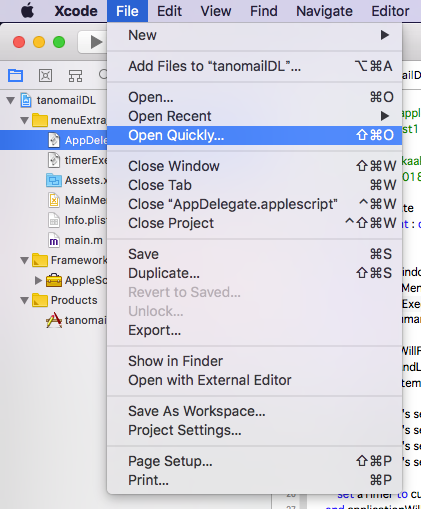
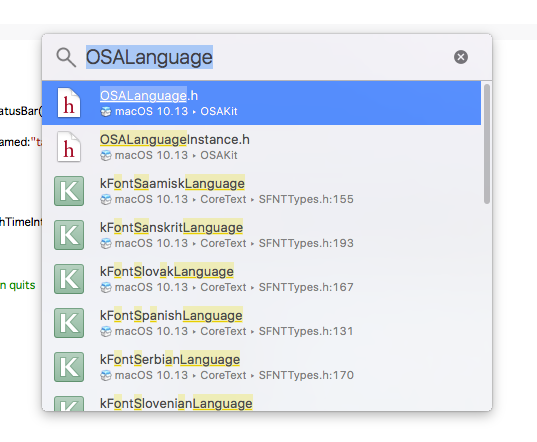
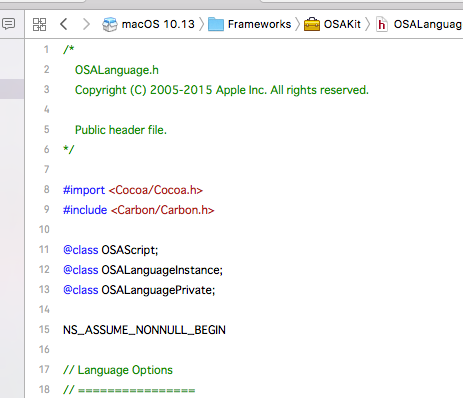
というわけで、Web上にドキュメントが掲載されていないOSAKit系の情報については、Xcode上から、以下のように操作してヘッダーファイルの内容を確認することが必要なようです。
| AppleScript名:nameを指定してOSA言語のインスタンスを生成する |
| — Created 2018-03-05 by Takaaki Naganoya — 2018 Piyomaru Software use AppleScript version "2.4" use scripting additions use framework "Foundation" use framework "OSAKit" property OSALanguage : a reference to current application’s OSALanguage property OSALanguageInstance : a reference to current application’s OSALanguageInstance set anOSALanguageInstance to OSALanguageInstance’s languageInstanceWithLanguage:(OSALanguage’s defaultLanguage()) set aLanguage to anOSALanguageInstance’s |language|()’s |name|() as string –> "AppleScript" set bLanguage to OSALanguage’s languageForName:"AppleScript" set bName to bLanguage’s |name|() as string –> "AppleScript" set cLanguage to OSALanguage’s languageForName:"JavaScript" set cName to cLanguage’s |name|() as string –> "JavaScript" set langArray to (OSALanguage’s availableLanguages()’s valueForKeyPath:"name") as list –> {"AppleScript", "JavaScript"} |
Script Editorをコントロールして各構文要素の色情報を取得する v5
Script Editorをコントロールして、AppleScriptの各構文要素の色情報を取得するAppleScriptです。
AppleScriptの構文要素の色分けを取得するのに、当初はplistファイルから読み込んでいたのですが、途中から(Mac OS X 10.5あたり?)plistファイルのフォーマットがテキスト形式からバイナリ形式に変更になり、AppleScriptから読み込んでも判定できない内容になりました(Cocoaの機能を使うと読み取れるのですが)。
そこで、「プログラム的には意味はないが、対象の構文要素が入っているテキスト」でAppleScriptを新規ドキュメントを作成してコンパイル(構文確認)を実行。新規ドキュメントからリッチテキストとして書式情報を取得し、想定した文字の位置から指定構文要素に対応する色情報を取得します。
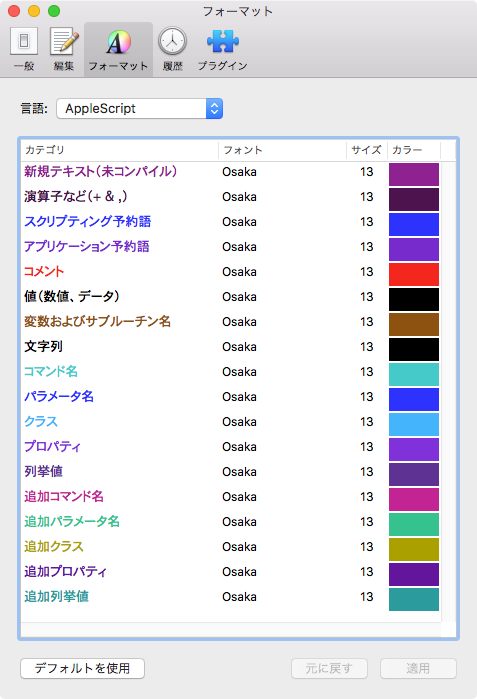
plistの保存形式が途中で変更されたのとは別に、書式つきテキスト(attribute runs)の挙動もOSバージョンによって微妙に変わってきました。
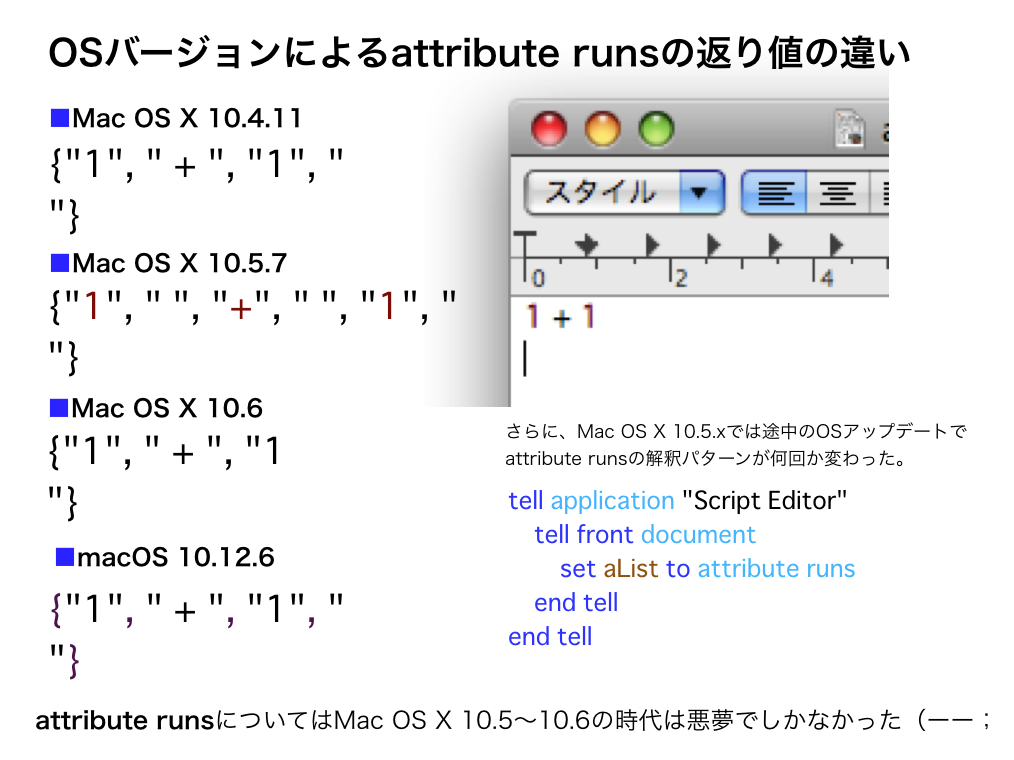
同じデータを与えても、書式の区切りが微妙に変わって、書式(色)情報を固定の箇所から読み取っていてはそのようなOSバージョン変更に伴う挙動の微妙な変更に対応し切れませんでした。そのため、文字列をサーチして毎回動的にデータ位置を検出するように書き換えた経緯があります。
本ルーチンは、変数名のリネーム用に作成したので構文要素確認用のダミーテキストは最低限のものだけを含んでいますが、その気になればすべての構文要素の色情報を取得可能です。
これとは別に、Cocoaの機能を用いてplistから構文書式情報を取得するAppleScriptも存在するものの、計算して微妙に色情報が合わないので、9年前に作成した本ルーチンを使い続けています(当時)。
→ さすがに重要なルーチンなので、Cocoa系の機能を使って処理するように書き換えました。いまはCocoa系ルーチンを使っています
| AppleScript名:Script Editorをコントロールして各構文要素の色情報を取得する v5 |
| — Created 2009-06-01 by Takaaki Naganoya — 2009-2018 Piyomaru Software set scList to getRexicalColorOfScriptEditor() of me –> {{32053, 4213, 32213}, {15672, 3071, 15831}, {2841, 6963, 64125}, {8259, 42547, 64473}, {0, 0, 0}, {32202, 16452, 3889}} –色書式データ。先頭から順番に、、、 –新規テキスト, 演算子など, スクリプティング予約語, コマンド名, 値(数値、データ), 変数およびサブルーチン名 –スクリプトエディタの各構文要素の指定色を返す –v5の変更点:Leopard以降のStyle runsの挙動変化(スペースを分離する/しない)に対応し、動的にサンプル文を走査するようにした –v4の変更点:構文要素検出時のテンポラリウィンドウ作成時にScript Editorを隠す –v3の変更点:重複時のエラー検出を追加 on getRexicalColorOfScriptEditor() set aRes to setVisibleOfSpecifiedProcess("Script Editor", false) of me set rexList to {"+", "set", "application", "Comment", "1", "a"} –文中から検索するテキスト要素 set colList to {} –色情報を入れるリスト tell application "Script Editor" set aDoc to make new document tell front document set aName to name –end tell –tell document aName –未コンパイル時のテキストを取得 set contents to "aaaaa" set rexItem1 to (color of attribute runs) set rexItem1 to contents of (item 1 of rexItem1) set colList to {rexItem1} –各種構文要素を含む文字を入れる set contents to "1 + 1 set a to \"abc\" tell application \"Finder\" end tell –Comment " –追加する場合には、テキストを後ろに追加すること try compile on error close without saving return false end try set rex1 to attribute runs set rex2 to color of attribute runs repeat with i in rexList set j to contents of i set rC to 1 repeat with ii in rex1 set jj to contents of ii set jj to replaceText(jj, " ", "") of me –スペースを削除する if j = jj then set the end of colList to contents of item rC of rex2 exit repeat –抜けていた end if set rC to rC + 1 end repeat end repeat close without saving end tell end tell –Script Editorの再表示 set aRes to setVisibleOfSpecifiedProcess("Script Editor", true) of me –要素の重複検出 set aRes to detectDuplicationSimple(colList) of me if aRes = false then return false else return colList end if end getRexicalColorOfScriptEditor –リスト中の重複検出 on detectDuplicationSimple(cList) copy cList to ccList set j to length of ccList repeat with i from 2 to j set first_item to item 1 of ccList set ccList to rest of ccList if first_item is in ccList then return false end if end repeat return true end detectDuplicationSimple –指定プロセスの可視/不可視切り替え on setVisibleOfSpecifiedProcess(aProc, aBoolean) tell application "System Events" if exists process aProc then set visible of process aProc to aBoolean set resF to true else set resF to false end if end tell return resF end setVisibleOfSpecifiedProcess –任意のデータから特定の文字列を置換 on replaceText(origData, origText, repText) set curDelim to AppleScript’s text item delimiters set AppleScript’s text item delimiters to {origText} set origData to text items of origData set AppleScript’s text item delimiters to {repText} set origData to origData as text set AppleScript’s text item delimiters to curDelim return origData end replaceText |
Terminalで指定コマンドのman pageを表示する
Terminal.appで指定コマンドのman pageを表示するAppleScriptです。
Terminal.appには
{appName:”Terminal”, appBundleID:”com.apple.Terminal”, urlScheme:{“telnet”, “ssh”, “x-man-page”}}
と、いろいろURL Schemeが定義されており、そのうちの1つ、x-man-pageのURL Shcemeを利用して表示させてみました。
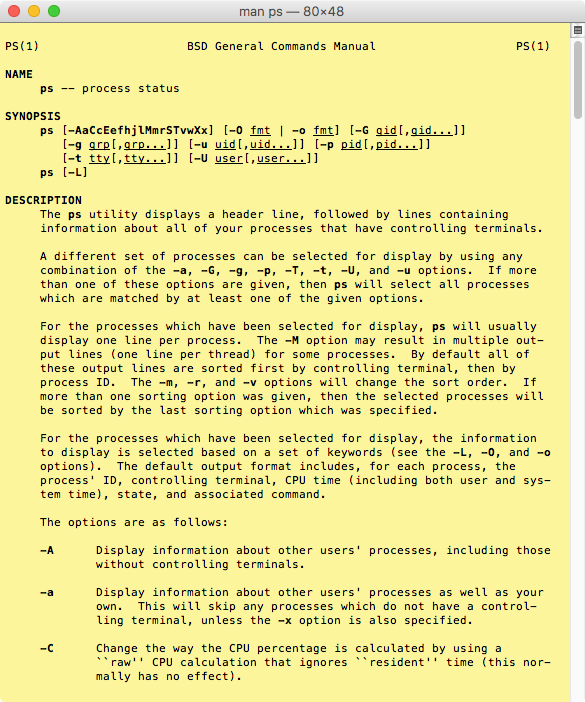
| AppleScript名:Terminalで指定コマンドのman pageを表示する |
| set aCommandName to "ps" set aURL to "x-man-page://" & aCommandName open location aURL |
エンコーダーの情報を取得する
| AppleScript名:エンコーダーの情報を取得する |
| tell application "iTunes" set anEncoder to current encoder set aProp to properties of anEncoder –> {class:encoder, id:63, index:1, name:"AAC Encoder"} set encList to every encoder –> {encoder id 63 of application "iTunes", encoder id 60 of application "iTunes", encoder id 61 of application "iTunes", encoder id 62 of application "iTunes", encoder id 59 of application "iTunes"} set encnameList to name of every encoder –> {"AAC Encoder", "AIFF Encoder", "Lossless Encoder", "MP3 Encoder", "WAV Encoder"} set encPropList to properties of every encoder –> {{class:encoder, id:63, index:1, name:"AAC Encoder"}, {class:encoder, id:60, index:2, name:"AIFF Encoder"}, {class:encoder, id:61, index:3, name:"Lossless Encoder"}, {class:encoder, id:62, index:5, name:"MP3 Encoder"}, {class:encoder, id:59, index:6, name:"WAV Encoder"}} end tell |
デスクトップを隠すv6
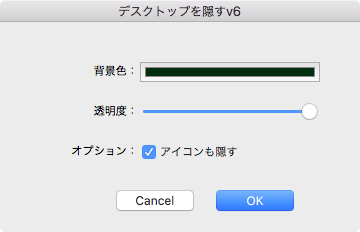
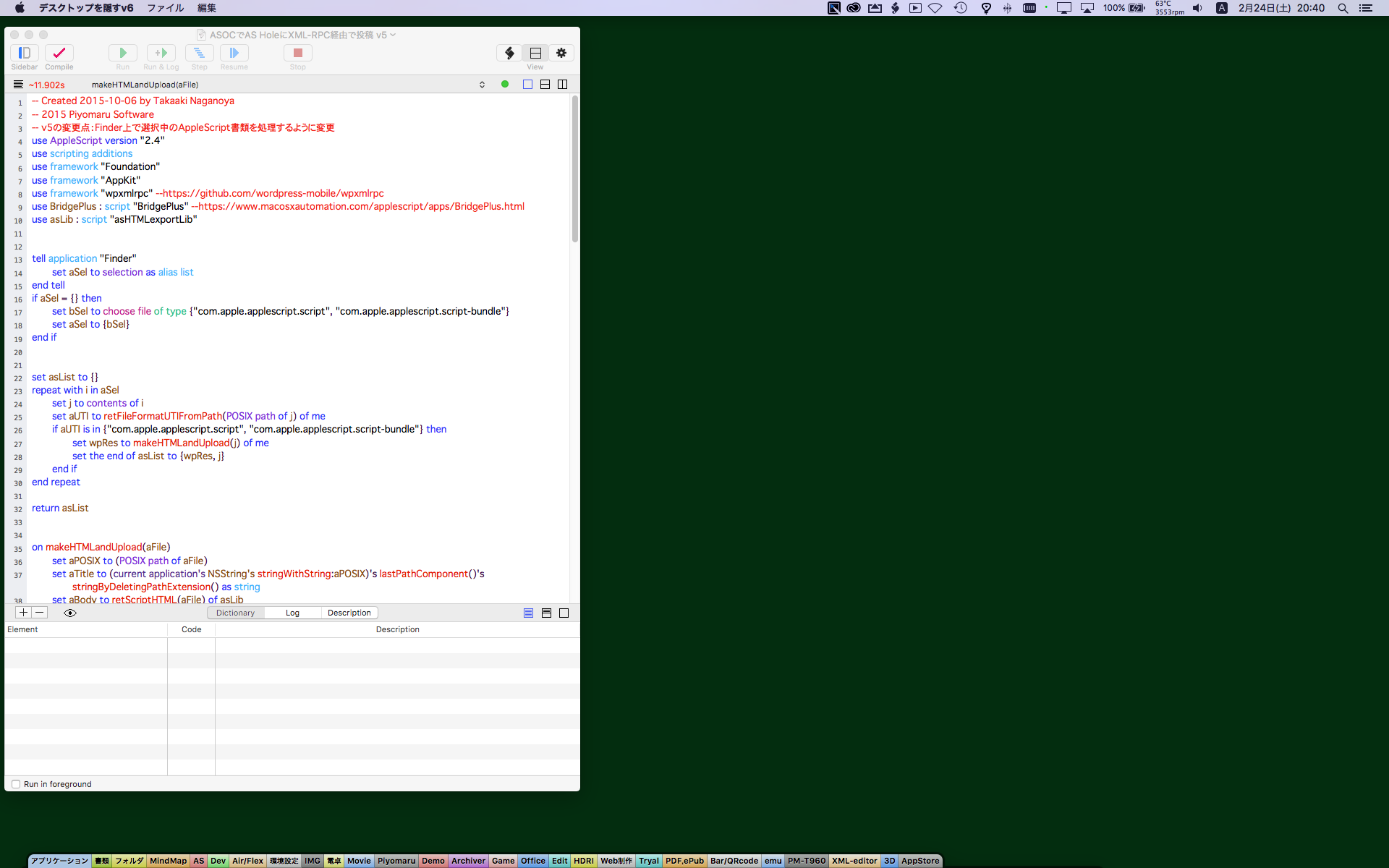
Edama2さんから投稿していただいた、デスクトップを隠すAppleScriptアプレットです。
資料や本のために画面キャプチャを行うさい、デスクトップを隠しておく(アイコンとかデスクトップピクチャとか)必要があるケースがあります。そのような用途のために作られたものです。
| AppleScript名:デスクトップを隠すv6 |
| script HideDesktop use AppleScript version "2.4" use scripting additions use framework "Foundation" use framework "Carbon" — AEInteractWithUser() is in Carbon #GUI部品のtag property _TAG_OF_COLOR_WELL : 501 property _TAG_OF_SLIDER : 502 property _TAG_OF_BUTTON : 503 on run if current application’s AEInteractWithUser(-1, missing value, missing value) is not equal to 0 then return #色データを復元 if my _color_data = missing value then set myColor to current application’s NSColor’s colorWithCalibratedRed:0.2 green:0.3 blue:0.5 alpha:1 else set str to current application’s NSString’s stringWithString:(my _color_data) set enc to current application’s NSISOLatin1StringEncoding set strData to str’s dataUsingEncoding:(enc) set myColor to current application’s NSUnarchiver’s unarchiveObjectWithData:strData end if activate my makeSettingWindow(myColor, my _alpha_value, my _is_show_icon) end run on quit repeat with aWin in (current application’s NSApp’s |windows|()) set aSound to missing value if aWin’s styleMask() = current application’s NSBorderlessWindowMask then try tell current application’s NSSound’s alloc() tell initWithContentsOfFile_byReference_("/Applications/Messages.app/Contents/Resources/Default.aiff", true) set dTime to currentTime() play() set aSound to it end tell end tell end try end if (my closeWin:(aWin)) if aSound ≠ missing value then delay (dTime + 0.5) end repeat –continue quit end quit on makeSettingWindow(myColor, alphaVal, isShowIcon) #NSView tell current application’s NSView’s alloc() tell initWithFrame_(current application’s NSMakeRect(0, 0, 360, 210)) setNeedsDisplay_(true) set aView to it end tell end tell #Labelをつくる tell current application’s NSTextField’s alloc() tell initWithFrame_(current application’s NSMakeRect(60, 150, 80, 20)) setEditable_(false) setStringValue_("背景色:") setDrawsBackground_(false) setBordered_(false) setAlignment_(current application’s NSRightTextAlignment) aView’s addSubview:it end tell end tell tell current application’s NSTextField’s alloc() tell initWithFrame_(current application’s NSMakeRect(60, 110, 80, 20)) setEditable_(false) setStringValue_("透明度:") setDrawsBackground_(false) setBordered_(false) setAlignment_(current application’s NSRightTextAlignment) aView’s addSubview:it end tell end tell tell current application’s NSTextField’s alloc() tell initWithFrame_(current application’s NSMakeRect(60, 70, 80, 20)) setEditable_(false) setStringValue_("オプション:") setDrawsBackground_(false) setBordered_(false) setAlignment_(current application’s NSRightTextAlignment) aView’s addSubview:it end tell end tell #Color Well tell current application’s NSColorWell’s alloc() tell initWithFrame_(current application’s NSMakeRect(140, 150, 180, 20)) setColor_(myColor) setTag_(my _TAG_OF_COLOR_WELL) aView’s addSubview:it end tell end tell #スライダー tell current application’s NSSlider’s alloc() tell initWithFrame_(current application’s NSMakeRect(140, 110, 180, 20)) setMaxValue_(100) setMinValue_(10) –setNumberOfTickMarks_(25) setKnobThickness_(1) setAllowsTickMarkValuesOnly_(true) setTickMarkPosition_(current application’s NSTickMarkBelow) setIntValue_(alphaVal) setTag_(my _TAG_OF_SLIDER) aView’s addSubview:it end tell end tell #アイコンを隠すか tell current application’s NSButton’s alloc() tell initWithFrame_(current application’s NSMakeRect(140, 70, 180, 20)) — pullsDown:false setButtonType_(current application’s NSSwitchButton) setTitle_("アイコンも隠す") setState_(isShowIcon) setTag_(my _TAG_OF_BUTTON) aView’s addSubview:it end tell end tell #OK/Cancel Button tell current application’s NSButton’s alloc() tell initWithFrame_(current application’s NSMakeRect(110, 10, 90, 40)) setButtonType_(current application’s NSMomentaryLightButton) setBezelStyle_(current application’s NSRoundedBezelStyle) setTitle_("Cancel") setTarget_(me) setAction_("clicked:") setKeyEquivalent_(ASCII character (27)) aView’s addSubview:it end tell end tell tell current application’s NSButton’s alloc() tell initWithFrame_(current application’s NSMakeRect(210, 10, 90, 40)) setButtonType_(current application’s NSMomentaryLightButton) setBezelStyle_(current application’s NSRoundedBezelStyle) setTitle_("OK") setTarget_(me) setAction_("clicked:") setKeyEquivalent_(return) aView’s addSubview:it end tell end tell set aTitle to current application’s name as text #Window set aScreen to current application’s NSScreen’s mainScreen() set aFrame to aView’s frame() set aBacking to current application’s NSTitledWindowMask set aDefer to current application’s NSBackingStoreBuffered tell current application’s NSWindow’s alloc() tell initWithContentRect_styleMask_backing_defer_screen_(aFrame, aBacking, aDefer, false, aScreen) –setLevel_(current application’s NSNormalWindowLevel) setTitle_(aTitle) setDelegate_(me) setDisplaysWhenScreenProfileChanges_(true) setHasShadow_(true) setIgnoresMouseEvents_(false) setOpaque_(false) setReleasedWhenClosed_(true) setContentView_(aView) |center|() makeKeyAndOrderFront_((me)) end tell end tell end makeSettingWindow #ボタンをクリックした時 on clicked:aSender #カラーパネルを閉じる tell current application’s NSColorPanel if (sharedColorPanelExists() as boolean) then sharedColorPanel()’s |close|() end tell #設定値の読み込み tell aSender’s superview() set myColor to viewWithTag_(my _TAG_OF_COLOR_WELL)’s |color|() set alphaVal to viewWithTag_(my _TAG_OF_SLIDER)’s intValue() set isShowIcon to viewWithTag_(my _TAG_OF_BUTTON)’s state() end tell #Windowを閉じる my closeWin:(aSender’s |window|()) set aTitle to aSender’s title() as text if aTitle = "OK" then #デスクトップを隠す set {myColor, my _alpha_value, my _is_show_icon} to my makeCoverWindow(myColor, alphaVal, isShowIcon) #NSColor–>NSData–>NSString set aData to current application’s NSArchiver’s archivedDataWithRootObject:(myColor) set enc to current application’s NSISOLatin1StringEncoding set str to current application’s NSString’s alloc()’s initWithData:(aData) encoding:enc set my _color_data to str as text else if aTitle = "Cancel" then tell current application to quit end if end clicked: #ウィンドウを作成 on makeCoverWindow(myColor, alphaVal as integer, isShowIcon as boolean) set aScreen to current application’s NSScreen’s mainScreen() set screenFrame to aScreen’s frame() set aBacking to current application’s NSBorderlessWindowMask set aDefer to current application’s NSBackingStoreBuffered set aHeight to screenFrame’s |size|’s height set aWidth to screenFrame’s |size|’s width set aFrame to current application’s NSMakeRect(0.0, aHeight, aWidth, aHeight) #Image tell current application’s NSImage’s alloc() tell initWithSize_(screenFrame’s |size|) lockFocus() set theColor to myColor’s colorWithAlphaComponent:(alphaVal / 100) tell current application’s NSBezierPath’s bezierPath() appendBezierPathWithRect_(screenFrame) theColor’s |set|() fill() end tell unlockFocus() set anImage to it end tell end tell #View tell current application’s NSImageView’s alloc() tell initWithFrame_(aFrame) setNeedsDisplay_(true) setImage_(anImage) set aCustView to it end tell end tell #Window tell current application’s NSWindow’s alloc() tell initWithContentRect_styleMask_backing_defer_screen_(aFrame, aBacking, aDefer, false, aScreen) #アイコンの表示 if not isShowIcon then setLevel_(current application’s kCGDesktopWindowLevel) else setLevel_(((current application’s kCGBackstopMenuLevelKey) – 100)) –>メニューバーの影のため100ひく end if setBackgroundColor_(current application’s NSColor’s clearColor()) setContentView_(aCustView) setDelegate_(me) setDisplaysWhenScreenProfileChanges_(true) setHasShadow_(false) setIgnoresMouseEvents_(false) setOpaque_(false) setReleasedWhenClosed_(true) makeKeyAndOrderFront_((me)) #Sound try (current application’s NSSound’s alloc()’s initWithContentsOfFile:"/Applications/Messages.app/Contents/Resources/Invitation Accepted.aiff" byReference:true)’s play() on error the error_message number the error_number (current application’s NSSound’s soundNamed:"Purr")’s play() end try setFrame_display_animate_(screenFrame, true, true) end tell end tell return {myColor, alphaVal, isShowIcon} end makeCoverWindow #close win on closeWin:aWindow repeat with n from 10 to 1 by -1 (aWindow’s setAlphaValue:n / 10) delay 0.02 end repeat aWindow’s |close|() delay 0.02 end closeWin: end script #設定値 property _color_data : missing value property _alpha_value : 100 property _is_show_icon : true on run run of HideDesktop end run on quit quit of HideDesktop continue quit end quit |
指定ファイルをFinderで選択表示_OLD Style_as
| AppleScript名:指定ファイルをFinderで選択表示_OLD Style_as |
| — Created 2016-10-31 by Takaaki Naganoya — 2016 Piyomaru Software set aFile to choose file tell application "Finder" activate reveal aFile end tell |
指定ファイルをFinderで選択表示_asoc
| AppleScript名:指定ファイルをFinderで選択表示_asoc |
| — Created 2016-10-31 by Takaaki Naganoya — 2016 Piyomaru Software use AppleScript version "2.4" use scripting additions use framework "Foundation" use framework "AppKit" set aFile to POSIX path of (choose file) set pathStr to current application’s NSString’s stringWithString:aFile set parentPath to pathStr’s stringByDeletingLastPathComponent() set aRes to current application’s NSWorkspace’s sharedWorkspace()’s selectFile:pathStr inFileViewerRootedAtPath:parentPath |
Appleのハードウェアのアイコン名を一覧から選択して返す
| AppleScript名:Appleのハードウェアのアイコン名を一覧から選択して返す |
| — Created 2017-07-29 by Takaaki Naganoya — 2017 Piyomaru Software use AppleScript version "2.4" use scripting additions use framework "Foundation" set aRes to chooseHardwareModel() of me on chooseHardwareModel() set sRes to (do shell script "ls " & (quoted form of "/System/Library/CoreServices/CoreTypes.bundle/Contents/Resources/") & "com.apple.*.icns") set aList to paragraphs of sRes set aaList to choose from list aList if aaList = false then return set aPath to first item of aaList set aStr to ((current application’s NSString’s stringWithString:aPath)’s lastPathComponent()’s stringByDeletingPathExtension()) as string return aStr end chooseHardwareModel |
shell環境変数を取得する
do shell scriptコマンドでシェルコマンドが実行される場合の環境変数の確認は、1コマンドで実行できます。Terminal.app上で実行するときと初期条件が異なるので、必要に応じて環境変数の設定が必要です。
do shell script "env"
★Click Here to Open This Script
これが、Cocoaの機能だとどういう条件で実行されるのか、というのがこのScriptを書いた原因です。動かしてみて、「ああ、do shell scriptコマンドと同じなんだね」ということが理解できました。
| AppleScript名:shell環境変数を取得する |
| — Created 2016-03-16 by Takaaki Naganoya — 2016 Piyomaru Software use AppleScript version "2.4" use scripting additions use framework "Foundation" current application’s NSProcessInfo’s processInfo()’s environment() –> (NSDictionary) {PATH:"/usr/bin:/bin:/usr/sbin:/sbin", TMPDIR:"/var/folders/h4/jfhlwst88xl9z0001s7k9vk00000gr/T/", LOGNAME:"maro", XPC_FLAGS:"0x0", HOME:"/Users/me", Apple_PubSub_Socket_Render:"/private/tmp/com.apple.launchd.KvufhRIpUw/Render", USER:"me", SSH_AUTH_SOCK:"/private/tmp/com.apple.launchd.3B8HzKhUz5/Listeners", DISPLAY:"/private/tmp/com.apple.launchd.el9lFx0WpV/org.macosforge.xquartz:0", XPC_SERVICE_NAME:"au.com.myriad-com.ASObjC-Explorer-4.1891872", SHELL:"/bin/bash", __CF_USER_TEXT_ENCODING:"0x1F8:0x1:0xE"} |
現在のLocaleのIdentifier文字を取得する
| AppleScript名:現在のLocaleのIdentifier文字を取得する.scpt |
| use AppleScript version "2.7" use scripting additions use framework "Foundation" set aLoc to (current application’s NSLocale’s currentLocale()’s identifier()) as anything log aLoc –> "ja_JP" set aLoc to (current application’s NSLocale’s systemLocale()’s identifier()) as anything log aLoc –> (__NSCFLocale) <__NSCFLocale: 0x6180000f5480> set isoCountry to (current application’s NSLocale’s ISOCountryCodes()) as anything log isoCountry –> (NSArray) {"AD", "AE", "AF", "AG", "AI", "AL", "AM", "AO", "AQ", "AR", "AS", "AT", "AU", "AW", "AX", "AZ", "BA", "BB", "BD", "BE", "BF", "BG", "BH", "BI", "BJ", "BL", "BM", "BN", "BO", "BQ", "BR", "BS", "BT", "BV", "BW", "BY", "BZ", "CA", "CC", "CD", "CF", "CG", "CH", "CI", "CK", "CL", "CM", "CN", "CO", "CR", "CU", "CV", "CW", "CX", "CY", "CZ", "DE", "DJ", "DK", "DM", "DO", "DZ", "EC", "EE", "EG", "EH", "ER", "ES", "ET", "FI", "FJ", "FK", "FM", "FO", "FR", "GA", "GB", "GD", "GE", "GF", "GG", "GH", "GI", "GL", "GM", "GN", "GP", "GQ", "GR", "GS", "GT", "GU", "GW", "GY", "HK", "HM", "HN", "HR", "HT", "HU", "ID", "IE", "IL", "IM", "IN", "IO", "IQ", "IR", "IS", "IT", "JE", "JM", "JO", "JP", "KE", "KG", "KH", "KI", "KM", "KN", "KP", "KR", "KW", "KY", "KZ", "LA", "LB", "LC", "LI", "LK", "LR", "LS", "LT", "LU", "LV", "LY", "MA", "MC", "MD", "ME", "MF", "MG", "MH", "MK", "ML", "MM", "MN", "MO", "MP", "MQ", "MR", "MS", "MT", "MU", "MV", "MW", "MX", "MY", "MZ", "NA", "NC", "NE", "NF", "NG", "NI", "NL", "NO", "NP", "NR", "NU", "NZ", "OM", "PA", "PE", "PF", "PG", "PH", "PK", "PL", "PM", "PN", "PR", "PS", "PT", "PW", "PY", "QA", "RE", "RO", "RS", "RU", "RW", "SA", "SB", "SC", "SD", "SE", "SG", "SH", "SI", "SJ", "SK", "SL", "SM", "SN", "SO", "SR", "SS", "ST", "SV", "SX", "SY", "SZ", "TC", "TD", "TF", "TG", "TH", "TJ", "TK", "TL", "TM", "TN", "TO", "TR", "TT", "TV", "TW", "TZ", "UA", "UG", "UM", "US", "UY", "UZ", "VA", "VC", "VE", "VG", "VI", "VN", "VU", "WF", "WS", "YE", "YT", "ZA", "ZM", "ZW"} set isoCurrency to (current application’s NSLocale’s ISOCurrencyCodes()) as anything log isoCurrency –> {"ADP", "AED", "AFA", "AFN", "ALK", "ALL", "AMD", "ANG", "AOA", "AOK", "AON", "AOR", "ARA", "ARL", "ARM", "ARP", "ARS", "ATS", "AUD", "AWG", "AZM", "AZN", "BAD", "BAM", "BAN", "BBD", "BDT", "BEC", "BEF", "BEL", "BGL", "BGM", "BGN", "BGO", "BHD", "BIF", "BMD", "BND", "BOB", "BOL", "BOP", "BOV", "BRB", "BRC", "BRE", "BRL", "BRN", "BRR", "BRZ", "BSD", "BTN", "BUK", "BWP", "BYB", "BYR", "BZD", "CAD", "CDF", "CHE", "CHF", "CHW", "CLE", "CLF", "CLP", "CNX", "CNY", "COP", "COU", "CRC", "CSD", "CSK", "CUC", "CUP", "CVE", "CYP", "CZK", "DDM", "DEM", "DJF", "DKK", "DOP", "DZD", "ECS", "ECV", "EEK", "EGP", "EQE", "ERN", "ESA", "ESB", "ESP", "ETB", "EUR", "FIM", "FJD", "FKP", "FRF", "GBP", "GEK", "GEL", "GHC", "GHS", "GIP", "GMD", "GNF", "GNS", "GQE", "GRD", "GTQ", "GWE", "GWP", "GYD", "HKD", "HNL", "HRD", "HRK", "HTG", "HUF", "IDR", "IEP", "ILP", "ILR", "ILS", "INR", "IQD", "IRR", "ISJ", "ISK", "ITL", "JMD", "JOD", "JPY", "KES", "KGS", "KHR", "KMF", "KPW", "KRH", "KRO", "KRW", "KWD", "KYD", "KZT", "LAK", "LBP", "LKR", "LRD", "LSL", "LSM", "LTL", "LTT", "LUC", "LUF", "LUL", "LVL", "LVR", "LYD", "MAD", "MAF", "MCF", "MDC", "MDL", "MGA", "MGF", "MKD", "MKN", "MLF", "MMK", "MNT", "MOP", "MRO", "MTL", "MTP", "MUR", "MVP", "MVR", "MWK", "MXN", "MXP", "MXV", "MYR", "MZE", "MZM", "MZN", "NAD", "NGN", "NIC", "NIO", "NLG", "NOK", "NPR", "NZD", "OMR", "PAB", "PEI", "PEN", "PES", "PGK", "PHP", "PKR", "PLN", "PLZ", "PTE", "PYG", "QAR", "RHD", "ROL", "RON", "RSD", "RUB", "RUR", "RWF", "SAR", "SBD", "SCR", "SDD", "SDG", "SDP", "SEK", "SGD", "SHP", "SIT", "SKK", "SLL", "SOS", "SRD", "SRG", "SSP", "STD", "SUR", "SVC", "SYP", "SZL", "THB", "TJR", "TJS", "TMM", "TMT", "TND", "TOP", "TPE", "TRL", "TRY", "TTD", "TWD", "TZS", "UAH", "UAK", "UGS", "UGX", "USD", "USN", "USS", "UYI", "UYP", "UYU", "UZS", "VEB", "VEF", "VND", "VNN", "VUV", "WST", "XAF", "XAG", "XAU", "XBA", "XBB", "XBC", "XBD", "XCD", "XDR", "XEU", "XFO", "XFU", "XOF", "XPD", "XPF", "XPT", "XRE", "XSU", "XTS", "XUA", "XXX", "YDD", "YER", "YUD", "YUM", "YUN", "YUR", "ZAL", "ZAR", "ZMK", "ZMW", "ZRN", "ZRZ", "ZWL", "ZWR", "ZWD"} set aveLoc to (current application’s NSLocale’s availableLocaleIdentifiers()) as anything log aveLoc –> {"eu", "hr_BA", "en_CM", "rw_RW", "en_SZ", "tk_Latn", "uz_Arab", "he_IL", "ar", "en_PN", "as", "en_NF", "rwk_TZ", "zh_Hant_TW", "gsw_LI", "th_TH", "ta_IN", "es_EA", "fr_GF", "ar_001", "en_RW", "tr_TR", "de_CH", "ee_TG", "en_NG", "fr_TG", "az", "fr_SC", "es_HN", "en_AG", "ru_KZ", "gsw", "dyo", "so_ET", "zh_Hant_MO", "de_BE", "km_KH", "my_MM", "mgh_MZ", "ee_GH", "es_EC", "kw_GB", "rm_CH", "en_ME", "nyn", "mk_MK", "bs_Cyrl_BA", "ar_MR", "en_BM", "ms_Arab", "en_AI", "gl_ES", "en_PR", "ha_Latn_GH", "ne_IN", "or_IN", "khq_ML", "en_MG", "pt_TL", "en_LC", "ta_SG", "jmc_TZ", "om_ET", "lv_LV", "es_US", "en_PT", "vai_Latn_LR", "to_TO", "en_NL", "cgg_UG", "ta", "en_MH", "iu_Cans_CA", "zu_ZA", "shi_Latn_MA", "brx_IN", "ar_KM", "en_AL", "te", "chr_US", "yo_BJ", "fr_VU", "pa", "tg", "ks_Arab", "kea", "te_IN", "th", "fr_RE", "ur_IN", "yo_NG", "ti", "guz_KE", "tk", "kl_GL", "ksf_CM", "mua_CM", "lag_TZ", "fr_TN", "es_PA", "pl_PL", "to", "hi_IN", "dje_NE", "es_GQ", "kok_IN", "pl", "tr", "bem", "ha", "ckb", "lg", "fr_GN", "en_PW", "en_NO", "nyn_UG", "sr_Latn_RS", "pa_Guru", "he", "swc_CD", "ug_Arab", "lu_CD", "mgo_CM", "sn_ZW", "en_BS", "ps_AF", "da", "ms_Latn_SG", "ps", "ln", "pt", "iu_Cans", "hi", "lo", "ebu", "de", "gu_IN", "seh", "en_CX", "en_ZM", "tzm_Latn_MA", "fr_HT", "fr_GP", "lt", "lu", "ln_CD", "vai_Latn", "el_GR", "lv", "en_KE", "sbp", "hr", "en_CY", "es_GT", "twq_NE", "zh_Hant_HK", "kln_KE", "fr_GQ", "chr", "hu", "es_UY", "fr_CA", "en_NR", "mer", "shi", "es_PE", "fr_SN", "bez", "sw_TZ", "kkj", "hy", "kk_Cyrl_KZ", "en_CZ", "teo_KE", "teo", "dz_BT", "ar_JO", "mer_KE", "khq", "ln_CF", "nn_NO", "en_MO", "ar_TD", "dz", "ses", "en_BW", "en_AS", "ar_IL", "ms_Latn_BN", "bo_CN", "nnh", "teo_UG", "hy_AM", "ln_CG", "sr_Latn_BA", "en_MP", "ksb_TZ", "ar_SA", "ar_LY", "en_AT", "so_KE", "fr_CD", "af_NA", "en_NU", "es_PH", "en_KI", "en_JE", "lkt", "en_AU", "fa_IR", "uz_Latn_UZ", "ky_Cyrl", "zh_Hans_CN", "ewo_CM", "fr_PF", "ca_IT", "en_BZ", "ar_KW", "pt_GW", "fr_FR", "am_ET", "en_VC", "fr_DJ", "fr_CF", "es_SV", "en_MS", "pt_ST", "ar_SD", "luy_KE", "swc", "de_LI", "fr_CG", "zh_Hans_SG", "en_MT", "ewo", "af_ZA", "om_KE", "nl_SR", "es_ES", "es_DO", "ar_IQ", "fr_CH", "nnh_CM", "es_419", "en_MU", "en_US_POSIX", "yav_CM", "luo_KE", "dua_CM", "et_EE", "en_IE", "ak_GH", "rwk", "es_CL", "kea_CV", "fr_CI", "fr_BE", "en_NZ", "ky_Cyrl_KG", "en_LR", "en_KN", "nb_SJ", "sg", "sr_Cyrl_RS", "ru_RU", "en_ZW", "sv_AX", "si", "ga_IE", "en_VG", "sk", "agq_CM", "fr_BF", "naq_NA", "sl", "en_MW", "mr_IN", "az_Latn", "en_LS", "de_AT", "ka", "sn", "sr_Latn_ME", "fr_NC", "so", "is_IS", "twq", "ig_NG", "sq", "fo_FO", "sr", "tzm", "ga", "om", "en_LT", "bas_CM", "ki", "nl_BE", "ar_QA", "sv", "kk", "sw", "es_CO", "az_Latn_AZ", "rn_BI", "or", "kl", "ca", "en_VI", "km", "kn", "en_LU", "fr_SY", "ar_TN", "en_JM", "fr_PM", "ko", "fr_NE", "fr_MA", "gl", "ru_MD", "saq_KE", "ks", "fr_CM", "gv_IM", "fr_BI", "en_LV", "ks_Arab_IN", "es_NI", "en_GB", "kw", "nl_SX", "dav_KE", "tr_CY", "ky", "en_UG", "tzm_Latn", "en_TC", "nus_SD", "ar_EG", "fr_BJ", "gu", "es_PR", "fr_RW", "sr_Cyrl_BA", "gv", "fr_MC", "cs", "bez_TZ", "es_CR", "asa_TZ", "ar_EH", "ms_Arab_BN", "mn_Cyrl", "sbp_TZ", "ha_Latn_NE", "lt_LT", "mfe", "en_GD", "cy", "ca_FR", "es_BO", "fr_BL", "bn_IN", "uz_Cyrl_UZ", "az_Cyrl", "en_IM", "sw_KE", "en_SB", "ur_PK", "pa_Arab", "haw_US", "ar_SO", "en_IN", "ha_Latn", "fil", "fr_MF", "en_WS", "es_CU", "ja_JP", "en_SC", "en_IO", "pt_PT", "en_HK", "en_GG", "fr_MG", "de_LU", "ms_Latn_MY", "tg_Cyrl", "en_SD", "shi_Tfng", "ln_AO", "ug_Arab_CN", "as_IN", "en_GH", "ro_RO", "jgo_CM", "dua", "en_UM", "en_SE", "kn_IN", "en_KY", "vun_TZ", "kln", "en_GI", "ca_ES", "rof", "pt_CV", "kok", "pt_BR", "ar_DJ", "zh", "fi_FI", "tg_Cyrl_TJ", "es_PY", "ar_SS", "mua", "sr_Cyrl_ME", "vai_Vaii_LR", "en_001", "xog_UG", "en_TK", "si_LK", "en_SG", "nl_NL", "vi", "sv_SE", "pt_AO", "fr_DZ", "ca_AD", "xog", "en_IS", "nb", "seh_MZ", "es_AR", "sk_SK", "en_SH", "ti_ER", "nd", "az_Cyrl_AZ", "zu", "ne", "nd_ZW", "el_CY", "en_IT", "nl_BQ", "da_GL", "ja", "rm", "fr_ML", "rn", "en_VU", "rof_TZ", "ro", "ebu_KE", "ru_KG", "en_SI", "sg_CF", "mfe_MU", "nl", "brx", "bs_Latn", "fa", "zgh_MA", "en_GM", "shi_Latn", "en_FI", "nn", "en_EE", "ru", "kam_KE", "vai_Vaii", "ar_ER", "ti_ET", "rw", "ff", "luo", "fa_AF", "ha_Latn_NG", "nl_CW", "en_HR", "en_FJ", "fi", "pt_MO", "be", "en_US", "en_TO", "en_SK", "bg", "ru_BY", "it_IT", "ml_IN", "gsw_CH", "fo", "sv_FI", "en_FK", "nus", "ta_LK", "vun", "sr_Latn", "fr", "en_SL", "bm", "ar_BH", "guz", "bn", "bo", "ar_SY", "lo_LA", "ne_NP", "uz_Latn", "be_BY", "es_IC", "sr_Latn_XK", "ar_MA", "pa_Guru_IN", "br", "luy", "kde_TZ", "bs", "hu_HU", "ar_AE", "en_HU", "zh_Hans", "en_FM", "sq_AL", "ko_KP", "en_150", "en_DE", "fr_MQ", "en_CA", "en_TR", "ro_MD", "es_VE", "fr_WF", "mt_MT", "kab", "nmg_CM", "ru_UA", "fr_MR", "tk_Latn_TM", "zh_Hans_MO", "mn_Cyrl_MN", "bs_Cyrl", "sw_UG", "ko_KR", "en_DG", "bo_IN", "en_CC", "shi_Tfng_MA", "lag", "it_SM", "en_TT", "ms_Arab_MY", "sq_MK", "ms_Latn", "bem_ZM", "kde", "ar_OM", "cgg", "bas", "kam", "zh_Hant", "es_MX", "en_GU", "fr_MU", "fr_KM", "ar_LB", "en_BA", "en_TV", "sr_Cyrl", "dje", "kab_DZ", "fil_PH", "vai", "hr_HR", "bs_Latn_BA", "nl_AW", "dav", "so_SO", "ar_PS", "en_FR", "uz_Cyrl", "ff_SN", "en_BB", "ki_KE", "naq", "en_SS", "mg_MG", "mas_KE", "en_RO", "en_PG", "mgh", "dyo_SN", "mas", "agq", "bn_BD", "haw", "nb_NO", "da_DK", "en_DK", "saq", "ug", "cy_GB", "fr_YT", "jmc", "ses_ML", "en_PH", "de_DE", "ar_YE", "bm_ML", "yo", "lkt_US", "uz_Arab_AF", "jgo", "uk", "sl_SI", "en_CH", "asa", "lg_UG", "mgo", "id_ID", "en_NA", "en_GY", "zgh", "pt_MZ", "fr_LU", "kk_Cyrl", "mas_TZ", "ur", "en_DM", "ta_MY", "en_BE", "mg", "fr_GA", "ka_GE", "nmg", "en_TZ", "eu_ES", "ar_DZ", "id", "so_DJ", "yav", "mk", "pa_Arab_PK", "ml", "en_ER", "ig", "mn", "ksb", "uz", "vi_VN", "ii", "en_PK", "ee", "mr", "ms", "en_ES", "sq_XK", "it_CH", "mt", "en_CK", "br_FR", "sr_Cyrl_XK", "ksf", "en_SX", "bg_BG", "en_PL", "af", "el", "cs_CZ", "fr_TD", "zh_Hans_HK", "is", "my", "en", "it", "ii_CN", "eo", "iu", "en_ZA", "en_AD", "ak", "en_RU", "kkj_CM", "am", "es", "et", "uk_UA"} set isoLang to (current application’s NSLocale’s ISOLanguageCodes()) as anything log isoLang –> {"aa", "ab", "ace", "ach", "ada", "ady", "ae", "af", "afa", "afh", "agq", "ain", "ak", "akk", "ale", "alg", "alt", "am", "an", "ang", "anp", "apa", "ar", "arc", "arn", "arp", "art", "arw", "as", "asa", "ast", "ath", "aus", "av", "awa", "ay", "az", "ba", "bad", "bai", "bal", "ban", "bas", "bat", "bax", "bbj", "be", "bej", "bem", "ber", "bez", "bfd", "bg", "bh", "bho", "bi", "bik", "bin", "bkm", "bla", "bm", "bn", "bnt", "bo", "br", "bra", "brx", "bs", "bss", "btk", "bua", "bug", "bum", "byn", "byv", "ca", "cad", "cai", "car", "cau", "cay", "cch", "ce", "ceb", "cel", "cgg", "ch", "chb", "chg", "chk", "chm", "chn", "cho", "chp", "chr", "chy", "ckb", "cmc", "co", "cop", "cpe", "cpf", "cpp", "cr", "crh", "crp", "cs", "csb", "cu", "cus", "cv", "cy", "da", "dak", "dar", "dav", "day", "de", "del", "den", "dgr", "din", "dje", "doi", "dra", "dsb", "dua", "dum", "dv", "dyo", "dyu", "dz", "dzg", "ebu", "ee", "efi", "egy", "eka", "el", "elx", "en", "enm", "eo", "es", "et", "eu", "ewo", "fa", "fan", "fat", "ff", "fi", "fil", "fiu", "fj", "fo", "fon", "fr", "frm", "fro", "frr", "frs", "fur", "fy", "ga", "gaa", "gay", "gba", "gd", "gem", "gez", "gil", "gl", "gmh", "gn", "goh", "gon", "gor", "got", "grb", "grc", "gsw", "gu", "guz", "gv", "gwi", "ha", "hai", "haw", "he", "hi", "hil", "him", "hit", "hmn", "ho", "hr", "hsb", "ht", "hu", "hup", "hy", "hz", "ia", "iba", "ibb", "id", "ie", "ig", "ii", "ijo", "ik", "ilo", "inc", "ine", "inh", "io", "ira", "iro", "is", "it", "iu", "ja", "jbo", "jgo", "jmc", "jpr", "jrb", "jv", "ka", "kaa", "kab", "kac", "kaj", "kam", "kar", "kaw", "kbd", "kbl", "kcg", "kde", "kea", "kfo", "kg", "kha", "khi", "kho", "khq", "ki", "kj", "kk", "kkj", "kl", "kln", "km", "kmb", "kn", "ko", "kok", "kos", "kpe", "kr", "krc", "krl", "kro", "kru", "ks", "ksb", "ksf", "ksh", "ku", "kum", "kut", "kv", "kw", "ky", "la", "lad", "lag", "lah", "lam", "lb", "lez", "lg", "li", "lkt", "ln", "lo", "lol", "loz", "lt", "lu", "lua", "lui", "lun", "luo", "lus", "luy", "lv", "mad", "maf", "mag", "mai", "mak", "man", "map", "mas", "mde", "mdf", "mdr", "men", "mer", "mfe", "mg", "mga", "mgh", "mgo", "mh", "mi", "mic", "min", "mis", "mk", "mkh", "ml", "mn", "mnc", "mni", "mno", "mo", "moh", "mos", "mr", "ms", "mt", "mua", "mul", "mun", "mus", "mwl", "mwr", "my", "mye", "myn", "myv", "na", "nah", "nai", "nap", "naq", "nb", "nd", "nds", "ne", "new", "ng", "nia", "nic", "niu", "nl", "nmg", "nn", "nnh", "no", "nog", "non", "nqo", "nr", "nso", "nub", "nus", "nv", "nwc", "ny", "nym", "nyn", "nyo", "nzi", "oc", "oj", "om", "or", "os", "osa", "ota", "oto", "pa", "paa", "pag", "pal", "pam", "pap", "pau", "peo", "phi", "phn", "pi", "pl", "pon", "pra", "pro", "ps", "pt", "qu", "raj", "rap", "rar", "rm", "rn", "ro", "roa", "rof", "rom", "ru", "rup", "rw", "rwk", "sa", "sad", "sah", "sai", "sal", "sam", "saq", "sas", "sat", "sba", "sbp", "sc", "scn", "sco", "sd", "se", "see", "seh", "sel", "sem", "ses", "sg", "sga", "sgn", "shi", "shn", "shu", "si", "sid", "sio", "sit", "sk", "sl", "sla", "sm", "sma", "smi", "smj", "smn", "sms", "sn", "snk", "so", "sog", "son", "sq", "sr", "srn", "srr", "ss", "ssa", "ssy", "st", "su", "suk", "sus", "sux", "sv", "sw", "swb", "swc", "syc", "syr", "ta", "tai", "te", "tem", "teo", "ter", "tet", "tg", "th", "ti", "tig", "tiv", "tk", "tkl", "tl", "tlh", "tli", "tmh", "tn", "to", "tog", "tpi", "tr", "trv", "ts", "tsi", "tt", "tum", "tup", "tut", "tvl", "tw", "twq", "ty", "tyv", "tzm", "udm", "ug", "uga", "uk", "umb", "und", "ur", "uz", "vai", "ve", "vi", "vo", "vot", "vun", "wa", "wae", "wak", "wal", "war", "was", "wen", "wo", "xal", "xh", "xog", "yao", "yap", "yav", "ybb", "yi", "yo", "ypk", "yue", "za", "zap", "zbl", "zen", "zgh", "zh", "znd", "zu", "zun", "zxx", "zza"} set commonCurrency to (current application’s NSLocale’s commonISOCurrencyCodes()) as anything log commonCurrency –> (NSArray) {"AED", "AFN", "ALL", "AMD", "ANG", "AOA", "ARS", "AUD", "AWG", "AZN", "BAM", "BBD", "BDT", "BGN", "BHD", "BIF", "BMD", "BND", "BOB", "BRL", "BSD", "BTN", "BWP", "BYR", "BZD", "CAD", "CDF", "CHF", "CLP", "CNY", "COP", "CRC", "CUC", "CUP", "CVE", "CZK", "DJF", "DKK", "DOP", "DZD", "EGP", "ERN", "ETB", "EUR", "FJD", "FKP", "GBP", "GEL", "GHS", "GIP", "GMD", "GNF", "GTQ", "GWP", "GYD", "HKD", "HNL", "HRK", "HTG", "HUF", "IDR", "ILS", "INR", "IQD", "IRR", "ISK", "JMD", "JOD", "JPY", "KES", "KGS", "KHR", "KMF", "KPW", "KRW", "KWD", "KYD", "KZT", "LAK", "LBP", "LKR", "LRD", "LSL", "LTL", "LVL", "LYD", "MAD", "MDL", "MGA", "MKD", "MMK", "MNT", "MOP", "MRO", "MUR", "MVR", "MWK", "MXN", "MYR", "MZE", "MZN", "NAD", "NGN", "NIO", "NOK", "NPR", "NZD", "OMR", "PAB", "PEN", "PGK", "PHP", "PKR", "PLN", "PYG", "QAR", "RON", "RSD", "RUB", "RWF", "SAR", "SBD", "SCR", "SDG", "SEK", "SGD", "SHP", "SKK", "SLL", "SOS", "SRD", "SSP", "STD", "SVC", "SYP", "SZL", "THB", "TJS", "TMT", "TND", "TOP", "TRY", "TTD", "TWD", "TZS", "UAH", "UGX", "USD", "UYU", "UZS", "VEF", "VND", "VUV", "WST", "XAF", "XCD", "XOF", "XPF", "YER", "ZAR", "ZMW"} set aLoc to (current application’s NSLocale’s localeIdentifierFromWindowsLocaleCode:1041) as anything log aLoc –> "ja_JP" — https://msdn.microsoft.com/ja-jp/library/Cc392381.aspx set aLocID to (current application’s NSLocale’s windowsLocaleCodeFromLocaleIdentifier:"ja_JP") as anything log aLocID –> 1041 set prefLang to (current application’s NSLocale’s preferredLanguages()) as anything log prefLang –> {"ja", "en-US", "en-GB", "fr", "en"} set aLangDIrect1 to (current application’s NSLocale’s characterDirectionForLanguage:"ja") as anything –日本語 log aLangDIrect1 –> 1 –NSLocaleLanguageDirectionLeftToRight set aLangDIrect2 to (current application’s NSLocale’s characterDirectionForLanguage:"ar") as anything –アラビア語 log aLangDIrect2 –> 2 –NSLocaleLanguageDirectionRightToLeft set aLangLineDIrect1 to (current application’s NSLocale’s lineDirectionForLanguage:"ja") as anything –日本語 log aLangLineDIrect1 –> 3 –NSLocaleLanguageDirectionTopToBottom set aLangLineDIrect2 to (current application’s NSLocale’s lineDirectionForLanguage:"ar") as anything –アラビア語 log aLangLineDIrect2 –> 3 –NSLocaleLanguageDirectionTopToBottom |
すべてのLocaleから各種情報を取得
| AppleScript名:すべてのLocaleから各種情報を取得 |
| — Created 2015-10-03 by Takaaki Naganoya — 2015 Piyomaru Software use AppleScript version "2.4" use scripting additions use framework "Foundation" set allLocaleIdentifiers to (current application’s NSLocale’s availableLocaleIdentifiers()) as list set cList to {} repeat with i in allLocaleIdentifiers set j to contents of i set tmpLoc to (current application’s NSLocale’s alloc()’s initWithLocaleIdentifier:j) set aLangCode to (tmpLoc’s objectForKey:(current application’s NSLocaleLanguageCode)) as text set aCountryCode to (tmpLoc’s objectForKey:(current application’s NSLocaleCountryCode)) as text set aCCYSymbol to (tmpLoc’s objectForKey:(current application’s NSLocaleCurrencySymbol)) as text set aLocID to (tmpLoc’s objectForKey:(current application’s NSLocaleIdentifier)) as text –set aCountryName to (tmpLoc’s displayNameForKey:(current application’s NSLocaleCountryCode)) set locIDDisplayName to (tmpLoc’s displayNameForKey:(current application’s NSLocaleIdentifier) value:aLocID) as text set the end of cList to {aLocID, aLangCode, aCountryCode, aCCYSymbol, locIDDisplayName} end repeat cList –> {{"eu", "eu", "missing value", "¤", "euskara"},…. {"ja_JP", "ja", "JP", "¥", "日本語 (日本)"}, ….. {"ja", "ja", "missing value", "¤", "日本語"}, ………., {"en_US", "en", "US", "$", "English (United States)"}, {"en_US_POSIX", "en", "US", "$", "English (United States, Computer)"}, {"zh-Hans", "zh", "missing value", "¤", "中文(简体)"},….. {"zh-Hant", "zh", "missing value", "¤", "中文(繁體)"}, ….{"zh-Hans_HK", "zh", "HK", "HK$", "中文(简体、中国香港特别行政区)"},} |
Current Localeから各種情報を取得する
| AppleScript名:Current Localeから各種情報を取得する |
| — Created 2016-10-12 by Takaaki Naganoya — 2016 Piyomaru Software use AppleScript version "2.4" use scripting additions use framework "Foundation" set curLocale to current application’s NSLocale’s currentLocale() set aDS1 to curLocale’s objectForKey:(current application’s NSLocaleDecimalSeparator) –> (NSString) "." set aDS2 to curLocale’s objectForKey:(current application’s NSLocaleGroupingSeparator) –> (NSString) "," set aDS3 to curLocale’s objectForKey:(current application’s NSLocaleCurrencySymbol) –> (NSString) "¥" set aDS4 to curLocale’s objectForKey:(current application’s NSLocaleCurrencyCode) –> (NSString) "JPY" set aDS5 to curLocale’s objectForKey:(current application’s NSLocaleCollatorIdentifier) –> (NSString) "ja-JP" set aDS6 to curLocale’s objectForKey:(current application’s NSLocaleQuotationBeginDelimiterKey) –> (NSString) "「" set aDS7 to curLocale’s objectForKey:(current application’s NSLocaleQuotationEndDelimiterKey) –> (NSString) "」" set aDS8 to curLocale’s objectForKey:(current application’s NSLocaleAlternateQuotationBeginDelimiterKey) –> (NSString) "『" set aDS9 to curLocale’s objectForKey:(current application’s NSLocaleAlternateQuotationEndDelimiterKey) –> (NSString) "』" set aDS10 to curLocale’s objectForKey:(current application’s NSLocaleIdentifier) –> (NSString) "ja_JP" set aDS11 to curLocale’s objectForKey:(current application’s NSLocaleLanguageCode) –> (NSString) "ja" set aDS12 to curLocale’s objectForKey:(current application’s NSLocaleCountryCode) –> (NSString) "JP" set aDS13 to curLocale’s objectForKey:(current application’s NSLocaleScriptCode) –> missing value set aDS14 to curLocale’s objectForKey:(current application’s NSLocaleVariantCode) –> missing value set aDS15 to curLocale’s objectForKey:(current application’s NSLocaleExemplarCharacterSet) –> (__NSCFCharacterSet) <__NSCFCharacterSet: 0x60800124d890> set aDS16 to curLocale’s objectForKey:(current application’s NSLocaleCalendar) –> (_NSCopyOnWriteCalendarWrapper) <_NSCopyOnWriteCalendarWrapper: 0x610000232ca0> set aDS17 to curLocale’s objectForKey:(current application’s NSLocaleCollationIdentifier) –> missing value set aDS18 to curLocale’s objectForKey:(current application’s NSLocaleUsesMetricSystem) –> (NSNumber) 1 set aDS19 to curLocale’s objectForKey:(current application’s NSLocaleMeasurementSystem) –> (NSString) "Metric" |
Locale情報を取得する
| AppleScript名:Locale情報を取得する |
| — Created 2015-09-11 by Takaaki Naganoya — 2015 Piyomaru Software use AppleScript version "2.4" use scripting additions use framework "Foundation" set aLocale to (current application’s NSLocale’s currentLocale’s objectForKey:(current application’s NSLocaleIdentifier)) as list of string or string –as anything –> "ja_JP" set aLangList to (current application’s NSLocale’s preferredLanguages()) as list of string or string –as anything –> {"ja", "en-US", "en-GB", "fr", "en"} set aLocList to (current application’s NSLocale’s availableLocaleIdentifiers()) as list of string or string –as anything –> {"eu", "hr_BA", "en_CM", "rw_RW", "en_SZ", "tk_Latn", "uz_Arab", "he_IL", "ar", "en_PN", "as", "en_NF", "rwk_TZ", "zh_Hant_TW", "gsw_LI", "th_TH", "ta_IN", "es_EA", "fr_GF", "ar_001", "en_RW", "tr_TR", "de_CH", "ee_TG", "en_NG", "fr_TG", "az", "fr_SC", "es_HN", "en_AG", "ru_KZ", "gsw", "dyo", "so_ET", "zh_Hant_MO", "de_BE", "km_KH", "my_MM", "mgh_MZ", "ee_GH", "es_EC", "kw_GB", "rm_CH", "en_ME", "nyn", "mk_MK", "bs_Cyrl_BA", "ar_MR", "en_BM", "ms_Arab", "en_AI", "gl_ES", "en_PR", "ha_Latn_GH", "ne_IN", "or_IN", "khq_ML", "en_MG", "pt_TL", "en_LC", "ta_SG", "jmc_TZ", "om_ET", "lv_LV", "es_US", "en_PT", "vai_Latn_LR", "to_TO", "en_NL", "cgg_UG", "ta", "en_MH", "iu_Cans_CA", "zu_ZA", "shi_Latn_MA", "brx_IN", "ar_KM", "en_AL", "te", "chr_US", "yo_BJ", "fr_VU", "pa", "tg", "ks_Arab", "kea", "te_IN", "th", "fr_RE", "ur_IN", "yo_NG", "ti", "guz_KE", "tk", "kl_GL", "ksf_CM", "mua_CM", "lag_TZ", "fr_TN", "es_PA", "pl_PL", "to", "hi_IN", "dje_NE", "es_GQ", "kok_IN", "pl", "tr", "bem", "ha", "ckb", "lg", "fr_GN", "en_PW", "en_NO", "nyn_UG", "sr_Latn_RS", "pa_Guru", "he", "swc_CD", "ug_Arab", "lu_CD", "mgo_CM", "sn_ZW", "en_BS", "ps_AF", "da", "ms_Latn_SG", "ps", "ln", "pt", "iu_Cans", "hi", "lo", "ebu", "de", "gu_IN", "seh", "en_CX", "en_ZM", "tzm_Latn_MA", "fr_HT", "fr_GP", "lt", "lu", "ln_CD", "vai_Latn", "el_GR", "lv", "en_KE", "sbp", "hr", "en_CY", "es_GT", "twq_NE", "zh_Hant_HK", "kln_KE", "fr_GQ", "chr", "hu", "es_UY", "fr_CA", "en_NR", "mer", "shi", "es_PE", "fr_SN", "bez", "sw_TZ", "kkj", "hy", "kk_Cyrl_KZ", "en_CZ", "teo_KE", "teo", "dz_BT", "ar_JO", "mer_KE", "khq", "ln_CF", "nn_NO", "en_MO", "ar_TD", "dz", "ses", "en_BW", "en_AS", "ar_IL", "ms_Latn_BN", "bo_CN", "nnh", "teo_UG", "hy_AM", "ln_CG", "sr_Latn_BA", "en_MP", "ksb_TZ", "ar_SA", "ar_LY", "en_AT", "so_KE", "fr_CD", "af_NA", "en_NU", "es_PH", "en_KI", "en_JE", "lkt", "en_AU", "fa_IR", "uz_Latn_UZ", "ky_Cyrl", "zh_Hans_CN", "ewo_CM", "fr_PF", "ca_IT", "en_BZ", "ar_KW", "pt_GW", "fr_FR", "am_ET", "en_VC", "fr_DJ", "fr_CF", "es_SV", "en_MS", "pt_ST", "ar_SD", "luy_KE", "swc", "de_LI", "fr_CG", "zh_Hans_SG", "en_MT", "ewo", "af_ZA", "om_KE", "nl_SR", "es_ES", "es_DO", "ar_IQ", "fr_CH", "nnh_CM", "es_419", "en_MU", "en_US_POSIX", "yav_CM", "luo_KE", "dua_CM", "et_EE", "en_IE", "ak_GH", "rwk", "es_CL", "kea_CV", "fr_CI", "fr_BE", "en_NZ", "ky_Cyrl_KG", "en_LR", "en_KN", "nb_SJ", "sg", "sr_Cyrl_RS", "ru_RU", "en_ZW", "sv_AX", "si", "ga_IE", "en_VG", "sk", "agq_CM", "fr_BF", "naq_NA", "sl", "en_MW", "mr_IN", "az_Latn", "en_LS", "de_AT", "ka", "sn", "sr_Latn_ME", "fr_NC", "so", "is_IS", "twq", "ig_NG", "sq", "fo_FO", "sr", "tzm", "ga", "om", "en_LT", "bas_CM", "ki", "nl_BE", "ar_QA", "sv", "kk", "sw", "es_CO", "az_Latn_AZ", "rn_BI", "or", "kl", "ca", "en_VI", "km", "kn", "en_LU", "fr_SY", "ar_TN", "en_JM", "fr_PM", "ko", "fr_NE", "fr_MA", "gl", "ru_MD", "saq_KE", "ks", "fr_CM", "gv_IM", "fr_BI", "en_LV", "ks_Arab_IN", "es_NI", "en_GB", "kw", "nl_SX", "dav_KE", "tr_CY", "ky", "en_UG", "tzm_Latn", "en_TC", "nus_SD", "ar_EG", "fr_BJ", "gu", "es_PR", "fr_RW", "sr_Cyrl_BA", "gv", "fr_MC", "cs", "bez_TZ", "es_CR", "asa_TZ", "ar_EH", "ms_Arab_BN", "mn_Cyrl", "sbp_TZ", "ha_Latn_NE", "lt_LT", "mfe", "en_GD", "cy", "ca_FR", "es_BO", "fr_BL", "bn_IN", "uz_Cyrl_UZ", "az_Cyrl", "en_IM", "sw_KE", "en_SB", "ur_PK", "pa_Arab", "haw_US", "ar_SO", "en_IN", "ha_Latn", "fil", "fr_MF", "en_WS", "es_CU", "ja_JP", "en_SC", "en_IO", "pt_PT", "en_HK", "en_GG", "fr_MG", "de_LU", "ms_Latn_MY", "tg_Cyrl", "en_SD", "shi_Tfng", "ln_AO", "ug_Arab_CN", "as_IN", "en_GH", "ro_RO", "jgo_CM", "dua", "en_UM", "en_SE", "kn_IN", "en_KY", "vun_TZ", "kln", "en_GI", "ca_ES", "rof", "pt_CV", "kok", "pt_BR", "ar_DJ", "zh", "fi_FI", "tg_Cyrl_TJ", "es_PY", "ar_SS", "mua", "sr_Cyrl_ME", "vai_Vaii_LR", "en_001", "xog_UG", "en_TK", "si_LK", "en_SG", "nl_NL", "vi", "sv_SE", "pt_AO", "fr_DZ", "ca_AD", "xog", "en_IS", "nb", "seh_MZ", "es_AR", "sk_SK", "en_SH", "ti_ER", "nd", "az_Cyrl_AZ", "zu", "ne", "nd_ZW", "el_CY", "en_IT", "nl_BQ", "da_GL", "ja", "rm", "fr_ML", "rn", "en_VU", "rof_TZ", "ro", "ebu_KE", "ru_KG", "en_SI", "sg_CF", "mfe_MU", "nl", "brx", "bs_Latn", "fa", "zgh_MA", "en_GM", "shi_Latn", "en_FI", "nn", "en_EE", "ru", "kam_KE", "vai_Vaii", "ar_ER", "ti_ET", "rw", "ff", "luo", "fa_AF", "ha_Latn_NG", "nl_CW", "en_HR", "en_FJ", "fi", "pt_MO", "be", "en_US", "en_TO", "en_SK", "bg", "ru_BY", "it_IT", "ml_IN", "gsw_CH", "fo", "sv_FI", "en_FK", "nus", "ta_LK", "vun", "sr_Latn", "fr", "en_SL", "bm", "ar_BH", "guz", "bn", "bo", "ar_SY", "lo_LA", "ne_NP", "uz_Latn", "be_BY", "es_IC", "sr_Latn_XK", "ar_MA", "pa_Guru_IN", "br", "luy", "kde_TZ", "bs", "hu_HU", "ar_AE", "en_HU", "zh_Hans", "en_FM", "sq_AL", "ko_KP", "en_150", "en_DE", "fr_MQ", "en_CA", "en_TR", "ro_MD", "es_VE", "fr_WF", "mt_MT", "kab", "nmg_CM", "ru_UA", "fr_MR", "tk_Latn_TM", "zh_Hans_MO", "mn_Cyrl_MN", "bs_Cyrl", "sw_UG", "ko_KR", "en_DG", "bo_IN", "en_CC", "shi_Tfng_MA", "lag", "it_SM", "en_TT", "ms_Arab_MY", "sq_MK", "ms_Latn", "bem_ZM", "kde", "ar_OM", "cgg", "bas", "kam", "zh_Hant", "es_MX", "en_GU", "fr_MU", "fr_KM", "ar_LB", "en_BA", "en_TV", "sr_Cyrl", "dje", "kab_DZ", "fil_PH", "vai", "hr_HR", "bs_Latn_BA", "nl_AW", "dav", "so_SO", "ar_PS", "en_FR", "uz_Cyrl", "ff_SN", "en_BB", "ki_KE", "naq", "en_SS", "mg_MG", "mas_KE", "en_RO", "en_PG", "mgh", "dyo_SN", "mas", "agq", "bn_BD", "haw", "nb_NO", "da_DK", "en_DK", "saq", "ug", "cy_GB", "fr_YT", "jmc", "ses_ML", "en_PH", "de_DE", "ar_YE", "bm_ML", "yo", "lkt_US", "uz_Arab_AF", "jgo", "uk", "sl_SI", "en_CH", "asa", "lg_UG", "mgo", "id_ID", "en_NA", "en_GY", "zgh", "pt_MZ", "fr_LU", "kk_Cyrl", "mas_TZ", "ur", "en_DM", "ta_MY", "en_BE", "mg", "fr_GA", "ka_GE", "nmg", "en_TZ", "eu_ES", "ar_DZ", "id", "so_DJ", "yav", "mk", "pa_Arab_PK", "ml", "en_ER", "ig", "mn", "ksb", "uz", "vi_VN", "ii", "en_PK", "ee", "mr", "ms", "en_ES", "sq_XK", "it_CH", "mt", "en_CK", "br_FR", "sr_Cyrl_XK", "ksf", "en_SX", "bg_BG", "en_PL", "af", "el", "cs_CZ", "fr_TD", "zh_Hans_HK", "is", "my", "en", "it", "ii_CN", "eo", "iu", "en_ZA", "en_AD", "ak", "en_RU", "kkj_CM", "am", "es", "et", "uk_UA"} |
秒以下の時間待ちを計測
| AppleScript名:秒以下の時間待ちを計測 |
| — Created 2015-09-05 by Takaaki Naganoya — 2015 Piyomaru Software use AppleScript version "2.4" use scripting additions use framework "Foundation" set a1Dat to current application’s NSDate’s timeIntervalSinceReferenceDate() current application’s NSThread’s sleepForTimeInterval:("0.001" as real) –delay 0.001 set b1Dat to current application’s NSDate’s timeIntervalSinceReferenceDate() set c1Dat to b1Dat – a1Dat –> 0.001403987408 –> 0.001309990883 –> 0.001239955425 |
Macの製品カテゴリ名を取得する
| AppleScript名:Macの製品カテゴリ名を取得する |
| — Created 2015-11-01 by Takaaki Naganoya — 2015 Piyomaru Software use AppleScript version "2.4" use scripting additions use framework "Foundation" set macRes to getSystemProfileInAGenre("SPHardwareDataType", "machine_name") of me –> "MacBook Pro" on getSystemProfileInAGenre(aTargGenre as string, aTargKey as string) set sRes to do shell script ("/usr/sbin/system_profiler -xml " & aTargGenre) set aSource to (readPlistFromStr(sRes) of me) as list set aaList to contents of first item of aSource set aList to _items of aaList repeat with i in aList set aDict to (current application’s NSMutableDictionary’s dictionaryWithDictionary:(contents of i)) set aKeyList to (aDict’s allKeys()) as list if aTargKey is in aKeyList then set aRes to (aDict’s valueForKeyPath:aTargKey) if aRes is not equal to missing value then return aRes as string end if end if end repeat return false end getSystemProfileInAGenre –stringのplistを読み込んでRecordに on readPlistFromStr(theString) set aSource to current application’s NSString’s stringWithString:theString set pListData to aSource’s dataUsingEncoding:(current application’s NSUTF8StringEncoding) set aPlist to current application’s NSPropertyListSerialization’s propertyListFromData:pListData mutabilityOption:(current application’s NSPropertyListImmutable) |format|:(current application’s NSPropertyListFormat) errorDescription:(missing value) return aPlist end readPlistFromStr |
ソフトウェア的にアンマウントしたが物理的に接続解除していないHard Driveの名前を取得する v2
ソフトウェア的にアンマウントした状態で、各種接続端子(USBとか)で物理的につながったままの外部ドライブの名称を取得するAppleScriptです。
いちど、そういう質問が来て「できるわけがない」という回答をしていました。AppleScriptの性質上、ソフトウェア的にそういう操作は許可されていません。そもそも、そんな機能はありません。
ただ、まさかshell command経由でそうした操作ができるとは知りませんでした。冗談半分で調べてみたら存在したという状況です。
| AppleScript名:ソフトウェア的にアンマウントしたが物理的に接続解除していないHard Driveの名前を取得する v2 |
| — Created 2017-06-20 Shane Stanley — Modified 2017-06-20 Takaaki Naganoya use AppleScript version "2.4" — Yosemite (10.10) or later use framework "Foundation" use scripting additions set theResult to do shell script "diskutil list -plist" — make dictionary from property list set theResult to current application’s NSString’s stringWithString:theResult set pListDict to theResult’s propertyList() –> (NSDictionary) {AllDisks:{"disk0", "disk0s1", "disk0s2", "disk0s3", "disk1"}, AllDisksAndPartitions:{{DeviceIdentifier:"disk0", Size:500277790720, Content:"GUID_partition_scheme", Partitions:{{DiskUUID:"FC89778D-9028-4FAA-8118-F74802B0664E", DeviceIdentifier:"disk0s1", Size:209715200, Content:"EFI", VolumeName:"EFI", VolumeUUID:"85D67001-D93E-3687-A1C2-79D677F0C2E0"}, {DiskUUID:"AAF54C8C-9229-4DC1-8EA5-5FCCE9050DC4", DeviceIdentifier:"disk0s2", Size:499418034176, Content:"Apple_CoreStorage"}, {DiskUUID:"EE72FC16-C614-4C77-9048-6EF118451D48", DeviceIdentifier:"disk0s3", Size:650002432, Content:"Apple_Boot", VolumeName:"Recovery HD", VolumeUUID:"3400E36B-24AA-3B7A-93E3-BBDCDFF48548"}}}, {DeviceIdentifier:"disk1", Size:499055067136, MountPoint:"/", Content:"Apple_HFS", VolumeName:"Cherry"}}, WholeDisks:{"disk0", "disk1"}, VolumesFromDisks:{"Cherry"}} — extract relevant info set disksAndParitions to pListDict’s objectForKey:"AllDisksAndPartitions" –> (NSArray) {{DeviceIdentifier:"disk0", Size:500277790720, Content:"GUID_partition_scheme", Partitions:{{DiskUUID:"FC89778D-9028-4FAA-8118-F74802B0664E", DeviceIdentifier:"disk0s1", Size:209715200, Content:"EFI", VolumeName:"EFI", VolumeUUID:"85D67001-D93E-3687-A1C2-79D677F0C2E0"}, {DiskUUID:"AAF54C8C-9229-4DC1-8EA5-5FCCE9050DC4", DeviceIdentifier:"disk0s2", Size:499418034176, Content:"Apple_CoreStorage"}, {DiskUUID:"EE72FC16-C614-4C77-9048-6EF118451D48", DeviceIdentifier:"disk0s3", Size:650002432, Content:"Apple_Boot", VolumeName:"Recovery HD", VolumeUUID:"3400E36B-24AA-3B7A-93E3-BBDCDFF48548"}}}, {DeviceIdentifier:"disk1", Size:499055067136, MountPoint:"/", Content:"Apple_HFS", VolumeName:"Cherry"}} set partitionsArray to current application’s NSMutableArray’s array() — to store values repeat with anEntry in disksAndParitions set thePartitions to (anEntry’s objectForKey:"Partitions") if thePartitions = missing value then — no partitions means a volume (partitionsArray’s addObject:anEntry) else (partitionsArray’s addObjectsFromArray:thePartitions) end if end repeat — filter by Content type set thePred to current application’s NSPredicate’s predicateWithFormat:"Content == ’Apple_HFS’ OR Content == ’Apple_APFS’ " set partitionsArray to partitionsArray’s filteredArrayUsingPredicate:thePred — get names return (partitionsArray’s valueForKey:"VolumeName") as list |
指定のDiskの情報を取得する
| AppleScript名:指定のDiskの情報を取得する |
| — Created 2016-04-06 by Takaaki Naganoya — 2016 Piyomaru Software use AppleScript version "2.4" use scripting additions use framework "Foundation" set targDev to "/dev/disk3" –Blu-ray drive via USB set aDict to current application’s NSMutableDictionary’s alloc()’s init() try set a to do shell script "diskutil info " & targDev on error return false end try set aList to paragraphs of a repeat with i in aList set j to contents of i if j is not equal to "" then set jj to parseByDelim(j, ":") of me if (count every item of jj) is equal to 2 then copy jj to {j2, j3} set jj2 to (current application’s NSString’s stringWithString:j2) set jj3 to (current application’s NSString’s stringWithString:j3) set jjj2 to (jj2’s stringByTrimmingCharactersInSet:(current application’s NSCharacterSet’s whitespaceCharacterSet())) set jjj3 to (jj3’s stringByTrimmingCharactersInSet:(current application’s NSCharacterSet’s whitespaceCharacterSet())) (aDict’s setValue:jjj3 forKey:jjj2) end if end if end repeat return aDict as list of string or string –> {Read-Only Media:"Yes", OS Can Be Installed:"No", Volume Name:"Not applicable (no file system)", OS 9 Drivers:"No", Virtual:"No", Device Block Size:"2048 Bytes", Low Level Format:"Not supported", Removable Media:"Yes", Device / Media Name:"MATSHITA BD-MLT UJ240AS", Optical Media Erasable:"No", Optical Drive Type:"CD-ROM, CD-R, CD-RW, DVD-ROM, DVD-R, DVD-R DL, DVD-RW, DVD-RAM, DVD+R, DVD+R DL, DVD+RW, BD-ROM, BD-R, BD-RE", Part of Whole:"disk3", Device Identifier:"disk3", Whole:"Yes", Optical Media Type:"BD-R", SMART Status:"Not Supported", Device Location:"External", Volume Free Space:"Not applicable (no file system)", Device Node:"/dev/disk3", Read-Only Volume:"Not applicable (no file system)", Media Type:"Generic", Total Size:"0 B (0 Bytes) (exactly 0 512-Byte-Units)", Media Removal:"Software-Activated", Mounted:"Not applicable (no file system)", Content (IOContent):"None", File System:"None", Protocol:"USB"} –テキストを指定デリミタでリスト化 on parseByDelim(aData, aDelim) set aText to current application’s NSString’s stringWithString:aData set aList to aText’s componentsSeparatedByString:aDelim return aList as list end parseByDelim |
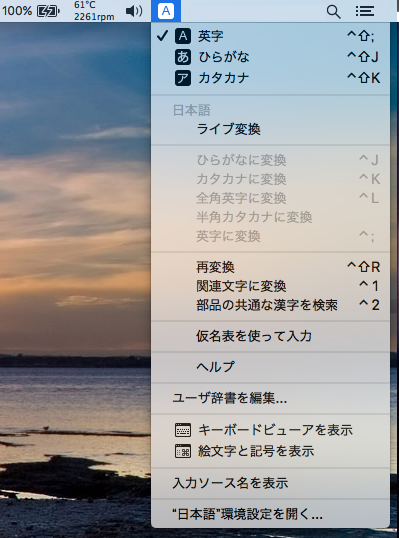
Input Methodのメニュー表示名を取得する
| AppleScript名:Input Methodのメニュー表示名を取得する |
| — Created 2017-01-22 by Takaaki Naganoya — 2017 Piyomaru Software use AppleScript version "2.4" use scripting additions use framework "Foundation" use framework "InputManager" –https://github.com/jensnockert/input-manager set cList to (current application’s CSInputSource’s all()’s valueForKey:"localizedName") as list –> {"ひらがな", "英字", "カタカナ", "日本語", "かなパレット", "com.apple.PressAndHold", "絵文字と記号", "キーボードビューア", "EmojiFunctionRowIM_Extension"}–10.10.x –> {"ひらがな", "英字", "カタカナ", "日本語", "かなパレット", "com.apple.PressAndHold", "絵文字と記号", "キーボードビューア"}–10.12.x |
InputManagerでIMを切り換える
InputManager.frameworkを呼び出して、日本語入力Input Methodの入力文字の切り替えを行うAppleScriptです。
スクリプトエディタ上でControl-Command-Rにてフロントエンド・プロセスで実行する必要があります。
| AppleScript名:InputManagerでIMを切り換える |
| — Created 2017-01-22 by Takaaki Naganoya — 2017 Piyomaru Software use AppleScript version "2.4" use scripting additions use framework "Foundation" use framework "AppKit" use framework "InputManager" –https://github.com/jensnockert/input-manager –Check If this script runs in foreground if not (current application’s NSThread’s isMainThread()) as boolean then display alert "This script must be run from the main thread (Command-Control-R in Script Editor)." buttons {"Cancel"} as critical error number -128 end if –Caution: This script runs on only Japanese language environment set cList to current application’s CSInputSource’s all() set dList to (cList’s valueForKey:"localizedName") set aRes to ((dList’s indexOfObject:"ひらがな") as integer) –"Hiragana" in Japanese set bRes to ((dList’s indexOfObject:"英字") as integer) –"English Letters" in Japanese set hiraKey to cList’s objectAtIndex:aRes set engKey to cList’s objectAtIndex:bRes repeat 10 times hiraKey’s |select|() delay 1 engKey’s |select|() delay 1 end repeat |